How to Download Facebook Videos in HD: A Complete 2026 Guide
Facebook hosts more video than almost any other platform on the internet — cooking tutorials, live event replays, viral Reels, family memories, and clips that creators pour real time and budget into. Yet for all that content, the platform still offers no straightforward way to save most of it to your device. The built-in “Save video” button only bookmarks a clip inside the app; it never puts an actual file in your hands. This guide explains why so many people download Facebook videos, how to do it in about ten seconds without installing anything, and — just as importantly — how to do it responsibly.
Why Save Facebook Videos in the First Place?
The reasons are more practical than you might expect. Offline viewing is the big one: commuters, travelers, and anyone on a limited data plan would rather watch a saved MP4 than stream the same clip three times. Creators and page admins are another major group — many want a local backup of their own Reels and live streams, because relying on a social platform as your only archive is a risk nobody should take. There is also the simple reality that Facebook content disappears. Accounts get deleted, posts get removed, and live replays expire, taking the video with them. Finally, some people just want the audio: a recorded talk, an interview, or a podcast-style live session is often more useful as an MP3 you can listen to on the go.
The Problem: Facebook Doesn’t Offer a Real Download Button
Aside from letting you export your own uploaded data through a buried settings menu, Facebook provides no native download option for videos in the feed. The workarounds people try first tend to be poor. Screen recording works, but it captures interface elements, drops the resolution, and forces you to babysit the recording in real time. Desktop “downloader” programs are worse: many are bloated, ad-riddled, or outright unsafe to install. That is why browser-based downloaders have become the standard solution — they run entirely on the web, touch nothing on your system, and work identically on a phone, tablet, or computer.
What to Look for in a Facebook Video Downloader
Not all of these tools are built the same, so it pays to check a few things before you trust one:
- No installation required. Everything should happen in the browser — no apps, no executables, no “codec packs.”
- True HD output. The tool should offer the highest quality Facebook itself serves, typically 720p or 1080p MP4, without watermarks or quality-destroying re-encoding.
- Speed. Pasting a link should resolve in seconds, not minutes of redirect chains.
- Privacy. Look for HTTPS processing, no account requirement, and a clear statement that your links and videos aren’t stored.
- Genuinely free. No daily caps, no locked “premium” resolutions, no surprise fees.
- Mobile support. A large share of Facebook viewing happens on phones, so the downloader should too.
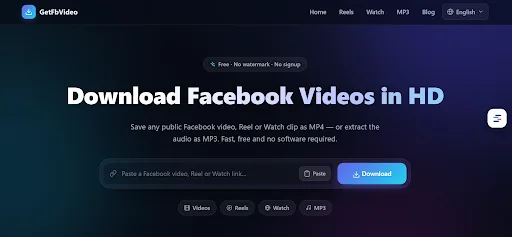
A dedicated Facebook video downloader like GetFbVideo checks every one of those boxes: you paste the link of any public video, Reel, or Watch clip, choose HD or SD, and the MP4 — or an extracted MP3 audio file — saves straight to your device, with no signup and no watermark.
How to Download a Facebook Video in Three Steps
The process is the same on every device:
- Copy the video link. On mobile, tap the Share arrow under the video and choose “Copy link.” On desktop, you can grab the URL straight from the address bar.
- Paste the link into the downloader. Open the tool in a new tab, paste the URL into the input field, and hit the download button.
- Choose your quality and save. Pick HD, SD, or MP3, and the file downloads immediately.
On a computer, the file lands in your Downloads folder by default; on a phone, it goes to your gallery or files app, depending on your browser settings. The whole routine takes around ten seconds once you’ve done it twice.
Reels, Watch, and MP3: More Than Standard Videos
Modern downloaders handle Facebook’s newer formats too, and that matters more every year. Reels — Facebook’s short vertical clips — download in exactly the same way and keep their full quality, which is useful for creators archiving their own catalog. Facebook Watch content, which skews longer and more episodic, works identically: copy the Watch page link, paste, save. And MP3 extraction quietly solves a whole category of problems on its own. Recorded webinars, sermons, lectures, and interviews are frequently published as video when all you really need is the audio; converting a public clip to MP3 turns it into something you can listen to like a podcast.
Desktop, Mobile, or Browser Extension?
For occasional use, the website itself is all you need — it runs in any modern browser on any operating system. Heavy users have options, though. Browser extensions for Chrome and Firefox reduce the routine to a single click while you browse, and Android users can install a lightweight app instead of juggling tabs. The right choice depends purely on how often you save videos; the underlying result is the same HD file either way.
Is Downloading Facebook Videos Legal?
This deserves a straight answer rather than fine print. Downloading a video you created, or one whose owner has given you permission to save, is fine for personal use. Saving a public clip to watch offline later sits in the same everyday category as recording a TV show did a generation ago. What crosses the line is redistribution: re-uploading someone else’s content, stripping credit, or using downloaded material commercially without permission infringes the creator’s rights and violates Facebook’s terms.
It is also worth knowing what reputable tools can’t do — and won’t. Private videos, friends-only posts, and group-restricted content are inaccessible to legitimate downloaders by design. If a service claims it can pull private content, that is a reason to close the tab, not a feature. Respecting those boundaries protects creators and keeps the whole ecosystem of free tools sustainable.
Quick Troubleshooting Tips
If a download doesn’t start, the fix is usually one of four things. First, confirm the video is public — restricted content simply won’t resolve. Second, make sure you copied the full link using the Share menu rather than a truncated in-app reference. Third, check your device storage and your browser’s download permissions, especially on mobile. And fourth, for freshly ended live streams, give Facebook a few minutes to finish processing the replay before pasting the link.
Final Thoughts
Saving a video for a long flight, or backing up the content you spent hours making, shouldn’t require sketchy software or a screen recorder running in the background. Free browser tools like GetFbVideo have turned it into a ten-second task on any device — paste a public link, pick HD or MP3, done. Used responsibly, with respect for creators and their rights, a good downloader is simply the download button Facebook never shipped.