How to Find Someone on TikTok Without Exact Username
You refreshed the feed. The video went. So did whoever made it.
Or maybe it is somebody you actually know and you have never once seen their handle written down. Either way, TikTok search wants a precise @ and you do not have one.
You can still find someone on TikTok without their exact username. What decides the fastest route is not effort. It is which scrap of information you happen to be holding: a half-remembered handle, a screenshot, a phone number, a mutual friend. Sometimes just the memory of one video.
Work from the clue you have rather than from the top of a list.
Start With the Clue You Actually Have
Every method below is tied to one specific starting point. Find yours and skip the rest.
- Saw their video recently. Watch history. Nothing else comes close.
- Half the handle. A keyword search across public accounts.
- A screenshot or profile picture. Reverse image lookup, then verify by hand.
- Their phone number, already saved. Contact sync inside the app.
- A mutual friend. Following lists and comment sections.
- Direct contact with them. Ask for the QR code and stop guessing.
If what you have is their real name rather than any of the above, that is a slightly different job and the guide on finding a TikTok username by name handles it properly.
You Saw the Video: Check Your Watch History First
Most people never think of this and it solves the problem outright more often than any clever search does.
TikTok keeps a record of what rolled past you. If the video was recent, the creator is sitting in there.
- Open your profile and tap the menu at the top.
- Go into Settings and privacy.
- Find the Activity centre, then Watch history.
- Filter by date and scroll to roughly when you see it.
The exact path shifts a little between app versions, so hunt around the Activity centre if the wording differs on yours. Worth checking your liked videos and favourites too. People forget what they tapped.
You Remember Part of the Handle
Fragments are more useful than they feel. Half a handle, an odd spelling, a number on the end, a word you are fairly sure was in there.
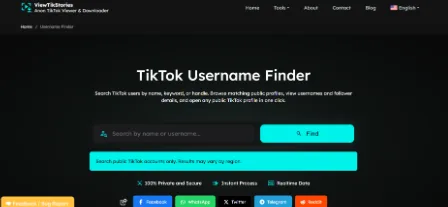
TikTok search wants precision. A finder does not. You can search TikTok users by name or keyword and get back public accounts whose usernames or display names contain what you typed, with follower details next to each one so you can tell the near-duplicates apart.
Things worth trying when the fragment alone is not enough:
- Swap the separators. Periods and underscores get remembered wrong constantly.
- Drop any numbers you are unsure about and search the word alone.
- Try the fragment with their city or their niche attached.
- Search it on the open web with the word TikTok next to it.
You Only Have a Screenshot or Profile Picture
An image is a real clue. Not a magic one.
- Reverse image search it. Google Lens or a similar tool. Profile photos get reused across platforms constantly, so a match elsewhere often carries the handle with it.
- Read the screenshot itself. Captions, on-screen text, a shop name in the background, a sound title along the bottom. Any of it is searchable.
- Search the sound. If the audio name is visible, opening that sound page lists videos using it.
Do not treat a visual match as proof on its own. Stolen profile pictures are ordinary on TikTok, so confirm against the bio and the actual videos before you decide.
You Have Their Number Saved in Contacts
TikTok can surface accounts belonging to people already in your phone. Its guidance on syncing contacts walks through it: open Profile, tap Add friends, choose Contacts and allow access.
Two honest caveats before you switch it on.
- It only works when the other person allows that kind of discovery. Plenty switch it off.
- You are handing your address book to TikTok. You can stop syncing later, though previously synced contacts may keep feeding suggestions.
Fine for a friend you have lost track of. Not the right tool for finding a stranger.
You Know People They Know
TikTok is small in the places that matter. If one mutual friend follows them, you are two taps away.
- Open the following list of somebody who definitely knows them.
- Read the comments under videos they would plausibly have commented on.
- Check tagged accounts on group videos, Duets or Stitches.
- Look at their other platforms. Instagram and YouTube bios list TikTok handles constantly.
Slower than a search box. Also the method with the highest hit rate for people you know in real life.
You Can Reach Them Directly: Ask for a QR Code
Unglamorous. Instant. Every TikTok profile has a shareable QR code. Scanning it drops you straight onto the right account with zero ambiguity.
If you can text the person at all, this beats every other method on this page. No spelling, no lookalikes, no wondering whether you found a fan page.
When Nothing Works
Sometimes the account genuinely is not findable and that is worth accepting early.
- Private accounts surface very little publicly.
- Results vary by region, so what your friend can see may not appear for you.
- The handle may simply have changed. TikTok allows a username change about once a month and the profile link changes with it, which is why old links die.
- Somebody who has never posted publicly leaves almost nothing to search against.
Once you land on the right account, the TikTok Profile Viewer opens a public profile in the browser so you can check it properly before following anybody.
Where This Should Stop
Worth saying plainly, because a page like this can be read the wrong way.
Finding a friend you lost touch with is normal. Tracking somebody who does not want to be found is not. TikTok treats harassment and unwanted contact as violations under its Community Guidelines. Those rules exist for a reason.
- Do not use any of this on somebody who has blocked you.
- Do not build a profile of a stranger from scattered clues.
- Be especially careful where the person might be a minor. TikTok applies tighter discovery defaults to younger teens deliberately.
The Community Guidelines are short and worth a read if you are unsure where the line sits.
TikTok Search FAQs
Can I find a TikTok account with just a phone number?
Only through contact sync. It also depends on them permitting that kind of discovery. There is no public reverse lookup.
Does the person know I searched for them?
No. Searching sends no notification. Following them obviously does.
Can I find someone who blocked me?
Their content will not appear for you. Working around that is not something worth doing.
What if they deleted the account?
Then there is nothing left to find. A deleted account leaves no public trace behind.
Pick One Clue and Start There
The mistake is trying everything at once. Choose the strongest thing you have and follow it.
Recent video means watch history. A fragment of the handle means a keyword search. A mutual friend means their following list. Direct contact means just ask.
When all you have is a partial handle or a vague keyword, run it through the TikTok Username Finder and let it do the matching. Get the handle and the story viewer plus everything else on the site works off it.