How to Group Keywords (and Turn Each Group Into an Article)
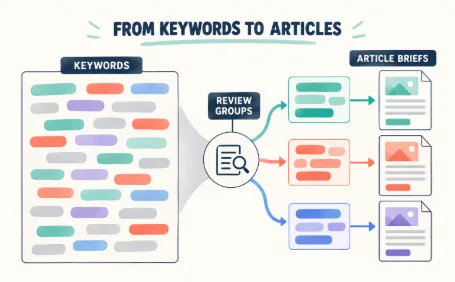
Say the spreadsheet in front of you holds 900 keywords. It came from three tools, a competitor scrape, and a brainstorm session nobody pruned. Somewhere in that pile sits your next six months of content, but as a flat list it tells you nothing. The rows have to become groups before they can become pages.
This walkthrough covers the whole distance: how to sort a raw keyword export into groups you can defend, and how each group then becomes one planned article instead of three half-overlapping ones.
Turn a flat keyword list into reviewed groups, then give each approved group a page of its own.
Why grouping keywords matters
Ungrouped lists fail in a specific way. Writers pick keywords one at a time, so closely related searches end up with separate pages, and those pages compete with each other for the same queries. SEOs call it keyword cannibalization: several of your URLs splitting the visibility that one strong, comprehensive page could have earned.
Scattered coverage is the quieter cost. With 900 rows and no structure, you publish whatever looks easiest that week. Whole subtopics sit untouched because nobody scrolled that far down the sheet, while three separate posts answer near-identical questions.
Grouping fixes the failure at the source. Decide once which searches belong together, and every later decision, from page count to internal links to publishing order, inherits that structure instead of reopening the argument.
What is keyword grouping?
Keyword grouping is the practice of sorting a keyword list into sets of searches that a single page can satisfy together. “Best running shoes,” “best running shoes 2026,” and “best trail running shoes” describe one searcher’s task in different wording. They belong in one group and, usually, on one URL.
You will also hear the term keyword clustering. Most practitioners use the two interchangeably, with a slight tilt in emphasis: clustering describes the mechanics of measuring how similar keywords are, while grouping describes the editorial result, the buckets you actually plan content around. This guide says grouping and treats clustering as the machinery inside it.
The output that matters is a set of topic clusters: groups of keywords united by shared intent, each mapped to one page that answers all of its searches.
How to group keywords: by intent, topic, and SERP
Three lenses do the sorting, and you need all three, because each catches mistakes the other two miss. If you want each lens worked through on a live list, our fuller keyword clustering walkthrough goes deeper than the summary here.
Intent, topic, and SERP overlap are three checks on the same grouping decision.
Search intent first. Informational searches want an explanation, commercial searches want comparisons before a purchase, and transactional searches arrive with a wallet open. “How to choose running shoes” and “buy running shoes online” share almost every noun and still need different pages, because the reader behind each query wants a different thing. Split by intent before anything else, or you will merge audiences that no single page can serve.
Topic and semantic overlap next. Within one intent, compare what the searches actually describe. Modifiers carry the signal: “for flat feet,” “for beginners,” and “under $100” each mark a distinct angle that can deserve its own group when the volume supports it. In the other direction, ignore phrasing differences that don’t change the ask. “Best trail running shoes” and “top trail running shoes” are one keyword wearing two coats.
SERP overlap as the referee. When two keywords seem to belong together, search both and compare the results pages. If Google returns largely the same URLs for each, it treats them as one topic, and so should you. When the results diverge, that is Google saying the searches deserve separate pages even though the wording looks similar. I run this check on every pair I’m unsure about; it settles arguments that intent and semantics leave open.
None of this is exotic. The failure mode is capacity: doing it by hand in a spreadsheet barely works for a hundred keywords. Every judgment is yours to make at row 400, two keywords that clearly belong together end up six hundred rows apart, and the next person to open the file groups everything differently. Manual grouping isn’t wrong; it just doesn’t survive contact with a real export.
Grouping keywords step by step
Step 1. Consolidate the export
Pull every keyword list into a single CSV, duplicates removed, with search volume attached if you have it. One file, one version of the truth.
Step 2. Run a clustering pass
Upload the CSV to a keyword grouping tool and let it take the first sort. SEMagi, the platform we build, analyzes the semantic relationships and search intent across the list and returns clusters as editable candidates, so the keyword grouping pass that used to eat an afternoon finishes in minutes.
Step 3. Review like an editor, not a rubber stamp
Work through the proposed groups and fix what no algorithm can know: this group quietly spans two audiences, that one is really three topics, this keyword belongs on your pricing page rather than a blog post. The tool proposes the groups; the final call stays with you. Expect this pass to take real time, because it is where the quality of your plan is decided.
Step 4. Convert each surviving group into a content target
One group, one intended URL, one primary keyword, with the remaining group members as supporting terms that page should also rank for. That mapping is your content plan, already half written.
From keyword groups to a content plan
The grouped list converts to a working plan with almost no extra effort. Each group becomes one row: the target page, its primary keyword, its supporting keywords, and a priority score based on volume and business value. Sort by priority and you have a publishing order that no longer depends on who scrolled which part of the spreadsheet last quarter.
The same structure tells you how pages should link. Groups under one broader theme point to a pillar page that covers the theme itself, and the pillar links back down to them. Readers get a sensible path through related articles, and search engines get a clear map of how your coverage fits together.
Turning each group into an article
Here is where most keyword workflows stop and most content backlogs start: a solid plan of sixty groups, and writing capacity for maybe six articles a quarter.
A finished group already contains what a brief needs. The primary keyword names the page. The supporting keywords sketch the sections, and the intent fixes the angle. The distance from cluster to outline is short, which is exactly why drafting help pays off at this stage. Feed the group to an AI article writer and you get a structured draft back: sections mapped to the group’s keywords, headings that reflect what people actually search for, a shape you can argue with rather than a blank page you have to face.
The mechanics of that draft are worth knowing. The writer builds an outline first, with one section per meaningful keyword in the group, so the structure of the article mirrors the shape of the search demand before a single paragraph exists. You can adjust that outline while it is still cheap to change, promote a section, cut another, reorder the flow, and only then generate the prose.
Editing remains your job, and it is the part worth keeping. Facts need verification, and claims need your own experience behind them; the draft also needs a read from someone who knows the topic, because readers notice when nobody did. The generic sentences an AI reaches for first are the ones to cut or ground in something specific you actually know. Used this way, AI compresses the blank-page phase of writing and leaves the judgment phases with you. A team that finished four articles a month can work through a much longer plan without pretending the machine wrote them, and without publishing drafts nobody checked.
Conclusion
A 900-row export becomes a publishing schedule once the rows turn into groups and the groups turn into pages. Run the clustering pass, edit the results like an owner, plan one page per group, then draft with the group as the brief. SEMagi runs that whole pipeline in one place, from the first cluster to the finished draft.