How to Use Seedance 2.0 Without Wasting Your First Generation Credits
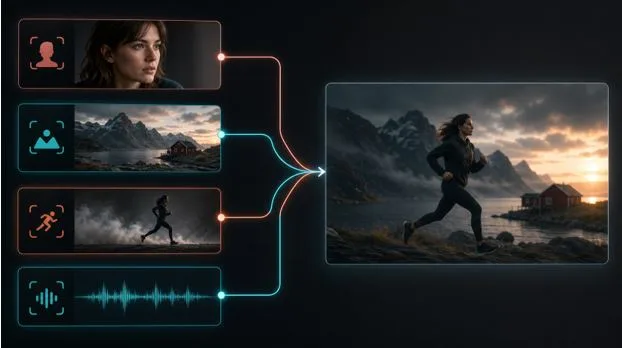
AI video demos make the process look almost effortless: type a sentence, wait a moment, and receive a polished scene. Real projects are less forgiving. A five-second clip may need to match a product, preserve a character, follow a camera move, leave room for captions, and fit an edit that already has music.
That is why the best way to learn Seedance is not to collect clever prompts. It is to build a repeatable workflow.
Seedance 2.0 is designed around multimodal references. In addition to text, it can use images, video, and audio to guide a generation. ByteDance’s published technical information describes clips from four to 15 seconds and support for multiple reference assets. Those limits matter, but the more useful idea is simple: each input should have one clear job.
The following process works for social ads, product videos, music visuals, concept trailers, and short narrative scenes.
Start With a Shot, Not a Story
“A stylish commercial for a new running shoe” is a campaign idea, not a shot. A video model still has to decide where the camera is, what the shoe is doing, how the light behaves, and what changes from the first frame to the last.
Reduce the idea to one visible event:
A runner steps into a shallow puddle at dawn. The camera tracks beside the shoe at ankle height. Water droplets catch the orange backlight as the foot pushes off.
This description gives the model a subject, an action, a setting, a camera position, and a lighting cue. It also fits inside a short clip. If the campaign needs an establishing shot, a close-up, and a final product frame, treat them as three shots rather than forcing a complete advertisement into one generation.
A practical first pass is four to six seconds. Short clips are easier to diagnose because there are fewer moments in which the subject, anatomy, or background can drift. Once the look and motion work, extend the shot or create a connected follow-up.
Give Every Reference Asset One Responsibility
Uploading more material does not automatically produce more control. References can conflict. A portrait may imply soft studio light, a location image may show hard noon sun, and a motion clip may use a handheld camera. The model must reconcile all three unless the prompt states what to borrow from each.
Use a short reference brief:
- Image 1: character appearance and clothing only
- Image 2: location, color palette, and lighting
- Video 1: body movement and camera rhythm
- Audio 1: pace and transition timing
Then name those roles in the prompt. Do not assume the model knows that one image is for wardrobe while another is for composition. A useful how to use Seedance 2.0 workflow is closer to directing a small crew than searching a stock library: the clearer the assignment, the easier it is to judge the result.
For a product shot, use a clean product image as the identity reference and a separate mood board for the environment. For a character scene, choose a neutral reference image with visible facial features and clothing details. Highly stylized or heavily cropped references leave the model to invent missing information, which can cause continuity problems later.
Write Prompts in Production Order
A reliable prompt can be written in the same sequence a director might brief a shot:
- Subject and setting
- Action over time
- Camera position and movement
- Lighting and visual treatment
- Audio or atmosphere
- Constraints
For example:
A ceramic artist in a sunlit workshop shapes a small clay cup on a spinning wheel. She presses both thumbs into the center, steadies the rim, then looks down and smiles. Medium close-up from slightly above the wheel; slow push-in with no cut. Warm late-afternoon window light, natural skin texture, and fine clay dust on her hands. Quiet wheel hum and soft room tone. Keep the cup, hand positions, apron, and background shelves consistent.
Notice that the prompt describes a timeline. “Presses, steadies, then looks” is more actionable than a list such as “pottery, cinematic, beautiful, realistic.” Style words can support a scene, but they cannot replace blocking.
Build a Small Test Matrix
Random re-prompting burns time because several variables change at once. Instead, create three versions of the same shot:
- Version A changes only the action wording.
- Version B keeps the action but changes the camera instruction.
- Version C uses the better action and camera, then tests lighting.
If each version is five seconds, the first round produces 15 seconds of comparable material. That is more informative than three unrelated 15-second attempts. Keep the seed and other available settings fixed when possible, and label exported files with the variable being tested.
Evaluate the clips against four questions:
- Does the subject remain recognizable?
- Is the action physically readable from start to finish?
- Does the camera do what the prompt asks?
- Can the clip enter and exit cleanly in an edit?
The last question is frequently overlooked. A visually impressive clip may still be difficult to use if its opening frame is already mid-action or its final frame contains heavy motion blur.
Design for the Final Platform
A vertical social clip needs different staging from a widescreen product film. In 9:16, keep important faces, hands, and products away from interface overlays near the top and bottom. Leave a quiet area for captions rather than asking the video model to render small promotional text. Editable text added in post is easier to revise, localize, and approve.
Audio also deserves a deliberate choice. Native audio can be useful for footsteps, ambience, impacts, or performance timing. For a branded campaign, however, licensed music, final dialogue, and a clean mix are usually better handled in post. Generate the visual rhythm you need, then retain control of legal clearance and loudness.
A Practical Production Case: A Café Launch
Imagine a neighborhood café needs three vertical posts for a seasonal drink. Instead of requesting “a viral iced coffee commercial,” the creator prepares:
- One clean cup image for product shape and logo placement
- One counter photo for location and palette
- One three-second phone clip showing the desired pour
- Three shot briefs: ice drop, espresso pour, and customer pickup
Each shot is tested at five seconds. The first round contains 15 seconds of generated footage. Only the best shot receives two controlled variations, bringing the test total to 25 seconds rather than generating several full advertisements. The editor adds the price, offer date, logo, and licensed music afterward.
This is a small example, but the logic scales. Separate identity, movement, environment, and finishing. The Seedance video generator becomes most useful when it is one stage in a production pipeline, not a one-click replacement for planning and editing.
Common Mistakes That Make Good Prompts Fail
The first is contradiction: “static locked camera” and “dramatic orbiting shot” cannot both direct the same clip.
The second is excessive action. Three characters changing locations, handling props, speaking, and triggering an explosion may exceed what a short scene can express clearly.
The third is vague revision. “Make it better” gives no diagnosis; “keep the face unchanged and reduce camera shake” does.
Finally, do not use a celebrity, copyrighted character, or recognizable campaign as a shortcut for art direction. Even when a model can imitate a reference, commercial use may involve rights of publicity, copyright, trademark, or platform-policy issues. Original characters and licensed assets create a cleaner production path.
The Useful Definition of Success
The best first result is not necessarily the prettiest clip. It is the clip that teaches you what to keep. A controlled five-second test can establish a character, camera language, or lighting setup that supports an entire sequence.
Start with one shot, assign each reference a role, change one variable at a time, and finish text and branding in post. That approach produces fewer surprises—and turns AI video generation into a process a real creative team can repeat.