How to Use Videoinu to Create AI Videos: A Simple Step-by-Step Gui
Videoinu is made for people who want to turn ideas into videos without dealing with a hard workflow.Instead of spending hours editing, you can start with a prompt, build scenes, keep characters consistent, and create longer story-driven videos in one place.
New users can also get 500 free credits after signing up, which makes it easy to test the platform first.
Why Use Videoinu?
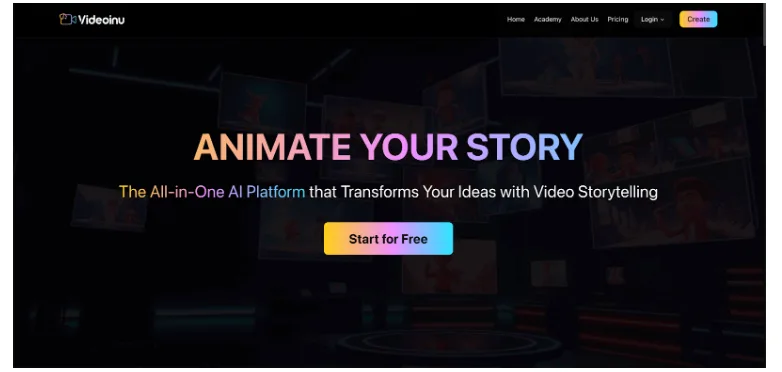
The main idea behind Videoinu is simple: make AI video creation easier and more useful for real creators. On its homepage, Videoinu positions itself as an all-in-one AI platform for video storytelling, with support for longer videos, consistent characters, style control, and AI voiceover. It also highlights that users can create videos beyond short 10-second clips, including longer animated episodes for YouTube.
That matters because many AI video tools are good for quick demos, but harder to use when you want to build a real story. Videoinu is closer to a full creation workflow. You can start from an idea, shape the look, keep the same character across scenes, and add voiceover for different audiences. The platform also says it supports 10+ languages and 30+ AI voices, which is helpful if you want to make content for more than one market.
Another reason to try it is that it is built for visual storytelling, not just one-off clips. If your goal is to make cartoon content, story videos, or channel-friendly series content, that focus comes through clearly on the site.Videoinu also includes models like Vidu Q3, Kling 3.0, and other leading AI video models, which gives users more flexibility when testing different video styles, motion quality, and creative workflows.
How to Use Videoinu: A Simple 5-Step Guide
Getting started with Videoinu is fairly direct. Here is the basic process from start to finish.
1. Sign Up and Claim Your Free Credits
First, create a Videoinu account. New users can currently get 500 free credits after signing up, so you can test the platform before paying. That makes the first step easy: register, log in, and open the main creation area.
If you are new to AI video, this is a good time to explore the homepage and see the type of content the platform is built for. Videoinu strongly leans into storytelling, animated content, and creator workflows, so it helps to understand that before starting your first project.
2. Start with Your Story Idea or Prompt
Once inside, begin with a simple idea. Videoinu is built around turning ideas into videos through storytelling, so you do not need to overthink the first prompt.
A good starting prompt might be:
“A brave little fox walks through a snowy forest at sunrise, warm storybook style.”
Keep it short and clear. Focus on the subject, the setting, and the mood. Since Videoinu is designed for story-led creation, prompts that feel like a scene usually work better than random visual descriptions. This also matches the examples shown on the homepage, which are framed like story moments rather than isolated shots.
3. Build the Visual Style and Character Look
One of the most useful parts of Videoinu is that it emphasizes consistent characters and creative control. On the official site, Videoinu says its AI helps keep cartoon heroes and story characters identical in every frame. It also highlights style flexibility, including cartoons, watercolor storybooks, and anime-like looks.
This means your next step is not just “generate and hope.” You should decide how you want the video to look.
At this stage, think about:
- what art style fits your video
- whether you want a kid-friendly cartoon feel or a more cinematic look
- whether the same character needs to appear across multiple scenes
If you want to build a series, brand mascot, or repeating main character, this step matters a lot. Videoinu’s positioning around character consistency is one of the clearest differences on its homepage, so it makes sense to use that strength early in the workflow.
4. Add Voiceover and Shape the Full Story
Videoinu is not only about visuals. The platform also promotes AI voiceover with 10+ languages and 30+ expressive voices. That is useful if you want your video to feel complete instead of looking like a silent test clip.
Once your visual direction is clear, think about the full viewing experience:
- Do you want narration?
- Do you want a playful voice or a warm story tone?
- Do you want to make the same video work in another language?
This is especially useful for YouTube storytelling, kids’ content, or global creator workflows. The homepage makes clear that Videoinu is not just for short visual experiments. It is built for videos that people can actually publish and grow with.
5. Generate, Review, and Keep Improving
Now generate the video and review the result.
Like most AI tools, your first output may not be the final one. The smart way to use Videoinu is to treat it as a creative loop. Generate one version, watch it, adjust the prompt or style, and try again.
This matters even more if you are making a story instead of a single visual clip. You may want to improve:
- motion clarity
- character consistency
- scene pacing
- narration tone
- visual style
Videoinu’s homepage examples and feature sections suggest a workflow built around iteration and storytelling, not just a single click. So the best results usually come when you refine instead of stopping after the first generation.
What Makes Videoinu Different?
A lot of AI video tools can create short clips. Videoinu is more interesting because of how it frames the product.
First, it is built around storytelling. The homepage does not present it as just another prompt-to-video tool. It presents Videoinu as a platform that helps transform ideas through video storytelling.
Second, it pushes longer-form creation more than many competitors. The site explicitly says users can go beyond 10-second limits and create videos as long as 30-minute animated episodes for YouTube. That is a much broader promise than most AI video landing pages make.
Third, character consistency is a major selling point. If you are building repeatable content, that matters more than flashy one-time effects. A creator making series content usually cares about keeping the same character look from scene to scene, and Videoinu clearly markets that capability.
Fourth, it combines visual generation with style control and voiceover, which makes it feel more like an end-to-end creator tool. The site specifically calls out broad visual style options and multilingual AI voice support.
Who Should Use Videoinu?
Videoinu makes the most sense for creators who want more than a quick experiment.
It is a strong fit for:
- YouTube creators making story-based content
- users creating cartoon or kid-friendly videos
- people who want consistent characters
- creators who want voiceover built into the same workflow
- beginners who want to start with free credits and learn by doing
If you only want one short clip, many tools can do that. But if you want to build repeatable video content with a simple workflow, Videoinu feels better aligned with that goal based on its official positioning.
Final Thoughts
Videoinu is easiest to understand when you think of it as a storytelling tool, not just an AI generator. You start with an idea, shape the character and style, add voice if needed, and then refine the video until it feels publishable. With 500 free credits for new users, it is easy to test the workflow and see whether it fits your content goals.
FAQs
What is Videoinu?
Videoinu is an AI video platform focused on turning ideas into story-driven videos. Its homepage highlights longer-form video creation, character consistency, creative style control, and AI voiceover.
Do new users get free credits?
Yes. Videoinu currently offers 500 free credits for new users after registration, which helps people try the platform before paying.
What kind of videos is Videoinu best for?
Based on its official site, Videoinu is especially geared toward storytelling, animated content, YouTube-friendly videos, and projects that need consistent characters across scenes.
Can I add voiceover in Videoinu?
Yes. Videoinu says it supports AI voiceover in 10+ languages with 30+ expressive voices, which can help creators build more complete videos for different audiences.
Is Videoinu beginner friendly?
It appears to be designed that way. The platform emphasizes a simple, all-in-one workflow, and the free credits make it easier for beginners to start testing ideas right away.