How Wireless Networking Technologies Are Expanding Connectivity in Rural and Remote Areas
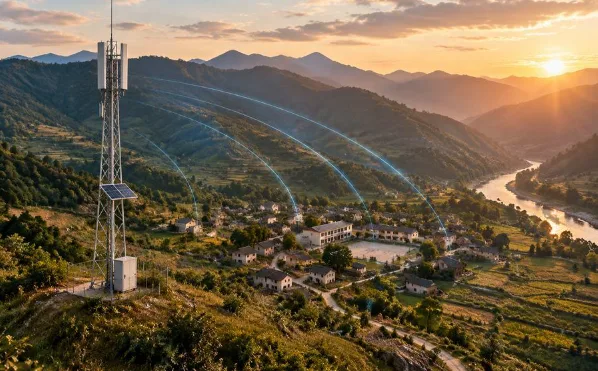
Wireless networking can extend rural connectivity by carrying data between fixed sites and providing local access where people gather. Wireless bridges connect locations across a suitable radio path, while outdoor wireless access points bring WiFi to school grounds, community spaces, farms, and business premises. Used alongside an appropriate upstream connection, these technologies can reduce the amount of cable construction needed and allow infrastructure to expand in stages.
The opportunity depends on careful planning. A radio cannot create internet service where no upstream connection exists, and a strong signal does not guarantee affordable, reliable access. Rural projects need a workable combination of backhaul, local coverage, power, maintenance, and service funding. When those parts fit together, wireless infrastructure can help communities make productive use of a connection that was previously too distant or difficult to reach.
1 Why Rural Connectivity Is Difficult to Build
Distance changes the economics of construction
In a densely populated area, a cable route may serve many homes and businesses within a short distance. Rural settlements can place fewer potential users along much longer routes. Excavation, poles, road crossings, permissions, and restoration work may account for a substantial share of the project, even before customer equipment is installed.
Terrain adds further complications. Hills, rivers, exposed ground, and seasonal access restrictions can make construction and maintenance harder. An existing utility route may help, but it does not automatically provide permission or suitable infrastructure for a telecommunications installation. Planners need to establish what is available and what can legally and safely be reused.
The cheapest installation is not always the best investment
Fiber remains an important option for capacity and long-term infrastructure. Wireless may be attractive where a particular segment would require extensive civil works, where demand is still developing, or where a temporary service is needed. The practical question is which combination meets the community’s needs over the planned operating period.
Compare equipment, construction, site rental, upstream service charges, energy, support, and replacements. A low purchase price can be outweighed by repeated visits to a difficult site. A more expensive initial route may be worthwhile if it offers better capacity or simpler maintenance. Rural connectivity decisions need a whole-project budget rather than a comparison of radio and cable prices alone.
2 Wireless Bridges Extend the Reach of Existing Networks
Connect fixed sites with a planned radio path
A point-to-point wireless bridge typically uses two compatible radios aimed at each other, with an Ethernet connection at both ends. One radio may connect to a building with broadband service, while the other serves a school, workshop, or community facility beyond the existing cable network.
At the receiving site, switches and local APs distribute the connection to users. The bridge supplies the link between locations; it does not replace the internet provider, gateway, or local network management. Confirm that the upstream service permits the intended arrangement, particularly when connectivity is shared beyond one organization or property.
Evaluate clearance before quoting a distance
Link feasibility depends on more than the separation between endpoints. Terrain, buildings, trees, antenna height, interference, and the chosen frequency affect performance. A path also needs suitable clearance around the direct line between antennas, including the Fresnel zone through which radio energy propagates.
Use terrain profiles and manufacturer planning tools to screen sites, then verify conditions in person. Allow for foliage growth and seasonal changes. If a hill blocks the route, a relay may help, but that introduces another powered and maintained site. Advertised range should be treated as a reason to investigate a link, not as a promise that every installation at that distance will work.
3 Outdoor APs Turn Backhaul into Local Access
Put coverage where people can use it
An outdoor AP provides a local wireless connection for compatible phones, laptops, tablets, and equipment. It can serve a courtyard, market area, shared workspace, or farm service yard when it has power and a connection back to the network. Its purpose differs from the fixed radio link bringing data to that site.
Coverage needs to work in both directions. A high-powered AP may be audible to a phone that cannot transmit effectively back from the same distance. Survey the actual user area with representative devices, and account for walls, vegetation, mounting orientation, and busy periods. A circle drawn around a mast is not a reliable substitute for a coverage assessment.
Match antenna patterns to the service area
An omnidirectional pattern may suit users distributed around a central location. Directional coverage can be useful when the intended service area lies mainly on one side of a building or pole. The COMFAST CF-WA971 WiFi 7 outdoor access point is one directional model to evaluate for such a layout. Its published specifications identify dual-band operation, pole mounting, and PoE power support.
Before choosing any model, confirm the current environmental rating, operating temperature, power requirements, supported features, and client compatibility. WiFi 7 does not automatically make an installation appropriate for every rural site. A newer AP cannot increase a limited upstream service’s capacity, and its headline wireless rate does not represent the speed every connected user will receive.
4 Different Rural Sites Need Different Deployment Plans
Schools need classroom capacity and controlled access
A school may use a bridge to reach an available broadband connection and distribute service through wired switches and ceiling access points. Indoor classrooms usually need their own coverage assessment; an outdoor AP in the yard should not be expected to serve every room through walls.
Plan for simultaneous lessons, teacher devices, administrative work, and downloaded learning materials. Separate student or visitor access from administrative systems using suitable network and security controls. If the connection is intermittent, locally stored resources and scheduled downloads can help, subject to licensing and the school’s systems. Success should be measured by whether lessons and administration work reliably during a normal school day.
Agriculture combines site links with several device types
An agricultural operation may need connections between an office, packing area, equipment shed, and monitoring station. Fixed wireless links can serve suitable routes, while APs provide connectivity around work areas. However, many agricultural sensors use technologies other than WiFi and require compatible gateways.
Separate small, regular telemetry messages from high-volume camera streams or image uploads. Plan buffering when the link is unavailable and verify that records retain useful timestamps. Vegetation, moving machinery, weather exposure, and seasonal operations all affect where equipment can be mounted and maintained. A network serving a farmyard has different coverage requirements from one intended to support distant fields.
Communities and businesses need predictable service
A community facility can provide a shared access location before broader household infrastructure becomes feasible. A market or small business cluster may benefit from connectivity for communication, stock management, payments, and customer access. Start with specific locations and activities rather than assuming one public AP can cover a whole settlement.
Estimate demand during busy periods and establish appropriate usage policies. Customer access should be separated from payment equipment and business administration. Essential transactions may need an approved backup connection or an offline procedure supported by the service provider. Coverage is valuable only when the network can support the activities people rely on it to perform.
5 Power and Maintenance Determine Whether Access Lasts
Design the energy supply alongside the radios
Remote sites may have unreliable electricity or no convenient outlet at the mounting location. PoE can carry data and power along the same Ethernet cable, simplifying local installation, but it still requires an energy source. Check compatibility between the device, switch or injector, cable run, and available power budget.
Where solar and batteries are appropriate, calculate the demand of every component and design for local seasonal conditions and the required outage duration. Include conversion losses and equipment needed upstream. Backup power for a single AP offers little benefit if the bridge or gateway loses power. Electrical protection and installation should follow applicable rules and qualified design advice.
Budget for outdoor conditions and repairs
Choose equipment and mounts for temperature, rain, dust, wind, and any local corrosion exposure. Follow installation instructions for cable entries, sealing, strain relief, grounding, and surge protection. Storage temperature and operating temperature are different specifications and should not be confused.
Identify who will inspect the site, respond to alerts, and obtain replacement equipment. Keep configurations, cable labels, and installation photographs in a secure handover record. Remote management can reduce unnecessary journeys, but it does not remove the need for physical access when a mount moves, a cable fails, or power equipment needs attention.
6 Expand in Stages and Measure Useful Access
Test a representative service before scaling
A pilot can reveal whether the chosen backhaul, local APs, and support arrangements work under actual conditions. Select a site that reflects the project’s challenges, including terrain, peak demand, and power availability. Test application performance, useful throughput, packet loss, and recovery after a controlled interruption.
Establish acceptance criteria before purchasing the full deployment. For a school, that might include concurrent learning sessions; for a community hub, successful access during busy hours; for a farm, complete delivery of monitoring records. Record the baseline so later expansion responds to measured demand rather than guesswork.
Keep affordability and ownership in the plan
Technical coverage is one part of access. Users also need suitable devices, understandable connection procedures, affordable service, and support when something fails. Define who pays recurring charges, manages accounts, and authorizes changes. Consider the needs of people who use the connection infrequently or require help getting started.
Reserve space, power, and network capacity for planned additions. Upgrade the limiting segment when demand grows, whether that is the upstream service, a bridge, switch uplink, or local AP. A mixed network can evolve over time, with wireless links supporting early access and fiber or other infrastructure added where demand and resources justify it.
7 Build Connectivity Around Long Term Use
Wireless technologies offer rural projects more ways to connect facilities without constructing a continuous cable route to every location. Bridges can extend an existing network across suitable paths, and outdoor APs can make that connection accessible in shared spaces. Their value comes from fitting those roles into a complete, maintainable service.
The strongest projects combine realistic capacity planning, dependable power, practical support, and an affordable operating model. They also retain the flexibility to use fiber, cellular, or satellite connections where those options fit better. Expanding connectivity means delivering a service that schools, farms, communities, and businesses can continue to use after the installation team has left.