I Was About to Spend $3,200 Furnishing My First House. MeltFlex AI Talked Me Out of Half of It.
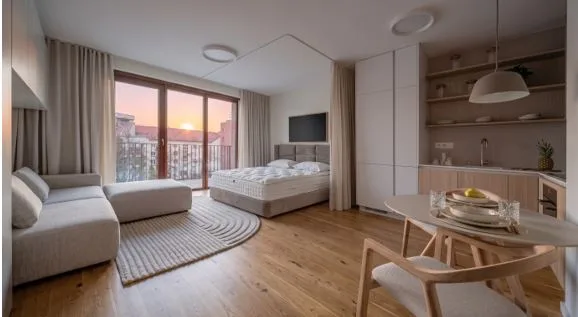
I ran a real, empty living room through an AI redesign tool before buying anything. Here is what genuinely helped, and the parts I think you should know before you trust it with your money.
Buying furniture for an empty room is one of those adult tasks nobody warns you about. I closed on a small house this spring, walked into a living room that held nothing but afternoon light and a radiator, and realized I had no real idea what belonged in it. My rough spreadsheet crept past $3,200 before I had committed to a single couch, and I still could not picture how any of it would actually sit in the room. That is a lot of money to spend on a hunch.
So before I ordered anything, I started testing MeltFlex AI, an app with a pitch that sounds almost too simple: upload a photo of the room you already have, pick a style, and get back a photorealistic image of that same room redesigned and fully furnished in about 20 seconds. No designer, no 3D software, no Saturday lost to showrooms. I have poked at enough AI image tools to expect disappointment, so I went in trying to catch it failing.
What it actually does
The idea is narrower than most AI tools, and I mean that as a compliment. You upload a photo of a space, empty or already furnished, tell it the room type, and pick a direction from a long list of styles. The usual suspects are there, modern, Scandinavian, farmhouse, industrial, coastal, mid-century, along with the trendier ones people actually search for like Japandi. A few seconds later you get your room back, restyled.
The thing that separated it from a generic image generator, in my testing, is that it mostly respects the room you gave it. My window stayed where my window is. The ceiling looked like my ceiling. The proportions carried over instead of being quietly reinvented into somebody else’s apartment. That is the whole difference between “here is a pretty room” and “here is your room, redone,” and it is the only version of this that helps when you are about to spend real money.
The part I did not expect
Speed is the obvious win. My first usable render came back faster than it takes to microwave leftovers, and because it is that fast, you actually experiment. I ran my empty living room through four styles back to back, something I would never do if each try cost me twenty minutes of setup.
But the feature I would actually tell a friend about is the furniture. The pieces in the render are not dreamy AI objects you can never track down. They are tied to real products from stores like IKEA, Amazon, and Wayfair, with prices and buy links attached. So the image is not just a mood board. It is a shopping list with a photo of my own room wrapped around it. That is the thing that quietly rewrote my $3,200 spreadsheet, because I could see which splurges earned their place and which ones I was about to buy for no reason.
Where it still has work to do, and I want to be honest
Here is the part the app’s own homepage will not lead with.
My very first upload was a lazy phone photo, bad angle, half in shadow, a box still sitting in the corner. The render came back muddled, because the AI could not cleanly tell the room apart from the clutter. Garbage in, garbage out is very real here. Once I reshot the space clean, straight on, in daylight, the quality jumped so much it felt like a different product. The problem is the app never told me that up front. Plenty of first-time users are going to judge it on a weak render that was half their own bad photo, and a simple “here is how to shoot your room” prompt would fix most of it.
It also takes small liberties with the space now and then, the kind of quiet inaccuracy that matters if you are planning a purchase down to the inch. These renders are a genuinely good starting point for a direction. They are not a measured floor plan, and treating one as construction-ready would be a mistake.
The furniture matching, as much as I liked it, comes with an asterisk too. The app is upfront that it shows you the exact piece “or a similar alternative,” so what you see is not always the precise item you can click and buy. It gets you to the right chair, not always to that chair. And the interface waves around a “4K” option, but the genuinely crisp output tops out closer to 2K in practice, and the sharper tier lives on the paid plans. None of that is a dealbreaker, but I would rather the labels matched what actually lands.
What it costs, and who should bother
You can start free, which is the honest way to try it, though the free allowance is thin, enough for a render or two rather than a whole project. Paid plans scale by how much you generate, running up to roughly $29 a month at the standard tier and about $59 for pro, with the higher plans unlocking the sharper renders and more projects. Prices shift by region, so check what shows up for you.
If you are redesigning one room exactly once, a monthly subscription is an awkward fit, and I wish there were a cleaner one-and-done option. But for a realtor staging listings, a landlord furnishing units, or anyone about to make a string of furniture decisions, the math flips fast.
The verdict
After a week with it, my honest read is this. If you want a designer’s taste, judgment, and someone to blame when the rug is wrong, this does not replace that and never pretends to. But if you want to see your own empty room in three styles before lunch, cheaply, with a real shopping list attached, it does that unusually well.
I came in expecting another AI toy that generates rooms belonging to nobody. I left with four renders of my actual living room, one I am probably going to build toward, and buy links for half the furniture in it. It did not furnish my house for me. It did stop me from spending $3,200 on a guess, and for a first-time homeowner staring at an empty room, that turned out to be worth more than the render itself.