Localizing Children’s Videos: Why a Good Translation Is Only the Start
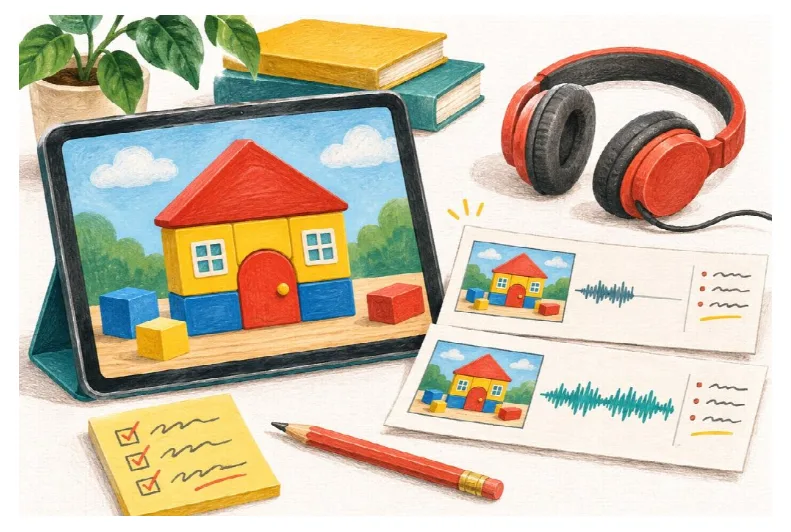
Check the spoken line against its picture before producing a full language version.
The English version tells a child to put a red block beside a door. The French version says the same thing. Both sentences are correct, but in the finished video the red block moves before the French instruction has ended. A moment later, an English label appears on screen.
Nothing is wrong with the translation. The video is still unfinished.
For a small studio, an educational publisher, or an independent animator, a second-language version involves more than replacing narration. Spoken instructions, pictures, captions, and time on screen have to agree. A child voice generator can produce a new audio track; someone still has to decide whether that track works in the sequence.
The useful unit of work is one short, complete example: a line, its picture, and the action that follows it. Check those together before generating the rest.
First, decide exactly who the new version is for
“French” is a language choice, not a complete audience brief. A clip for children already fluent in French needs different wording from a listening exercise for beginners. The intended region matters too, particularly when the script contains school terms, everyday objects, or informal expressions.
Write a brief that a translator and an audio reviewer can both use:
- Who is listening, and how familiar are they with the language?
- Is the voice telling a story, giving an instruction, or playing a character?
- Which regional vocabulary and pronunciation should be used?
- Will the listener see the pictures, read the text, or only hear the audio?
These decisions prevent a vague request such as “make it sound more natural” from circulating through several revisions. They also help distinguish a voice that suits a fictional character from one that clearly explains a task.
Mark everything the audio depends on
Before translating, watch the source video without its soundtrack. Note every written word, visible number, pointing gesture, mouth movement, and action that has to happen at a particular line.
Then listen without the picture. Does “put that over there” still mean anything? It may work perfectly with a pointing hand, but it is a poor candidate for an audio-only version. A written label can cause the opposite problem: the instruction makes sense on its own, but the translated narration no longer matches the English word on screen.
Keep a short dependency sheet rather than a long production document:
| Source element | What can break | What the localized version needs |
| A hand points to a red block | The instruction arrives after the gesture | Move the gesture or give the line more time |
| The label “door” appears | The viewer reads English while hearing French | Replace the graphic as well as the spoken word |
| A character counts three windows | A cut hides the last window | Keep all three visible through the count |
| A character makes a wordplay joke | The translated line no longer explains the reaction | Rewrite the joke and check the reaction shot |
This review often reveals work that was not included in an “audio translation” estimate. Finding it now is preferable to discovering it in the final export.
Test a complete instruction, not a pleasant greeting
Here is a small production example. A fictional activity video shows a house made from colored blocks. A youthful narrator guides the viewer through two steps.
English script: “Put the red block beside the door. Now find the window.”
Illustrative French draft: “Pose le bloc rouge à côté de la porte. Maintenant, trouve la fenêtre.”
The French wording is a starting draft to review for the intended audience, not a universal approved translation. Generate the actual instruction and place it against the picture. A friendly “Hello, everyone” sample will not tell you whether the voice handles the words you need or whether the scene has enough room.
In this example, check when the red block moves, when the door label appears, and whether there is a clear separation before the window instruction. If the new take runs longer, leave the picture on screen longer or simplify the line with the translator. Speeding up the voice is not automatically the right correction.
KidVoice offers child-style text-to-speech generation across 10 languages, with browser playback and downloadable results. That makes it possible to try a short passage before committing to a larger script. It does not remove the need to check meaning or edit the video around the finished audio.
Choose the voice in the language the audience will hear
An English preview can help establish a character’s general direction. It cannot settle how a French instruction will sound. Listen in the target language, then test your own sentence with the chosen voice.
For a French project, the French kid voice generator provides French-language previews. Compare those first, then generate a line containing the names, objects, and sentence shapes that recur in the project.
Give the reviewer specific questions. Are the words intelligible? Is a question actually phrased as a question? Does a calm instruction suddenly become theatrical? Does the character sound consistent between two adjacent lines? A simple note such as “the second instruction sounds like a warning” is more actionable than a score out of ten.
If there is no fluent reviewer for a proposed language, keep that version as a draft. A smooth-sounding recording is not proof that it says the right thing.
Keep the spoken script separate from production instructions
A working document may contain “pause while the child finds the window” or “show the translated label.” Those are instructions to the editor, not words for the voice to read.
Use separate columns for the spoken text, visual changes, and review comments. Put only the intended speech into the generation field. When a pause needs to line up with an action, check the generated result and adjust the edit; do not assume a bracketed stage direction will be understood by every speech tool.
Keep captions tied to the final approved take. If the script changes after captions have been prepared, review both the wording and the timing again. For a read-along, a difference between the displayed sentence and the spoken one deserves attention even when both versions mean roughly the same thing.
Review one export as an ordinary viewer
The last check should use the exported video, not a folder of separate audio clips. Listen on a phone speaker as well as headphones, check the transitions between lines, and make sure music does not obscure a quiet word. Watch once with captions and once without them.
Record who approved the language, which script version was used, and which audio take is in the export. Keep the voice track separate from music and effects so a corrected sentence does not require rebuilding the whole soundtrack.
Finally, be clear about what the audience is hearing. A synthetic child-style voice should not be presented as a real child’s recorded testimony. Use scripts and reference recordings you are authorized to use, and obtain appropriate permission before basing a voice on an identifiable person. Choosing a preset avoids uploading a child’s private recording, but it does not resolve every permission question around a project.
A localized children’s video is ready when its words, pictures, and timing support the same experience. Generating the audio is one step. The work is finished when a viewer no longer has to compensate for the language change.