MillionMiner Tests Every ASIC Miner Before Shipping as Buyers Demand Proof of Performance
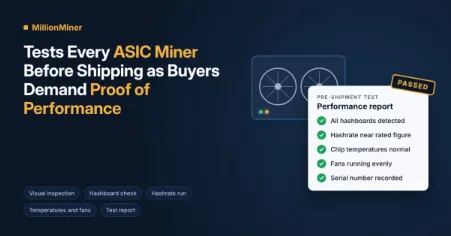
Buying a mining machine used to mean trusting a spec sheet and hoping for the best. That’s changing. More buyers now want to see that a machine works before it leaves the warehouse, not after it lands on their doorstep. MillionMiner tests every machine before shipping it and shares the results with buyers on request. This article explains what pre-shipment testing is, what it checks, what a test report tells you, and what you should still check yourself.
What does it mean to test a miner before shipping?
It means the seller powers the machine on, runs it as a buyer would, and records how it performs. The goal is simple. Any fault should show up in the warehouse, where it’s quick to fix, instead of at the buyer’s site, where it costs days of lost output and a return trip.
A test isn’t the same as a factory check. Factories test machines when they’re built. A pre-shipment test happens later, right before the machine is packed for the buyer, so it also catches problems from storage or earlier handling.
Why are buyers asking for proof of performance?
Mining machines are expensive, heavy, and slow to replace. If one arrives faulty, the buyer may wait weeks for a repair or a swap. During that time, it earns nothing.
Buyers have also learned that a rating on a spec sheet is a target, not a promise. Two machines of the same model can perform a little differently. A test result shows how that exact unit performed, which is more useful than a general number for the whole model.
What happens during a pre-shipment test?
Most testing follows the same basic steps. Each one looks for a different kind of problem.
Visual inspection
The technician checks the case, the fans, the power sockets, and the network port. Bent fan blades, loose screws, or damaged connectors are easy to spot by eye.
Power-on and board check
Next, the machine is powered on and connected to the network. The control panel should detect every hashboard. A board that doesn’t show up is one of the most common faults, and it’s far easier to deal with in the warehouse.
Hashrate run
The machine is then pointed at a mining pool and left to run. The technician watches its hashrate, which is the amount of work it does each second. The result should sit close to the model’s rated figure.
Temperature and fan check
While the machine runs, the technician checks the chip temperatures and fan speeds. Temperatures that climb too high, or a fan that runs slower than the others, can point to a problem that would only get worse over time.
Recording the results
Finally, the results are written down or saved as screenshots. This record becomes the test report.
What does a test report show?
A good test report gives a short snapshot of the machine’s health. It usually includes:
- The model and serial number.
- The hashrate during the test.
- Chip temperatures and fan speeds.
- Whether every hashboard was detected.
- The date of the test.
The serial number matters most. It ties the results to the exact unit you’ll receive, not just to the model in general.
How does testing work for a specific model?
The steps stay the same, but the numbers change from model to model. Take the Bitmain Antminer Z15 Pro as an example. It runs on the Equihash algorithm, is rated at about 840 kSol/s and draws about 2,780 watts through two cooling fans.
A test on this machine would check that the hashrate sits near 840 kSol/s and that both fans spin evenly. The kSol/s unit means thousands of solutions per second, which is how Zcash Miners measure their speed. Knowing the right unit and the right target for each model is what turns a test into useful proof.
Does a passed test guarantee the machine will work at home?
No, but it removes a big part of the risk. A test shows the machine worked in the warehouse. It can’t control what happens during shipping or how the machine is set up at the buyer’s site.
Rough handling in transit can still loosen a part. A weak power circuit, poor airflow or a hot room can also lower performance. That’s why buyers should run their own quick check after setup.
What should buyers check when the machine arrives?
A few simple checks help you compare your results with the test report:
- Inspect the box. Take photos of any damage before you open it.
- Check the outside. Look at the fans, sockets, and case for anything bent or loose.
- Power it on. Make sure the control panel shows every hashboard.
- Watch the hashrate. Give it an hour, then compare it with the report.
- Check temperatures. They should stay in the same range as during the test.
If your numbers are far below the report, something likely changed in shipping or at your site.
How does testing connect to warranty?
Testing and warranty work together. The test report shows the machine’s condition before it shipped. If a fault appears later, that record helps everyone understand when the problem started.
Keeping your test report, invoice and serial number in one place makes any warranty claim faster.
Key takeaways
- Pre-shipment testing checks a machine right before it’s packed, so faults are caught early.
- A test covers the case, the hashboards, the hashrate, temperatures and fans.
- A test report tied to a serial number is proof of how that exact unit performed.
- A passed test lowers risk, but shipping and site setup can still affect results.
- Buyers should run their own checks after setup and keep the report for warranty use.
Every ASIC miner is built for steady, long-running work. Testing before shipping and checking again after setup is the simplest way to make sure it starts that work on the right foot.
Disclaimer: This article is intended for informational purposes only. The information regarding MillionMiner’s ASIC miner testing, performance verification, and shipping procedures is based on the details provided and should not be considered an independent endorsement or guarantee of mining equipment performance. Buyers are encouraged to conduct their own research before making purchasing decisions.