Mobile Pest Control Software: Managing Your Techs in the Field
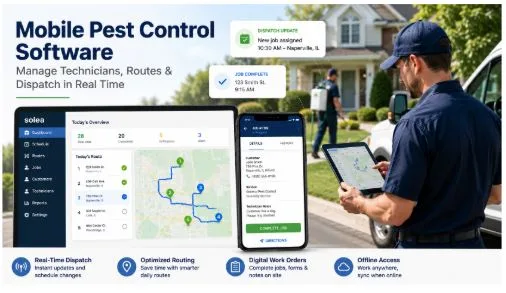
Most mobile pest control software promises to replace the dispatcher’s whiteboard. Few actually do. It’s 8:15 a.m. on a Tuesday in late June, your lead tech just called in sick with eight jobs on his board, a customer in Naperville is expecting him at 9 a.m. for a $3,800 termite pre-treat, and nobody has told her yet.
So what does she do? She calls techs one by one. Two don’t answer. The schedule gets rebuilt by 9:45, the Naperville customer has already left a bad review, and the day never fully recovers.
That situation tells you everything about whether your mobile pest control software is actually working. A platform that requires a dispatcher to manually reroute eight jobs by phone isn’t really a technology solution. You can more or less call a phone system with a dashboard attached. The question worth asking here is how many steps it takes your office to absorb a single tech no-show without a customer noticing.
Why does pest control business software fail field teams at scale?
Manual scheduling has a hard ceiling around 10 to 15 active technicians. Below that, a dispatcher can hold the day in working memory and recover from disruptions with a few calls. Above it, the variables multiply faster than any one person can manage.
When one job runs long in a 20-truck operation, the cascade touches every appointment downstream. Rebuilding that manually takes 30 to 45 minutes of active dispatcher time. During this period customers are already waiting past their windows and nobody is making tomorrow’s confirmation calls.
What does real mobile pest control software actually do?
Three capabilities separate genuine mobile pest control software from digital clipboards.
1. Offline job access
Techs in rural routes, older buildings, or low-signal areas need their schedule, job notes, service history, and forms available without a data connection. Platforms that require live connectivity for basic job access create documentation gaps and slow field execution. FieldRoutes, GorillaDesk, and Solea AI all cache job data locally so techs can complete work offline and sync when signal returns.
2. Built-in chemical tracking
For PCOs, application documentation is a compliance requirement, not a feature. State regulations require records of the product used, concentration, target pest, and application location. Platforms that build chemical logging into the job completion flow get significantly better field compliance than those that treat it as a separate manual step.
3. Real-time job status updates
When a tech marks a job complete, the office sees it instantly. When a job runs long, the system flags it. When a customer needs a revised ETA, it fires automatically. This single feature eliminates most inbound customer calls during peak hours.
What kills pest control mobile app adoption, and how do you prevent it?
Techs don’t resist mobile software because they oppose technology. They resist it because the learning curve creates more friction than the old system on day one, and nobody explained the payoff in advance.
The platforms that see fastest adoption share two characteristics:
- The tech-facing interface requires four taps or fewer for the most common actions: arriving at a job, completing service, logging a chemical application, collecting payment.
- The app works offline without degrading the experience. If going out of signal means losing access to job details, techs will revert to paper within a week.
How the main platforms compare on field usability:
GorillaDesk and Jobber earn strong marks from field teams for mobile UX. Simple, reliable, low training overhead. Right for operations under 15 trucks where scheduling complexity isn’t the bottleneck.
FieldRoutes has a solid mobile experience with better route visualization than either. Stronger fit for mid-size operations that need geographic density built into the daily schedule.
Housecall Pro is well-designed for home services broadly but hits limits in pest control specifically, particularly around skill-based routing and chemical documentation requirements.
Solea AI is built specifically for pest control field execution. Technicians get their optimized daily schedule, job details, service history, documentation, and payment collection in one place, with full offline functionality. When dispatch changes mid-day, the mobile view updates automatically.
How does real-time AI dispatch change pest control scheduling software?
Standard scheduling logic assigns the tech who’s free and closest. That works on a clean day. It doesn’t work when a tech calls out at 8 a.m. with six jobs on their board, an emergency comes in at 10, and two other jobs are already running behind.
AI dispatch weighs multiple variables at once:
- Certification requirements for the job type
- Current workload across the full team
- Geographic clustering to minimize drive time
- Downstream schedule impact of any change
When disruption hits, the system proposes the reassignment and the dispatcher approves in one step instead of spending 40 minutes rebuilding the board.
One strong example is Solea AI’s scheduler, it builds and optimizes routes daily, adjusting in real time as jobs change. It’s part of an AI-native platform built specifically for pest control, covering dispatch, 24/7 inbound call and text handling, invoicing, chemical tracking, CRM, and reporting.
For operators already on FieldRoutes or PestPac, Solea integrates with both, so adding AI dispatch doesn’t require a full platform migration.
The real question for any PCO evaluating this isn’t “does AI scheduling exist,” it’s “at what point does the operational drag from manual dispatch cost more than the solution?”
For most operations, that answer shows up around 10 trucks and 60-plus daily stops, when a single tech no-show starts taking 40 minutes to recover from instead of five.
As a PCO, four questions worth asking in any mobile pest control software demo:
- Does the app work fully offline?
- Does the AI scheduler re-optimize mid-day without the dispatcher triggering it?
- How many steps does it take to resolve a tech no-show with six jobs on their board?
- Can your least tech-comfortable technician complete a full service visit, including forms, payment, and chemical documentation, without calling the office for help after two weeks of use?
The answers tell you more about real-world fit than any feature checklist.
Learn more at solea.ai or explore pest control industry intelligence at authority.inc.