My First Look at the Hismith Premium 4.0: An Unboxing and Setup Guide
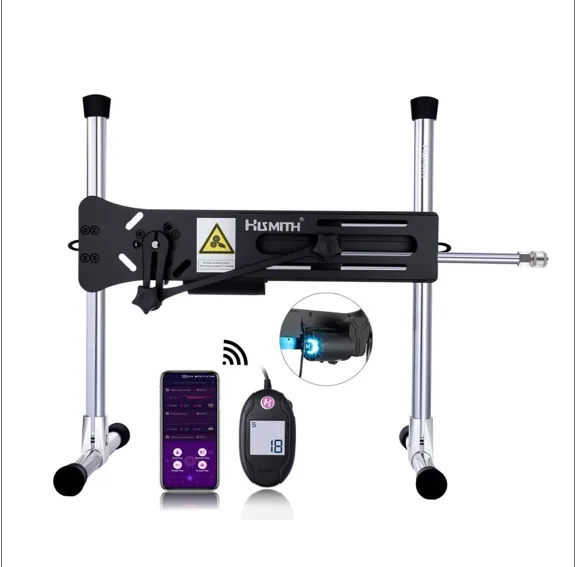
I had never assembled a modular device that could be controlled by an app before. When the box arrived, I cleared a table, laid out the parts, and took some time to see how they fit together.
This article looks at what came in the package, how setup went, and a few things I learned along the way from a beginner’s point of view.
What’s in the Box?
The set I received from Hismith included the main unit, a wired digital display controller, support rods, anti-skid covers, a power adapter, assembly tools, a dust cover, a carrying bag, and one compatible attachment.
The first thing I noticed was its weight. At about 25 pounds, this is not something you can easily tuck into a drawer. Before ordering, it is a good idea to decide where you will set it up and store it. That will make the rest of the process easier.
Setup Was Easier Than I Expected
The modular frame is designed for tool-free assembly, though the package also includes Allen wrenches. The support rods and main unit form the frame, and the attachment connects to the moving rod through Hismith’s KlicLok system.
Before setup, I placed the device on a stable, flat surface and checked that the attachment was securely connected. While learning the controls, I also kept the wired controller within reach so I could stop the machine when needed.
The attachment I received matched the details listed on the Hismith Premium 4.0 product page. Package contents may vary by version, so it is a good idea to check the product page before ordering.
Two Ways to Control It
The wired control box has a digital display that shows the current speed. I used this control first because the settings were clear and easy to adjust.
The Hismith App offers more control options. Depending on the setup, the app may include built-in modes, custom modes, sound and vibration controls, and shared user modes. I spent more time trying the built-in modes than creating custom ones, but these options are available if you want to adjust the experience further.
The product page lists a top speed of 267 strokes per minute and a stroke range of about 1.3 to 5 inches. These are the machine’s maximum specifications, not goals that a beginner needs to reach. I first focused on learning the controls and finding settings I felt comfortable managing.
What Is the Point of the Modular Design?
The machine provides the movement, while the attachment determines the shape and feel. The KlicLok connector makes it easier to switch compatible attachments while keeping the same machine.
If you plan to use an attachment from another brand, check the connector type and whether you need an adapter before buying. Parts that look similar are not always compatible.
Is It Right for You?
The Premium 4.0 may suit you if you want adjustable movement, app features, and the option to change attachments. It may not be the right choice if you want a small device that is ready to use as soon as you take it out of a drawer. It needs setup and storage space, as well as time for cleaning and care.
After unboxing the device and learning the controls, the setup felt less complicated than I had expected. The main things to consider ahead of time are space, storage, and which controls you will actually use.
You can find the full specifications on the Premium 4.0 product page, or browse other Hismith products.