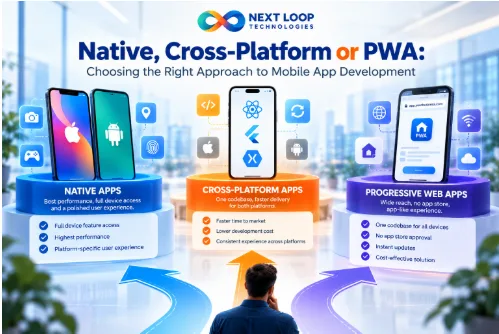
Before a single screen is designed, every mobile project faces a decision that shapes budget, timeline, and user experience: how will the app be built? The three main options are native apps, cross-platform apps, and progressive web apps (PWAs). Each is a legitimate choice. None is universally best.
This guide explains how they differ, where each shines, and how to choose without getting lost in technical debate.
The three approaches, explained simply
Native apps are built separately for each operating system, typically using the languages and tools provided by the platform owner. An iPhone app and an Android app are two codebases.
Cross-platform apps share most of their code across iOS and Android, using frameworks that let one team produce both. The result is installed from app stores like any other app.
Progressive web apps are web applications that can be added to a phone’s home screen, work with limited connectivity, and feel app-like, but run through the browser rather than being distributed primarily through app stores.
Native apps: when depth and polish matter most
Native development offers the most direct access to device capabilities and the smoothest alignment with each platform’s design conventions.
Strengths
- Best performance for demanding tasks such as complex animation, graphics, or real-time processing
- First access to new platform features
- Deep use of hardware: camera, sensors, Bluetooth, background processing
- Familiar look and behaviour for users on each platform
Trade-offs
- Two codebases to build and maintain, which usually means higher cost and more coordination
- Features must be delivered twice, so releases can drift apart
Native tends to suit apps where the device experience is the product, such as media tools, advanced camera features, or hardware-linked apps.
Cross-platform apps: one team, two platforms
Cross-platform frameworks reduce duplication by letting a single codebase serve both major platforms.
Strengths
- Faster delivery of a first version on both platforms
- Lower build and maintenance effort in many cases
- Consistent features and behaviour across platforms
- A good match for typical business apps: accounts, lists, forms, payments, notifications
Trade-offs
- Occasional limits when you need unusual or very new device features
- Possible performance differences in graphically intense apps
- Some dependency on the framework’s roadmap and community
For many businesses, cross-platform offers the best balance of reach, speed, and cost.
Progressive web apps: reach without the app store
A PWA is delivered through the browser and can be installed from it.
Strengths
- One codebase for all devices, including desktop
- No app-store approval cycle for updates
- Low friction: users can start without installing anything
- Cost-effective for content, catalogues, and simple tools
Trade-offs
- Access to device features is more limited, and support varies by platform and browser
- Less visibility than an app-store listing
- Some capabilities available to native apps, such as certain background tasks, may be restricted
PWAs suit situations where reach and simplicity matter more than deep device integration.
Did you know?
The term “progressive web app” was introduced in 2015 by Frances Berriman and Alex Russell to describe web apps that combine web reach with app-like capabilities. The idea has since matured, though support still differs across platforms.
Side-by-side comparison
| Factor | Native | Cross-platform | PWA |
| Codebases | One per platform | One shared (mostly) | One web codebase |
| Build cost | Higher | Moderate | Lower |
| Time to both platforms | Longer | Shorter | Shortest |
| Device feature access | Full | Broad, with some limits | More limited |
| Performance ceiling | Highest | High | Depends on browser |
| App-store presence | Yes | Yes | Limited |
| Update process | Store review | Store review | Instant, via web |
| Best for | Device-heavy, performance-critical apps | Most business and consumer apps | Reach-first, lightweight tools |
How to choose: a six-question checklist
- What does the app need from the device? If it depends on advanced camera, sensors, or background processing, lean native. If it mostly shows data and handles forms, cross-platform or PWA is likely enough.
- Which platforms do your users actually use? If most are on one, start there. Don’t build two apps for a minority.
- How quickly do you need to learn from real users? If you’re validating an idea, pick the approach that gets you feedback soonest.
- What is your budget for building and maintaining? Include updates for new operating-system versions, which every approach needs.
- Do users expect to find you in an app store? If discoverability there matters, a PWA alone may not be enough.
- What is your team’s strength? Existing web skills favour a PWA or certain cross-platform frameworks. Existing platform expertise favours native.
Expert insight
Teams often ask which technology is “better.” A more useful question is which compromise is cheapest to live with. Cross-platform trades a little device depth for a lot of speed. Native trades money for polish. PWAs trade features for reach. Naming the trade-off you accept makes the decision easier and the later budget conversation calmer.
Common mistakes
- Choosing a technology before defining the user journey. Start from what users need to do.
- Building both native apps for an unproven idea. Validate first.
- Underestimating ongoing costs. Operating-system updates, device variety, and store policy changes require continuous work.
- Ignoring offline behaviour. Decide what should work without connectivity.
- Skipping real-device testing. Emulators do not reveal everything about performance and behaviour.
- Treating app-store approval as a formality. Plan time for review and policy compliance.
Pro tips
- Build one core flow end to end first, then expand.
- Plan analytics and crash reporting from the first release.
- Keep business logic in a back-end API so it can serve more than one front end later.
- Test on a spread of real devices, including older ones your users may still have.
- Agree who owns the developer-store accounts and signing credentials from day one.
Putting the choice into practice
A sound process starts with the user journey, picks the lightest approach that meets the real needs, and keeps the back end clean enough to change direction later. Some development partners, including Nextloop Technologies, take this approach to mobile apps: begin with what users need to accomplish, then choose the technology that supports it. Whoever you work with, ask them to explain why they recommend a particular approach and what they would give up by choosing it.
Frequently asked questions
- What is the difference between native and cross-platform apps?
Native apps are built separately for each operating system. Cross-platform apps share most of their code across platforms using a framework.
- Are cross-platform apps slower?
For typical business apps, users rarely notice a difference. Graphically intense or hardware-heavy apps may benefit from native development.
- Is a PWA a real alternative to an app?
For many use cases, yes, especially where reach and low friction matter. If you need deep device access or an app-store presence, consider native or cross-platform.
- Which approach is cheapest?
Usually a PWA, then cross-platform, then two native apps, but total cost depends on features, design, and maintenance.
- Can we start with one approach and switch later?
Yes. Keeping logic in a shared back end and APIs makes migration easier, though a switch still involves real work.
- How much does it cost to maintain a mobile app?
There is no standard figure. Budget for operating-system updates, bug fixes, security patches, hosting, and improvements.
Final takeaway
Choose native when the device experience is the product, cross-platform when you need both platforms efficiently, and a PWA when reach and simplicity matter most. Start from your users’ needs, name the trade-offs you are accepting, and keep the architecture flexible enough to evolve.