SwifDoo PDF: A Practical PDF Editor for Everyday Document Tasks
Working with PDF files has become a regular part of both personal and professional life. Whether you need to edit contracts, review reports, merge files, or convert documents into different formats, having the right software can save time and improve productivity. Many users search for a solution that is simple to use while still offering the essential features needed for daily document management.
One option that continues to gain attention is SwifDoo PDF. It is designed to help users edit, organize, convert, annotate, and secure PDF documents without requiring advanced technical knowledge. From students and teachers to business professionals and freelancers, it offers a range of tools that make PDF management more convenient.
What Is SwifDoo PDF?
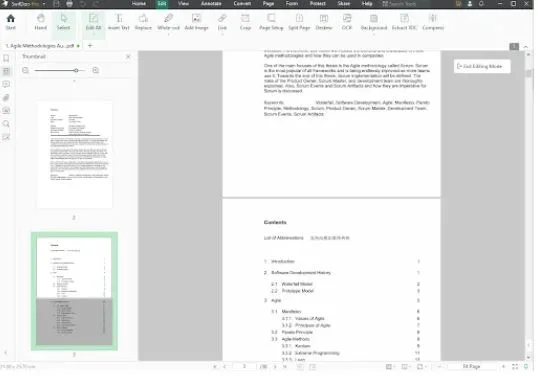
SwifDoo PDF is a complete PDF solution that allows users to perform multiple document-related tasks within a single application. Instead of switching between different programs for editing, converting, and organizing files, users can complete everything from one interface.
The software is built with ease of use in mind. Its clean layout helps new users quickly find the tools they need while also providing advanced capabilities for those who regularly work with PDF documents.
Whether you need to make quick edits or manage large collections of files, SwifDoo PDF provides practical features that support everyday workflows.
Edit PDF Documents with Ease
One of the biggest reasons people use PDF software is the ability to edit existing files. Traditional PDF documents are often difficult to modify without specialized software.
As a reliable PDF editor, SwifDoo PDF allows users to:
- Edit existing text
- Modify images inside PDFs
- Change fonts and formatting
- Add new text boxes
- Insert or delete pages
- Rearrange document pages
These editing tools are useful for updating reports, correcting mistakes, modifying contracts, or revising business documents without recreating the entire file.
Convert PDFs into Multiple Formats
Document conversion is another feature many users require. Instead of manually copying information from PDF files, SwifDoo PDF supports conversion into several commonly used formats.
Users can convert PDF files to:
- Microsoft Word
- Excel
- PowerPoint
- Images
- HTML
- Text files
It also supports converting other file types into PDF format, helping maintain consistent document formatting across different platforms.
Accurate conversion helps preserve layouts, fonts, tables, and images, reducing the need for additional editing after conversion.
Annotate and Review Documents
Collaboration often requires reviewing and commenting on documents before they are finalized.
SwifDoo PDF includes annotation tools that simplify document review. Users can:
- Highlight important information
- Underline text
- Add sticky notes
- Draw shapes
- Insert comments
- Use freehand drawing tools
These features are especially useful for students reviewing study materials, managers providing feedback, or teams collaborating on reports.
Merge, Split, and Organize PDF Files
Managing multiple PDF documents can become difficult when files need to be combined or separated.
SwifDoo PDF makes file organization simple by allowing users to:
- Merge multiple PDFs into one file
- Split large PDFs into smaller sections
- Rotate pages
- Delete unwanted pages
- Rearrange page order
- Extract selected pages
These tools help organize invoices, project documents, presentations, manuals, and archived files more efficiently.
Protect Sensitive Information
Many PDF documents contain confidential business or personal information.
SwifDoo PDF includes several security features that help protect important files, including:
- Password protection
- Permission controls
- Document encryption
- Digital signatures
These security options help prevent unauthorized access while allowing organizations to share documents safely with clients, employees, or partners.
OCR for Scanned Documents
Printed documents often need to be converted into searchable digital files.
SwifDoo PDF includes Optical Character Recognition (OCR), which recognizes text from scanned documents and image-based PDFs. After OCR processing, users can search, copy, and edit text that was previously locked inside scanned images.
This feature is especially valuable for businesses digitizing paper records or students working with scanned textbooks and research materials.
Simple Interface for Everyday Users
Many PDF programs include complex menus that can overwhelm new users.
SwifDoo PDF focuses on providing an organized workspace where common tools are easy to locate. This reduces the learning curve and helps users complete tasks more efficiently.
Whether editing a single page or managing multiple documents, users can quickly access the features they need without navigating through complicated settings.
Suitable for Different Types of Users
SwifDoo PDF supports a wide range of users across different industries.
Students can edit assignments, highlight notes, and organize research papers.
Teachers can review submissions, annotate documents, and prepare classroom materials.
Business professionals can update contracts, generate reports, merge documents, and secure confidential files.
Freelancers can edit proposals, convert invoices, and collaborate with clients more efficiently.
Legal professionals can review agreements, add comments, and protect sensitive documentation.
This flexibility makes the software useful for both occasional users and professionals who regularly work with PDF files.
Why Choose SwifDoo PDF?
There are many PDF applications available today, but users often prefer software that combines essential features with ease of use.
Some benefits of SwifDoo PDF include:
- Comprehensive PDF editing tools
- Fast document conversion
- OCR support for scanned files
- Built-in annotation features
- PDF merging and splitting
- Password protection and encryption
- User-friendly interface
- Support for multiple document workflows
Instead of relying on several different applications, users can perform most PDF-related tasks from a single platform.
Final Thoughts
Managing PDF documents does not have to be complicated. Whether you need to edit text, convert files, organize pages, review documents, or protect confidential information, having reliable software can make daily work much easier.
SwifDoo PDF</a> provides a balanced combination of editing, conversion, annotation, OCR, organization, and security features suitable for students, professionals, educators, and businesses alike. Its straightforward interface allows users to complete common PDF tasks efficiently while offering advanced capabilities when needed.
If you’re looking for a dependable PDF editor that supports a wide variety of document management needs, SwifDoo PDF is worth considering for both personal and professional use.