
Teen Patti Master on Android: What Makes an Update Useful?
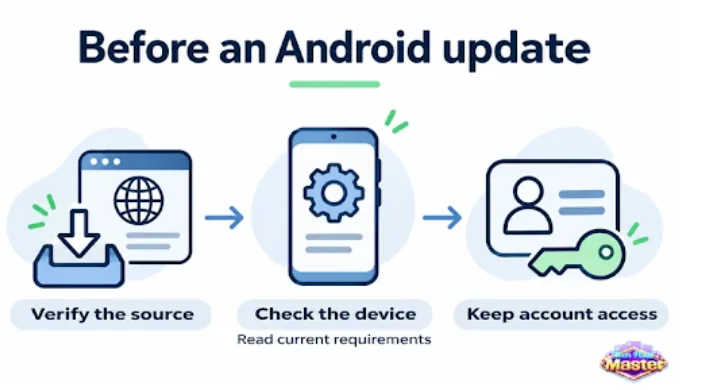
A Teen Patti Master update is useful when it keeps a supported Android installation working, addresses a documented problem or introduces a change the player actually needs. A larger version number, by itself, cannot establish any of those things. For someone returning to the app, the practical questions are whether the download comes from the right source, whether the phone meets its requirements and whether access to the existing account will be preserved.
The Teen Patti Master website describes an Android app built around the Indian three-card game, with other card and casual games available through its lobby. Its public pages separate product information, installation help and browser access. That separation is useful: changing an installed application is not the same task as opening a website, recovering a login or resolving an account restriction.
Before updating, check the download source, device requirements and access to your existing account.
Start with the installed app, not the download headline
Before looking for an update, note the version currently installed and the problem, if any, that needs attention. Perhaps the app displays an update request. Perhaps a particular screen fails to load. Or perhaps the player has simply seen a newer-looking download advertisement. These situations call for different checks, even though all three can lead someone to the same installation button.
An update request inside an existing application should be checked against the current information on the brand’s website. A loading problem requires a closer look at when it occurs. An advertisement needs verification before it becomes a reason to replace functioning software. Keeping these starting points separate prevents an ordinary connection problem from turning into an unnecessary reinstall.
The website’s download listing provides a place to review the offered build, file size and Android requirements. Treat those details as a set belonging to that particular file. An older screenshot or saved guide may describe a different release. If two sources disagree, ask which listing applies to the current download instead of selecting whichever number looks highest.
What a release description should actually tell you
A useful release note identifies a change clearly enough for a reader to recognise its relevance. A statement that a login error has been addressed is more informative than a promise of a smoother experience. A specified compatibility change matters to owners of the affected devices; a redesigned lobby may matter more to frequent players than to someone who only opens one table.
The Teen Patti Master APK New Version details should therefore be read alongside the installation requirements, not as a guarantee of better results. If the available listing does not explain a performance improvement, there is no basis for treating a faster download, a different icon or a new filename as evidence that gameplay has improved.
There is also a difference between app changes and account changes. Installing a new file does not by itself create eligibility for an offer, complete identity verification or settle a pending transaction. Those questions belong to the account and the service. An update may be required to access current functions, but it should not be described as a shortcut around their conditions.
Updating an app and resolving an account issue are different tasks; changing the file does not settle a pending request.
Package identity matters more than familiar branding
Two Android files can display similar names and still be different applications. Android Developers’ app-signing documentation explains that APKs are digitally signed and that signing identity is part of the update relationship. For a player, the important consequence is that an installation conflict should not be dismissed merely because the file has a familiar logo.
This does not mean every player needs to inspect a certificate manually. It means the source matters, and an unexpected request to remove the existing app deserves attention. The brand’s installation guidance specifically identifies a different signature as one possible reason for failure. Other possibilities include an incomplete file, incompatible Android software or insufficient storage; the error message helps distinguish them.
Do not solve an unexplained conflict by trying files from several unrelated download sites. That makes it harder to know which package is on the phone and which instructions apply. Keep the original download address and the exact message. If support needs to investigate, these details are more useful than a sequence of unsuccessful replacement files with similar names.
Protect account continuity before replacing anything
Before uninstalling, confirm how the existing account is accessed. Record the account identifier where available and make sure the original sign-in method is understood. Do not assume that creating a new account will restore an old balance or that reinstalling will repair an account-level restriction. The website’s installation guidance tells users to confirm recovery access before removing an existing installation.
A practical record can be simple: phone model, Android version, installed app version and the screen where the problem occurs. Screenshots should hide private identifiers unless they are being sent through a verified private support conversation. Passwords and verification codes are not troubleshooting attachments. The purpose is to preserve enough context to describe the problem, not to hand over control of the account.
If a transaction or game result is unresolved, record its status before changing software. A fresh installation may change what is visible on the device without explaining what happened on the service. Keeping a reference and approximate time allows the account issue to be investigated separately from the installation. It also avoids treating a newly opened screen as proof that the earlier action failed.
Compare the experience using a repeatable check
After a verified update, start with the task that prompted it. If the issue was signing in, check that stage first. If a particular screen failed, return to that screen before judging the whole application. Avoid changing the network, device settings and app version simultaneously where possible: several changes at once make it difficult to identify what actually helped.
For example, a lobby that opens after both an update and a switch from mobile data to Wi-Fi does not prove the update fixed the problem. The connection may have been responsible. Conversely, a successful sign-in does not establish that every game or payment function has been tested. Describe the observation narrowly: which task worked, under what conditions, and whether the original error returned.
This approach also produces a better support request if the update does not help. “The same error appears after sign-in on this phone and Android version” gives customer care a starting point. “The new app is broken” does not identify the failed stage. There is no need to test unfamiliar paid features merely to make a troubleshooting report more complete.
Know when an update is not the answer
Teen Patti Master’s website offers browser access as a separate route, but that should not be treated as proof that an account issue disappears outside the app. Features and account access need to be checked in the version used. A support question about verification or a pending withdrawal remains an account question even if the browser page opens successfully.
Google’s Play Protect guidance also makes clear that security checks can apply to apps obtained outside Google Play. Keep those protections enabled. If a file is blocked or flagged, stop and verify the source rather than looking for a way to suppress the warning. A promised update benefit is not a reason to ignore a device’s security response.
The best update decision is therefore specific: obtain the supported file through the brand’s own route, understand what it is intended to change and preserve access to the existing account. Once installed, check the relevant task rather than assuming universal improvement. Real-money features remain limited to eligible adults where permitted; replacing software does not alter those boundaries or guarantee a financial return.