The Best HTML to Text Converter
In today’s digital world, HTML is everywhere. From emails and newsletters to exported web pages and CMS content, developers, writers, and marketers constantly deal with raw HTML code. While HTML is essential for structuring web content, there are many situations where you simply need clean, readable plain text.
That’s where HTML to TEXT stands out as a fast, modern, and privacy-friendly solution.
What Is HTML to TEXT?
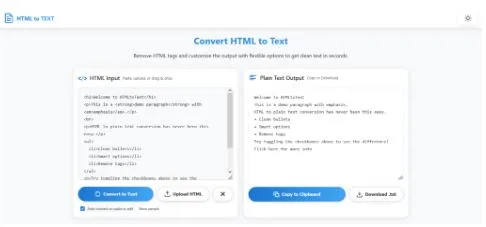
HTML to TEXT is a free online tool that converts HTML code into clean plain text instantly. It removes unwanted HTML tags while preserving readable formatting such as paragraphs, line breaks, lists, and links.
The platform is designed for simplicity, speed, and flexibility. Whether you are cleaning copied website content, extracting text from HTML emails, or preparing content for Markdown or documentation systems, the tool makes the process effortless.
A Clean and Modern User Experience
One of the first things users notice about the site is its polished and responsive interface. The design feels lightweight, modern, and distraction-free.
Key interface highlights include:
- Responsive layout for desktop and mobile
- Light and dark mode support
- Drag-and-drop HTML uploads
- Instant copy and download options
- Clear formatting controls
- Fast browser-based processing
Unlike many outdated converter tools cluttered with ads and confusing layouts, this website focuses on usability and speed.
Powerful Conversion Features
The real strength of HTML to TEXT comes from its advanced conversion options.
1. Remove HTML Tags Instantly
The core feature allows users to strip HTML tags from content while keeping the readable text intact. The tool automatically removes:
- HTML tags
- Scripts
- Styles
- Comments
This is especially useful for developers debugging content or writers cleaning copied text from websites.
2. Preserve Formatting
Many HTML removal tools destroy formatting completely. This converter gives users precise control over the final output.
Users can choose to:
- Convert <br> tags into line breaks
- Turn <p> tags into paragraph spacing
- Convert lists into readable bullet points
- Preserve links in readable text format
This flexibility makes the output much cleaner and easier to reuse.
3. Decode HTML Entities
The tool can automatically decode common HTML entities such as:
- & → &
- → space
- " → quotation marks
This small feature dramatically improves readability.
4. Compact Output Mode
For users who need compressed plain text, the compact mode removes unnecessary blank lines and extra whitespace.
This is ideal for:
- Data cleaning
- Text analysis
- Importing content into databases
- SEO processing
Fully Browser-Based for Better Privacy
One of the most impressive aspects of the tool is its privacy-first approach.
According to the site, all conversions happen directly inside the browser using JavaScript and DOM parsing. No server-side processing is required.
That means:
- No file uploads to external servers
- No waiting for remote processing
- Better security for sensitive content
- Faster performance
For businesses and developers handling private HTML documents or email exports, this is a major advantage.
Excellent Performance
The website mentions successful testing with HTML files larger than 15MB, which is impressive for a browser-based utility.
Because processing happens locally, performance depends mostly on the user’s device rather than remote server limitations.
This makes the tool suitable for:
- Large HTML exports
- Email archives
- CMS migrations
- Documentation cleanup
- Web scraping workflows
Perfect for Developers, Writers, and SEO Professionals
The converter is useful across many industries and workflows.
Developers
Developers can quickly clean HTML output for debugging, parsing, or exporting readable content.
Content Writers
Writers can strip formatting from copied web content before editing or publishing elsewhere.
SEO Professionals
SEO specialists often need plain text versions of pages for audits, keyword analysis, or content reviews.
Students and Researchers
Researchers can clean copied website material into readable notes without messy markup.
Drag-and-Drop Simplicity
The upload system is particularly user-friendly. Users can:
- Paste raw HTML
- Upload .html files
- Drag and drop files directly into the browser
The workflow is smooth and intuitive, making the tool accessible even for non-technical users.
Dark Mode Support
A surprisingly valuable feature is the built-in dark mode.
Many developers and writers spend hours working with text-based tools, and dark mode helps reduce eye strain during long sessions.
The theme preference is also saved locally for convenience.
No Installation Required
Unlike desktop utilities or browser extensions, HTML to TEXT works instantly with no downloads or setup.
Users can open the site and start converting immediately.
That simplicity makes it one of the most convenient HTML cleanup tools available online.
Final Thoughts
HTML to TEXT delivers exactly what a modern utility tool should:
- Fast performance
- Clean design
- Powerful conversion controls
- Browser-based privacy
- Excellent usability
Whether you are a developer cleaning raw HTML, a writer preparing content, or a professional processing large amounts of markup, the tool offers a reliable and polished experience.
For anyone searching for a fast and free way to remove HTML tags and generate clean plain text, this website is absolutely worth bookmarking.