The Business Case for an Easy HTML Editor in Internal Tools
Modern businesses run on internal tools: intranets, documentation platforms, employee communication hubs, workflow dashboards. The content inside these tools is what keeps teams aligned, processes moving, and institutional knowledge accessible. Yet for many organisations, actually editing and publishing that content is surprisingly painful.
A common problem is the lack of a simple, reliable content editor in the tools teams use every day. Without one, even small updates can require developer help, support requests, and extra back-and-forth, slowing everyone down.
That’s where an easy HTML editor becomes a genuine business decision, not just a product feature. It’s the difference between a team that can communicate and document efficiently and one that’s perpetually waiting in a queue. This article makes the business case for why organisations should treat accessible HTML editing as a core part of their internal tooling strategy.
Key Takeaways
- Manual HTML editing creates avoidable bottlenecks that slow down internal communication and publishing workflows.
- Non-technical teams can manage formatted content independently when given the right visual editing tools.
- Consistent, well-formatted internal content reduces errors, revisions, and cross-team miscommunication.
- Reducing developer dependency on routine content tasks frees engineering resources for higher-value work.
- Purpose-built editors like Froala Online HTML Editor offer the simplicity and flexibility internal tools actually need.
Why Internal Tools Need Better Content Editing
Internal tools have matured rapidly over the past decade. Teams now expect the same polish from their internal dashboards and documentation platforms as they do from consumer products. But content editing capabilities often haven’t kept pace, and the gap is causing real operational friction.
The Limitations of Manual HTML Editing
A common problem is relying on raw HTML input or having no proper content editor at all. When that happens, creating and updating content becomes harder, causing delays and inefficiencies across teams.
It requires technical expertise for simple updates. A content manager who wants to bold a heading, add a table, or embed a link shouldn’t need to write markup by hand. But without a visual editor, that’s exactly what happens. Simple tasks get escalated to developers, who have higher-priority work waiting.
It slows communication and publishing workflows. Every content update that depends on a technical handoff introduces latency. For time-sensitive announcements, policy changes, or operational alerts, that delay has real consequences.
It increases formatting inconsistencies and errors. When multiple people manually write HTML or copy-paste from external sources, the output is inconsistent. Tags get left unclosed, styles conflict, and the rendered result rarely matches the intent.
It creates dependency on technical teams for non-technical tasks. This is perhaps the most systemic problem. When content creation requires developer involvement, it doesn’t just slow individual tasks; it establishes a structural bottleneck that compounds across every team, every month.
Growing Demand for User-Friendly Internal Tools
The shift toward self-service content management isn’t a preference; it’s a structural trend in how modern organisations operate.
More teams are managing content independently. Marketing, HR, operations, and support teams all generate and maintain significant volumes of internal documentation. Expecting them to route every update through engineering is no longer realistic.
There’s also a broader shift toward no-code and low-code workflows. Organisations are actively reducing technical friction in internal processes, and content editing is a natural part of that movement. Teams that can update their own content, manage their own documentation, and publish their own announcements operate faster and more autonomously.
Scalability matters too. As organisations grow, the volume of internal content grows with them. Processes that depend on developer time for routine content tasks don’t scale, and the cost of that inefficiency compounds.
How Modern Editing Tools Improve Internal Workflows
Once a visual HTML editor is in place, the operational improvements tend to be immediate and measurable. Here’s where the impact shows up most clearly.
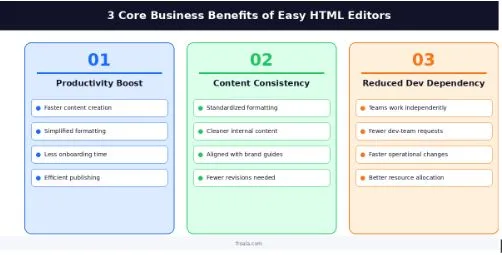
Improved Team Productivity
The most direct benefit is time. When employees don’t have to write markup, learn syntax, or wait for developer support, content gets created and published significantly faster.
Formatting workflows are simplified to the point where they become invisible. A toolbar with buttons for bold, italic, lists, tables, and links handles 90% of what most internal content requires. New employees can start contributing formatted content on day one, without any training beyond “click the button.”
The cumulative effect across a department, across an organisation, is meaningful. Less time on formatting means more time on the actual work the content is about.
Better Content Consistency
Standardised formatting doesn’t just look better; it reduces cognitive load for readers and errors for writers.
When everyone uses the same visual editor, the output HTML follows consistent patterns. Headings look like headings, tables are structured the same way, internal documentation feels like it came from one place, not a dozen different people copying and pasting from different sources.
This consistency also makes it easier to maintain alignment with company guidelines. Style requirements: font choices, heading structures, link formatting, can be enforced through toolbar configuration rather than training documents that nobody reads.
Reduced Developer Dependency
This benefit deserves particular emphasis because it affects both teams involved: the content team and the engineering team.
When non-technical teams can manage content updates independently, the volume of “can you just update this text” requests to engineering drops substantially. Developers get to stay in deep work longer. Content teams get faster turnaround. Both teams operate more efficiently.
From a resource allocation standpoint, developer time is expensive. Redirecting even a few hours per week away from routine content maintenance toward product development is a meaningful gain.
Key Features Businesses Should Prioritise
Not all HTML editors are built with internal tool use cases in mind. When evaluating options, these are the capabilities that matter most in a business context.
Intuitive Editing Experience
The editor needs to be approachable for non-technical users without configuration or explanation. A clean toolbar with clearly labelled controls, familiar formatting options, and predictable behaviour is more valuable in an internal tool than a feature-rich interface with a steep learning curve.
The goal is an editor that employees reach for naturally, not one they avoid because it feels complicated.
Real-Time Preview and Formatting
The ability to see content as it will appear, before publishing, is important for reducing errors and building editor confidence. Real-time preview closes the loop between intent and output, which is especially important for complex content like tables, multi-column layouts, or embedded media.
When writers can see exactly what they’re producing, they publish with more confidence and require less review.
Customisation and Integration Support
Internal tools vary significantly in their design systems, data structures, and workflow requirements. An editor that can be configured to match, restricting certain formatting options, enabling others, and adapting the toolbar to specific use cases is far more sustainable than a one-size-fits-all solution.
Integration with internal systems is equally important. An editor that exists as an isolated widget adds limited value; one that connects to content management workflows, dashboards, and publishing pipelines becomes a genuine productivity multiplier.
Common Internal Tool Use Cases
The value of a well-integrated HTML editor becomes concrete when you look at where it actually gets used. Across most organisations, the same categories come up consistently.
Employee Communication Platforms
Internal announcements, company updates, and team newsletters are among the highest-volume content types in most organisations. They’re also the content type most likely to be managed by non-technical communicators: HR teams, office managers, internal comms leads.
When these team members have a visual editor available, announcements get published faster, look more professional, and reach employees through properly formatted channels rather than plain-text emails with manually written HTML.
Department-wide updates, onboarding communications, and knowledge-sharing posts all benefit from the same improvement: accessible, visual formatting that doesn’t require technical support.
Documentation and Support Systems
Help articles, onboarding guides, and internal process documentation represent a different challenge: content that’s created less frequently but maintained over time. Here, consistency and clarity are especially important.
A well-formatted onboarding guide is easier to follow. A clearly structured help article reduces support ticket volume. Internal process documentation that’s consistently formatted is more likely to be read and followed.
When the teams responsible for this content- HR, operations, support- can edit and maintain it independently, documentation stays current. When they can’t, it drifts.
Workflow and Operations Platforms
Operational dashboards, formatted reports, and cross-team workflow tools represent the third major use case. These are tools where content is often generated dynamically or updated frequently, and where formatting quality directly affects decision-making.
A weekly operational summary that’s clearly formatted with structured headings, tables, and highlights is more useful than a wall of plain text. A dashboard that lets operations managers update formatted status notes without filing a support ticket is more responsive to actual business conditions.
This is where the integration capability of an HTML editor pays off most clearly, when it’s embedded directly in the workflow rather than treated as a separate layer.
Why Businesses Are Adopting User-Friendly Editing Tools
The trend toward visual HTML editing in internal tools isn’t driven by any single factor; it’s the convergence of several business pressures pointing in the same direction.
Faster Digital Workflows
Organisations are under consistent pressure to move faster. Internal communication bottlenecks, including content editing delays, are increasingly visible as friction points in otherwise agile processes.
Teams that can publish content independently, iterate on documentation quickly, and communicate through well-formatted channels operate with fewer handoffs and fewer delays. The operational benefit compounds across every team that touches internal content.
Collaboration also improves when everyone can contribute to shared content without technical barriers. Knowledge doesn’t stay siloed in the heads of the few people who know how to write HTML.
Better Employee Experience
There’s an often-overlooked human dimension to content tooling: how it feels to use. Tools that are easy to use get used. Tools that are frustrating get worked around, usually in ways that create new problems.
A consistent, accessible editing experience across devices, whether a team member is updating documentation from their laptop or reviewing a draft on their phone, reduces friction and increases adoption. When employees don’t have to think about the mechanics of content editing, they focus on the content itself.
Higher adoption rates across departments translate directly to better-maintained content, more current documentation, and more effective internal communication.
The Value of an Easy HTML Editor in Internal Tools
The business case for accessible HTML editing in internal tools ultimately comes down to a simple observation: content creation is a universal activity across modern organisations, but the tools to support it are often absent or inadequate.
When non-technical teams are forced to manage formatted content without a visual editor, the costs are real: in developer time, in publishing delays, in formatting inconsistencies, and in the slow erosion of documentation quality. When they’re given the right tools, those costs largely disappear.
An easy HTML editor addresses this at the root. It removes the technical barrier to formatted content, standardises output across teams, reduces dependency on development resources, and makes internal tools genuinely more usable for the people who rely on them every day.
For teams evaluating options, Froala’s Online HTML Editor is worth a close look. It’s built with integration in mind: configurable, embeddable, and capable of handling the kinds of content workflows that internal tools actually require. It’s not positioned as a publishing platform or a CMS replacement; it’s a focused tool that does one thing well: making rich content editing accessible to everyone.
The organisations that treat internal tooling seriously, including the editing experience, are the ones that communicate better, document more effectively, and move faster. That’s a competitive advantage that starts with something as practical as how people format a paragraph.
Need an easier way to manage content inside internal tools? Froala’s Online HTML Editor helps teams format, preview, and publish structured content without relying on manual HTML updates.
Frequently Asked Questions
What is an easy HTML editor?
An easy HTML editor is a tool that lets users create and format content without writing HTML code. Users can use buttons for headings, lists, links, and text formatting, while the editor generates the HTML automatically.
Why do businesses use HTML editors in internal tools?
Businesses use HTML editors, so non-technical teams can create and update content on their own. This saves time, reduces the need for developer help, and keeps content up to date.
What features should businesses prioritise in an HTML editor?
Businesses should look for an editor that is easy to use, provides a real-time preview, and integrates well with existing tools. Customisation options are also helpful for maintaining consistent content across teams.
How do HTML editors improve internal workflows?
HTML editors make content creation faster and easier for everyone. They help keep content consistent, reduce formatting errors, and allow developers to focus on building products instead of making routine content updates.