The Reaction GIF Gets Personal: How Face Swapping Moved From Novelty to Everyday Tool
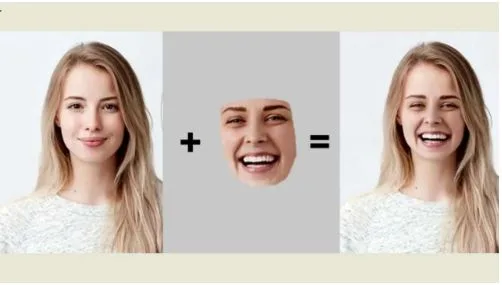
The reaction GIF has quietly become the most used image format on the internet, and for most of its life it has been a spectator sport. You picked from the same few hundred loops everyone else was picking from: the blinking guy, the confused maths lady, the slow clap. Over the past year that has started to change, as face swap tools that once needed a desktop and a tutorial have moved into the browser and started handling animated images properly.
Why GIFs Were the Hard Case
Swapping a face in a still photo is a solved problem. A GIF is a different animal: it is a sequence of frames, usually low resolution, often with heavy compression and colour banding, and the face in it moves, turns and changes expression. Early tools treated each frame separately, which produced a swap that flickered, drifted off the jaw or lost the eyes entirely when the subject turned. The result looked exactly like what it was.
The current generation tracks the face across the whole sequence instead. A GIF face swap tool now takes a single source photo, locks onto the face in every frame, and keeps the new face aligned through the motion, so the loop plays the way the original did with a different person in it. It works from a browser, takes under a minute, and does not require the user to know what a frame rate is.
What People Are Actually Doing With It
The obvious use is the group chat. Putting a friend’s face on a famous reaction loop is the modern equivalent of the doodle on the back of a photo, and it is the reason “face swap gif” searches have climbed steadily for two years. The less obvious uses are the ones growing fastest.
Small businesses are dropping a founder’s face into a well-known loop for a launch post, because a personalised GIF gets shared where a product shot does not. Teachers and trainers are using it to put themselves into short explainer animations. Fans are putting themselves into scenes from films, which is also where the same technology moves from a few seconds of GIF to full clips: the same tracking that keeps a face stable across sixty frames of a loop is what an AI video face swap relies on for a thirty-second video with sound.
What Separates a Good Result From a Bad One
Three things, in practice. The source photo matters most: a sharp, front-facing image with even light produces a swap that holds up; a dim group shot produces a face that looks like a distant relative. The GIF itself matters next: loops with a clearly visible face and moderate motion work best, while extreme angles or a face that leaves the frame will still trip up any tool. Finally, the tool’s handling of the export matters, because a swap that looks fine in preview and then gets re-compressed into a smeary 256-colour file has wasted the effort.
The Etiquette Question
Because the technology is now easy, the boundaries are worth stating. Swapping in your own face, or a friend’s with their blessing, is the whole point. Putting someone’s face into content they would not want to be in is not a grey area, and most reputable platforms, including CreateVision AI, block explicit content and expect users to have permission for any face they upload. The tools have become good enough that this is now a question of manners rather than capability, which is roughly where photography ended up a century ago.