Top 5 ATS Score Checker Free with Job Description Tools for Real Match Scores
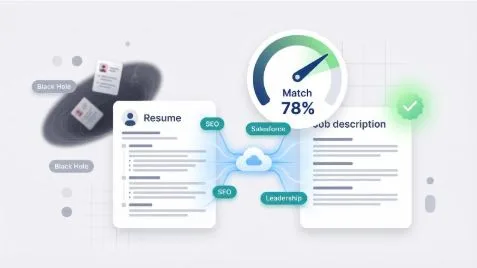
Nearly 99 percent of Fortune 500 companies use applicant-tracking systems (ATS) to triage résumés, so even strong candidates feel like they’re pitching into a black hole.
Align your wording with the posting and fix tiny formatting hiccups, and you’ll glide past the bots. To find the best free helpers, we ran one marketing résumé through every no-cost scanner we could open, grading each on accuracy, free-tier generosity, and speed.
The five standouts earned their spots—and in the next sections you’ll see our test setup, tool breakdowns, a table, and tips. Grab coffee; let’s flip hole into a green light.
How we chose the top 5
You deserve tools that work, not just rank on Google. So we built a simple, transparent test.
First, we paired one mid-level marketing résumé with a live Fortune 500 job description. That matchup stayed constant, giving every scanner the same hurdle.
Next, we ran each tool in a fresh browser session to avoid cookie-based freebies. We logged the match score, noted missing-keyword lists, and saved any formatting or writing tips.
Then we graded the results on four weighted criteria:
- Accuracy and depth – 50 percent.
A checker had to spot the right keywords and flag real formatting snags to score high. Empty praise or inflated percentages hurt its grade.
- Free-tier generosity – 20 percent.
Unlimited scans topped five-per-month caps. Hidden paywalls meant a quick exit.
- Day-to-day usability – 15 percent.
Fast uploads, clean dashboards, and (crucially) no forced downloads kept momentum.
- Bonus value – 15 percent.
AI rewrite suggestions, LinkedIn integration, or built-in design templates tipped close races.
Totals produced a clear leaderboard. The five winners you’re about to meet earned their spots under the same spotlight.
1. Enhancv – best for design-conscious job seekers
Enhancv began as a résumé builder with crisp, modern templates. Now Enhancv.com adds a free ATS scan, so style no longer risks substance.
Upload your PDF and the checker sprints through 16 technical gates: file type, font legibility, section labels, even whether your email sits in a header bots ignore. Seconds later you get a color-coded pass-or-fix verdict.
Enhancv ATS resume checker dashboard screenshot
Click any red flag and Enhancv jumps to that exact spot in its editor. Swap a decorative font for Arial, rename a “Professional journey” heading to the safer “Experience,” then rescan. Your score refreshes on the spot, keeping edits painless.
Need to match a real posting? Paste the job description into the AI Tailor box. The tool highlights missing keywords and offers rewrite suggestions you can accept with one tap. The free tier covers the core compatibility check; deeper keyword support sits behind the paid plan.
Because you can adjust wording and layout in the same window, you leave with a résumé that looks recruiter-ready and threads the ATS needle. If personal brand matters as much as clearing the bots, start here and save the deep-dive scans for later.
2. Jobscan – best for deep-dive analysis
Jobscan is the heavyweight of ATS checkers. It has parsed millions of résumés since 2013, and the experience shows: its dashboard splits your match score into hard skills, soft skills, education, and even job-title alignment.
Paste your résumé on the left and the job description on the right, then watch a forensic report appear. You see which keywords you nailed, which you missed, and whether odd formatting could hide contact details. For meticulous applicants, that detail is gold.
Jobscan resume vs job description match analysis screenshot
The catch is scarcity. The free tier caps you at five scans each month, according to the company’s pricing page at Jobscan. Active job hunters burn through that quota fast, then face a forty-nine-dollar paywall. Used wisely, those five scans help spot global gaps early and reserve the rest for dream roles.
Navigation feels old-school but clear. No browser plug-in, no AI filler, just a solid web form and dense feedback. If you thrive on data and want every percentage point possible, Jobscan earns its reputation.
Pro tip: Aim for a match score in the mid-seventies, not a perfect hundred. Recruiters spot keyword stuffing quickly, and Jobscan lets you stay natural while still pleasing the bots.
3. Resume Worded – best for AI coaching and story polish
Think of Resume Worded as a friendly editor on your shoulder. It scores résumé keywords, then goes further, line by line, flagging dull verbs, vague numbers, or passive phrasing that drains punch.
Drop your résumé into its “Score My Resume” tool and you get an overall grade out of 100 plus color-coded sub-scores for impact, brevity, style, and skills. A red flag beside “Achievements lack metrics” nudges you to trade “Improved marketing campaigns” for “Lifted lead conversions 28 percent.” Two quick tweaks, one big credibility lift.
Resume Worded Score My Resume feedback dashboard screenshot
Need to match a job post? The Targeted Resume module compares your draft with the description, but this job-specific checker sits behind the paid plan. Free users can still rely on the main scanner to polish a baseline document before applying.
Tips read in plain English: “Try stronger action verbs here,” “Quantify this win.” You edit, rescan, watch the score climb, and feel confidence rise.
Pair Resume Worded with an unlimited keyword checker later in the list and you own both craft and compliance. Your résumé clears the robot and persuades the reader who follows.
4. SkillSyncer – best budget-friendly keyword match checker
Sometimes you just need a quick thumbs-up on keywords. That is SkillSyncer’s entire promise, and it delivers.
Create a free account, paste your résumé on one side and the job post on the other, then tap Scan. A clean report appears: overall match percentage at the top, followed by two tidy columns—keywords you already have and keywords you are missing. The free tier gives you one job match scan per week, perfect for a priority application.
SkillSyncer ATS keyword match report screenshot
That simplicity is both the gift and the gap. SkillSyncer will not warn you if your phone number hides in a header or if your bullets ramble. It cares about keywords, period. Pair it with a fuller-featured checker earlier in this list and you cover every base.
Because scans are instant, SkillSyncer shines when you need to adjust wording on the fly. Tweak a bullet, rescan, and watch your score climb toward the mid-seventies—our sweet spot for ATS success without buzzword stuffing.
If your search demands precise targeting, this tool keeps pace with your ambition.
5. Jobalytics – best for real-time browsing feedback
You are skimming LinkedIn, spot a role that excites you, and wonder whether your résumé is ready. Instead of copy-pasting text into another tab, click the tiny “J” icon and see your match score in the same window, rhythm intact.
That is Jobalytics. The free Chrome extension reads the job description on any major board, compares it to the résumé you uploaded once, and opens a sidebar with your percentage plus a color-coded list of missing keywords. It is instant and convenient. According to the company website, Jobalytics also surfaces other jobs that score well with your résumé, trimming search time.
Jobalytics Chrome extension sidebar match score screenshot
Because scans are unlimited, you can run the tool on every posting in a scroll session. Spot a low score, tweak a bullet, re-upload, and watch the percentage climb without leaving the page.
The trade-offs are narrow scope and a Chrome-only home. You will not get writing advice or formatting checks, and Safari users miss out. Treat it as a fast pulse check, then lean on an earlier deep-dive scanner for full surgery.
For active hunters who live in tabs, Jobalytics turns casual browsing into targeted, data-backed prep.
Honorable mentions
A few solid scanners missed the top five yet still deserve a bookmark.
ResyMatch.io offers unlimited keyword scans and downloadable templates for quick résumé rebuilds. If you want a free scan plus a fresh layout without hopping between sites, this combo helps.
Teal Job Matcher lives inside its job-tracking dashboard. You store leads, track follow-ups, and open a tab to see which keywords you lack. The setup suits project-manager types who crave order.
MyPerfectResume ATS Checker runs a rapid formatting and keyword sweep, spotting graphics or tables that can jam older software. Run a check if you prefer visually rich layouts.
TopResume’s free review pairs you with a human who emails feedback. Expect a light sales pitch, but sometimes a fresh set of eyes beats an algorithm.
Use these extras when your main tool hits its scan limit. Variety keeps blind spots small and match scores strong.
At-a-glance comparison
| Tool | Free-tier limit | Stand-out feature | Match accuracy* | Best for |
| Enhancv | Basic ATS scan | Design templates, inline fixes | High | Style-focused job seekers who still need readability |
| Jobscan | 5 scans monthly | Hard- and soft-skill breakdown | 90-plus | Data-driven applicants chasing every keyword |
| Resume Worded | Basic résumé scan | AI writing critique | High | Writers polishing verbs, numbers, and flow |
| SkillSyncer | 1 scan weekly | Instant keyword gap list | Medium | Targeted tweaks on priority applications |
| Jobalytics | Unlimited | Live browser sidebar | High | Fast checks while browsing openings |
*Accuracy reflects how closely each tool matched our test résumé to the Fortune 500 posting during evaluation.
Pro tips to turn scores into interviews
Numbers alone never won a job. Let us turn your new match percentage into real traction.
- Aim for a 70 to 80 percent score. Recruiters can spot keyword stuffing, so keep language natural while still pleasing the bots.
- Work in exact keywords you can prove. If a posting demands “Salesforce” and you have zero CRM experience, skip or upskill before claiming it.
- Use two tools in tandem. Start with a writing coach such as Resume Worded to tighten phrasing, then finish with an unlimited matcher like SkillSyncer to fine-tune each application.
- Rerun scans after every tweak. Most platforms refresh in seconds, so iterate until major red flags vanish.
- Watch formatting. Headers, tables, or icons can scramble older systems; if any checker flags a layout concern, switch to a plain template before sending.
Treat these scanners as flight instruments: they keep you on course, but you still pilot the search.
Conclusion
Free ATS résumé checkers can lift your application from the discard pile to the short list—if you pick the right mix. Use a design-savvy tool for polish, a data-heavy scanner for depth, and a quick browser plug-in for real-time tweaks. With scores in the safe zone and wording that rings true, you are ready to impress both bots and hiring teams.