Top 6 Apple Music to MP3 Downloaders: Pros/Cons & Feedback
Due to DRM encryption, the music downloaded from Apple Music can only be played within the Apple ecosystem – which is quite limited. Many people have encountered this problem: they manage to cache the songs and transfer them to an MP3 player or old car radios, but the files simply cannot be played. This article reviews various excellent Apple Music-to-MP3 download tools, including desktop applications and free online utilities, to help you find a reliable method for converting music.
Comparison of 6 Apple Music to MP3 Downloaders
| TopVox All Music Converter | NoteBurner Apple Music Converter | aaplmusicdownloader | palmate | am-dl | aaplmusic | |
| Rating | 4.8/5.0 | 4.6/5.0 | 4.3/5.0 | 3.5/5.0 | 4.0/5.0 | 3.7/5.0 |
| OS | Windows 7 or later (64-bit)
macOS 10.14~27 |
Windows 7/8/10/11, macOS 11 ~Tahoe 26 | Web-based | Web-based | Web-based | Web-based |
| Supported Platforms | Spotify/Apple Music/Amazon Music/YouTube Music/Deezer/ Pandora/SoundCloud/Line Music/Audible | Apple Music | Apple Music | Apple Music | Apple Music | Apple Music |
| Audio Quality | Original 320kbps for MP3/M4A; 24-bit/48kHz for FLAC/WAV/ALAC | up to 320kbps / lossless alac | 64kbps~320kbps (YouTube match) | up to 320kbps (unstable / YouTube match) | up to 268kbps m4a/aac | 128~320kbps |
| Conversion Speed | 35× | 10× | ~5-10s per track | ~10s per track | ~5-7s per track | ~10s per track |
| Batch Download | ✅️ | ✅️ | ⚠️ limited (first 2 tracks free / zip) | ❌ (one by one) | ✅️ (m4a zip archive) | ⚠️ limited in free version |
| ID3 Tags | Keep full metadata or edit freely | Keep full metadata & lyrics | partial (title, artist, album, year) | basic (title, artist, album) | complete (title, artist, album, cover, lyrics) | basic metadata |
| Output Formats | MP3/ WAV/FLAC/AIFF/M4A (AAC/ ALAC) | MP3, AAC, FLAC, WAV, AIFF, ALAC | MP3, M4A | MP3 | MP3, M4A, AAC, etc. | MP3, M4A |
| Success Rate | 99% | 98% | ~70-80% | ~66-70% | ~85-90% | ~60-75% |
| Advanced Tools | AA/AAx Converter, Tag Editor, Format Converter, Playlist Transfer | Built-in CD burner, tag editor, aa/aax converter | zip archive | ❌️ | ❌️ | ❌️ |
TopVox All Music Converter🏆
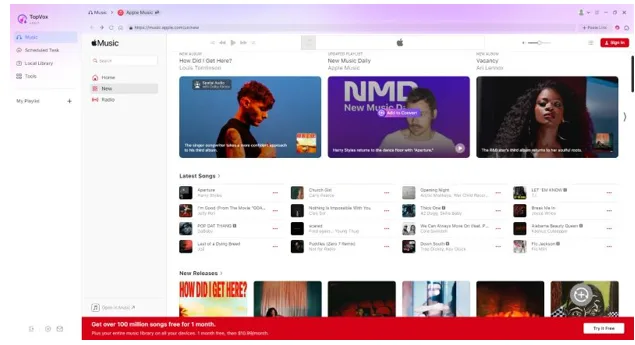
TopVox All Music Converter is the most feature-rich and stable Apple Music to MP3 tool in this test. It allows you to save singles, albums, playlists, and audiobooks from various mainstream streaming platforms. Unlike traditional conversion software, TopVox utilizes hardware acceleration, enabling batch downloads at up to 35 times the normal speed. Users can export Apple Music tracks in lossless format. Its clean and intuitive interface, along with useful additional tools, makes it suitable for both ordinary music listeners and enthusiasts who collect many songs.
Features
- Built-in Apple Music web player, no iTunes installation required.
- Hardware acceleration, up to 35× faster batch conversion speed.
- Various output formats like MP3, AAC, WAV, and FLAC.
- Automatically preserve full ID3 tags.
- One-click batch download for full albums and playlists.
- Integrated music player, downloader, and converter in one program.
- Clean, ad-free user interface with extra advanced tools.
- High conversion success rate.
- Supports multiple streaming platforms besides Apple Music.
Pros
- No dependency on iTunes, easier setup for new users
- High batch speed, great for large music collections
- Library management is convenient.
- No pop-up ads inside the software
- Stable performance with a high success rate
Cons
- Desktop-only, no iOS or Android mobile app
- Free trial limits conversion to the first 3 minutes of each track
- Full functionality requires a paid license
User Feedback
I have been trying to export the songs from Apple Music to use with old car stereos and MP3 players. I used TopVox to download a playlist with 42 songs – it took 8 minutes and 12 seconds, and the download was successful without any errors. I checked all the information about the songs, including the artists, album names, and cover images – and everything was complete. The MP3 files exported at 320kbps worked fine when played through headphones. I also tested the FLAC output, and it took 14 minutes and 47 seconds. Honestly, MP3 is enough for me.
NoteBurner Apple Music Converter
NoteBurner Apple Music Converter is a highly reliable audio conversion tool for Apple Music. The software can perform batch conversions up to 10 times, and it can handle high-resolution lossless files with a resolution of 24bit/192kHz. It also includes additional tools such as a label editor and CD burning capabilities. It can automatically organize files by artist or album, making it suitable for users who need to organize their local music libraries.
Pros
- Good at handling AAX audiobooks and old iTunes M4P files.
- Lossless output for audiophiles.
- Handy extra tools for library management and CD burning.
- Clean and beginner-friendly interface.
Cons
- The max speed is only 10×
- Only the first 1 minute of each track can be exported.
Author Note
NoteBurner delivers excellent output audio quality with solid performance, but its 10× batch conversion takes much longer for large playlists. What’s more, its strict trial limitation makes it hard for users to tell whether this tool truly fits your workflow before purchasing.
AppleMusicMP3
AppleMusicMP3 (aaplmusicdownloader.com) is an online Apple Music download tool that can be accessed directly on computers or mobile phones via a web page. It allows users to paste links to Apple Music singles, albums, and playlists, and it can export files in MP3 and M4A formats. The download speed can reach up to 320 kbps. It also supports batch ZIP downloads, as well as extracting basic cover art and track information. It’s suitable for individuals who need to download a small number of songs temporarily.
Testing Experience
The operation is very simple – just copy and paste the link to download the songs. However, the process often fails and is interrupted frequently. I noticed that the quality of the downloads is unstable. Although they are labeled as 320kbps, in reality, they are only 256kbps or even lower. Using the ZIP file for bulk downloading of the entire playlist requires payment, and it’s impossible to avoid ads and pop-up windows during the process. Therefore, this Apple Music converter is not suitable for long-term use.
APLMate
As an online Apple Music downloader, PLMate can convert Apple Music to MP3 format with a simple and intuitive interface, making it easy for beginners to use. Most songs can be exported within a few seconds. However, the audio quality turns out exactly as you wish – it’s just a way of increasing the sound quality using low-bitrate data, so lossless downloads are not possible.
There is no option to download all songs at once. You have to click on each song individually. The website also contains ads, and the file names generated during export carry the site’s watermark tags. Therefore, it’s not suitable for handling large playlists or music library organization.
am-dl
Unlike similar Apple Music downloader tools that are filled with ads, AM-DL focuses on a clean user experience with no pop-ups or ads at all. In addition to analyzing singles and albums, it can also analyze Apple Music videos and radio program links. It supports lossless 256kbps AAC and ALAC, ideal for users who have requirements for sound quality.
The tool can automatically extract LRC lyrics, high-definition cover images, and complete ID3 tags. It also allows customization of file naming rules and automatic archiving into ZIP files based on albums.
Limitations
By default, the file is downloaded in M4A format and does not support many customized output parameters, like bitrate or sampling rate. After pasting a link, the download will start automatically. Songs can only be saved manually one by one, and the process relies heavily on online servers. Download failures are likely to occur due to network fluctuations.
aaplmusic.com
This is an online Apple Music downloader focused on MP3 exports. It claims to convert Apple Music songs, albums, and playlists to MP3, with three selectable bitrates: 320kbps, 256kbps, and 192kbps. It supports one-click ZIP packaging, delivers ultra-HD cover art and full ID3 tags.
Pros
- Flexible quality selection.
- 30-second preview available before downloading.
- No subscription required.
Cons
- MP3-only, no lossless formats provided.
- The advertised 320kbps bitrate may be inflated.
- Can’t sync lyrics and lacks advanced options like an ID3 editor.
Conclusion
The tool choice ultimately depends on your usage habits, audio quality requirements, and the context in which you will use it. If you often work with large playlists and prefer stable and high-quality Apple Music conversion, a desktop application like TopVox All Music Converter would be a more suitable option. Online tools offer convenience for temporarily downloading a small number of songs. No matter which tool you choose, the converted files should only be used for personal offline enjoyment. Please do not use them for commercial purposes, redistribution, or sharing, and ensure that you comply with relevant copyright regulations.