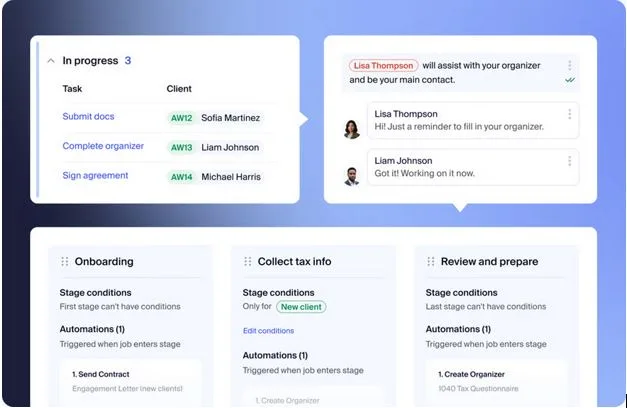
Top Practice Management Software for Accounting Firms: Guide for 2026
If you’re being honest, the “Monday status meeting” isn’t really about status.
It’s a workaround.
It’s the moment the team rebuilds the week from scraps: a few email threads, someone’s task list, a half-updated board, and the one person who “just knows” what’s urgent. And when that person is out? Things get… creative.
That’s why practice management software is a serious 2026 conversation. Most firms aren’t shopping because they’re bored. They’re shopping because the same problems keep showing up: work gets stuck, handoffs get fuzzy, and client communication lives in too many places.
Let’s break this down in a way that actually helps you shortlist tools, not just collect demo bookmarks.
The “Patchwork Stack” Isn’t Just Messy – It’s Expensive
Most firms didn’t intentionally build a chaotic tech stack. It happens the normal way: one good tool at a time.
You add e-signatures because printing is painful. A scheduler because “what time works?” emails are a time sink. Cloud storage because attachments vanish. Then a CRM. Then invoicing. Then a project board. Then some kind of form or intake tool.
Individually, those tools can be solid. The problem is the seams between them.
The seams are where time disappears: copying info from one system to another, hunting for the latest client answer, checking whether the reviewer already saw the update, trying to figure out which “final” PDF is actually final. It’s not hard work, but it’s constant work—and it adds up.
Clients feel the seams too, even if they don’t know what they’re called. They just know they’ve been asked for the same document twice, or they aren’t sure where to upload something, or their message got buried somewhere between email and the portal.
So the question in 2026 isn’t really “Which tool has the most features?” It’s: Which tool reduces confusion on a normal Wednesday?
Don’t Start With Demos. Start With How Work Moves in Your Firm.
A clean demo can be dangerous. If you go in without a clear idea of what you need, you’ll pick the prettiest interface, and only later realize your workflow doesn’t fit it.
When I’m helping someone think this through, I focus on a few practical realities:
The first is workflow control. Not the marketing version of workflow – real workflow. Can the system break a service into stages, assign responsibility, and show where work is sitting without someone babysitting it? If the answer is “kind of” or “only if you update it manually,” you’re buying a nicer view of the same bottleneck.
Next is client-side work. Because this is where you quietly win back hours.
A tool can be great internally and still create chaos externally. What matters is whether requests, uploads, signatures, and messages stay connected to the actual job. If they don’t, your team will still do the same follow-ups, just with a portal layered on top.
Then there’s visibility – especially if you’re an owner or manager. On a busy day, you should be able to answer these questions fast:
- What’s overdue?
- What’s waiting on a client?
- What’s waiting on review?
- What’s been sitting too long in one stage?
If that takes five clicks and an export, people will go back to meetings and Slack pings. It’s not because they love meetings. It’s because they need clarity.
One more thing that matters more than vendors admit: handoffs. If your team still has to retype the same details in two places (or reconcile “the spreadsheet” with “the system”), you’re paying for the software with your time.
A Better Way to Shortlist: Pick the Kind of Tool You Actually Need
People ask for “the best practice management software,” but that’s like asking for the best shoes. It depends where you’re walking.
Some firms are stitching tools together. They want fewer apps, fewer logins, fewer “Where did that file go?” moments. For those firms, an all-in-one platform usually makes sense: workflow, documents, client communication, billing, all under one roof.
That’s why tools like TaxDome often come up early in the conversation. Canopy is also commonly evaluated in that “put more of the firm in one place” category. And Karbon shows up a lot when firms care deeply about managing work across a team and keeping accountability tight.
Other firms have a different priority: they’re less focused on consolidation and more focused on internal coordination. If the real pain is handoffs – prep to review, review to partner, partner to client, then workflow-first tools can be a strong match. Just don’t assume “good workflow” automatically means “good client experience.” You have to test both.
And yes, some firms can run fine on general project tools, especially if they’re small and work is straightforward. That approach can be totally reasonable if you’re honest about the tradeoff: you’ll still need separate tools for documents, signatures, billing, and secure messaging. If your team already feels overwhelmed by too many apps, this usually becomes a stepping stone, not the long-term home.
How to Demo Like You Actually Want the Truth
Most demos show the “happy path.” Perfect intake. Perfect client response. Clean handoff. No weird exceptions.
Your firm does not live on the happy path.
So here’s the move: ask the vendor to walk through a real job lifecycle the way you run it – intake, requests, prep, review, signatures, invoicing. Watch closely for the moment they stop saying “the system does X” and start saying “and then you would…”
That’s where the manual work is hiding.
Documents are another place vendors love to gloss over. When a client uploads something, where does it land? How does the team get notified? What prevents duplicates and wrong-version errors?
If the solution is “someone checks the folder” or “someone checks email,” you’re not solving the problem – you’re just relocating it.
And finally, ask the question that predicts whether meetings will go away:
As the owner, what can I see in under a minute without exporting anything?
Overdue work, jobs waiting on clients, jobs stuck in review, jobs sitting too long. If that’s hard to see, your team will keep relying on meetings to recreate visibility.
Implementation Reality: The Fastest Way to Fail Is Running Two Systems
This is where a lot of rollouts die – not because the tool is bad, but because the firm tries to change everything at once.
They migrate everything, keep the old tracker “just in case,” and now they have two sources of truth. One gets updated sometimes. The other gets updated when someone remembers. Then trust drops, and the tool becomes “that thing we’re supposed to use.”
A smoother rollout starts with one repeatable workflow that causes stress: monthly bookkeeping close, 1040 intake, payroll – whatever hits your firm every week and creates the most follow-up.
Build that workflow. Train the team based on roles (not everyone needs to know everything). Run it until it feels stable. Then expand.
Here’s my strong opinion: once a workflow is live, retire the spreadsheet for that workflow. Keeping it “just in case” turns into double-entry, resentment, and eventually abandonment.
The Takeaway
Practice management software in 2026 isn’t about feature collecting. It’s about reducing the daily friction that makes firms feel busy even when they’re doing good work.
If you want a decision filter that cuts through the noise, use this:
Where does work get stuck in your firm, and which platform makes that bottleneck obvious the moment it happens?