Using a Fancy Font Generator: The Mechanics of Unicode Text
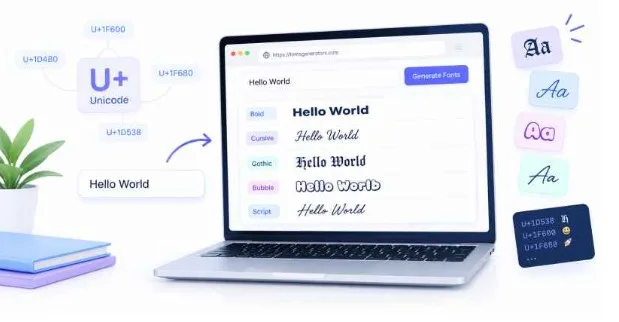
A fancy font generator creates stylized text by replacing standard keyboard characters with alternative symbols from the international Unicode standard. When you type text into one of these tools, it does not actually apply a font file like a Word document does. Instead, it instantly swaps your basic letters for obscure mathematical symbols, historical scripts, and regional alphabets that look like stylized English.
Here is the thing about the internet. We all want our words to stand out, whether we are building a personal brand on Instagram or setting up a distinct profile name on Discord. If you copy a sentence from a Microsoft Word document styled in custom calligraphy, the formatting disappears the moment you paste it into a Twitter bio. It reverts back to the platform’s default layout. This happens because web apps strip away font styling to maintain a consistent look across their pages.
But you have likely seen profiles that somehow bypass this rule. You might see a username wrapped in elegant cursive, bold blocks, or medieval gothic lettering. They did not hack the platform. They just used a specialized online text styling utility to change the raw identity of the characters themselves.
What is a fancy font generator?
A fancy font generator is a web-based tool that translates standard ASCII text into a visual mimicry of different font styles using the Unicode system. If you type the word “Hello” into a basic web input, the tool does not generate a font file. It outputs an entirely different sequence of digital characters.
Let us look at a real example. When you type the letter “A” on your keyboard, your computer processes the number 65. If you use a tool like Fonts Generator X, it might swap that number 65 for the number 119964. To your computer, 119964 represents a specific mathematical script capital letter. To your eyes, it just looks like an elegant, cursive letter “A”.
This conversion happens instantly. The generator contains a map of the alphabet for dozens of different styles. When you paste your text into the box, the system runs a simple substitution loop. It replaces every standard letter with its visual double from a completely different corner of the digital universe.
How does an online text styling utility manipulate Unicode?
To understand why this works, we have to look under the hood of modern computing. Before the 1990s, computers used different systems to read text depending on where they were built. A machine in Tokyo could not read a file created in Chicago without turning the text into a garbled mess of random symbols.
To fix this chaos, tech companies created the Unicode Consortium. Their goal was simple: assign a unique number to every single character, symbol, and punctuation mark across every language on Earth. Today, Unicode tracks over 150,000 characters. It includes everything from ancient Egyptian hieroglyphs to modern emojis.
The secret of character mapping
Within this massive library of symbols, there are hidden pockets of text meant for specific academic and technical industries. This is where the magic happens.
In 2001, Unicode version 3.1 added a massive block of mathematical alphanumeric symbols. Scientists and mathematicians needed a way to use bold, italic, script, and double-struck letters inside complex physics equations without changing the font of their entire research paper.
A fancy font generator exploits these academic symbols. It takes your standard text and maps it directly onto these mathematical character blocks.
Why your browser thinks a mathematical symbol is a letter
When you paste these symbols into your TikTok bio, the social network does not see custom styling. It sees raw data.
Because the platform is built to read Unicode, it looks at the numbers you pasted and searches its system font to find the matching graphic. If the system font includes those mathematical symbols, it draws them on the screen. The app thinks you are writing a math equation. You know you are just making your profile look interesting.
Fonts Generator X vs. traditional typography files
It helps to understand the difference between these copied symbols and actual font files like OpenType (.otf) or TrueType (.ttf).
| Feature | Unicode Symbols (Fonts Generator X) | Traditional Font Files (.ttf / .otf) |
| How it works | Changes the character code | Changes the visual skin of standard codes |
| Portability | Copy and paste anywhere on the web | Must be installed on the local device |
| File Size | Zero additional data weight | Ranges from 50 KB to several megabytes |
| System Support | Relies on built-in browser rendering | Requires software integration (Adobe, Word) |
| Searchability | Invisible to standard keyword searches | Fully searchable by search engines |
When a graphic designer sets up a website, they might spend $50 on a commercial font license. They load that font file onto a server so every visitor’s browser can download it and display the text correctly. If the server fails to load that file, the text drops back to a generic style like Arial.
A Unicode generator bypasses that whole infrastructure. The style is baked into the character itself. It is light, it requires zero loading time, and it travels with the text wherever you paste it.
Why do some devices show empty boxes or question marks?
Have you ever looked at a friend’s social media profile and seen a row of blank white rectangles instead of words? In the tech world, we call those boxes “tofu.”
This happens because of a breakdown in system compatibility. Even though Unicode defines what every number means, your specific phone or computer still needs a font file installed that contains the actual drawing for that number.
If you use an older Android phone running software from 2018, its internal library might not know what to do with a rare mathematical character variant added in a recent Unicode update. When the phone hits a number it does not recognize, it panics. It draws an empty square or a question mark inside a diamond to tell you that something is missing.
The hidden cost of stylized text online
Using an online text styling utility is an easy way to customize your digital space, but it comes with significant real-world drawbacks. Most people use these tools purely for aesthetics without realizing they are breaking parts of the web for other users.
Accessibility barriers for screen readers
This is the biggest issue by far. Visually impaired users rely on software called screen readers to navigate the internet. These programs read the text on a screen aloud to the user.
When a screen reader encounters standard text, it reads the words naturally. But when it hits a string of mathematical Unicode symbols, it reads the literal names of those characters.
Imagine you style your profile name to say “Mike” using a cursive generator. A screen reader will not say “Mike.” It will read it aloud as: “Mathematical Bold Script Capital M, Mathematical Bold Script Small I, Mathematical Bold Script Small K, Mathematical Bold Script Small E.”
It turns a simple name into an annoying, unreadable string of academic jargon. For someone trying to browse your page, it is completely frustrating.
Searchability and indexing issues
Search engines like Google are built to read standard text data. If you run a local bakery in Chicago and you style your business name as 𝕭𝖆𝖐𝖊𝖗𝖞 using a gothic font style, you are effectively hiding your business from search results.
When a customer searches for “Bakery near me,” Google looks for the standard letters B-a-k-e-r-y. It does not recognize the gothic math symbols as those letters. Your page will completely miss out on search traffic because the algorithms cannot read your stylized title.
Best practices for using stylized text responsibly
You do not need to abandon these tools completely. You just need to use them in the right context.
Keep your stylized characters limited to decorative flourishes rather than critical data. Use them for a fun phrase in your Instagram caption, a divider line in a blog post, or a gaming clan tag.
Never use them for your main account username, your email address, your business category, or essential links. Keep your core identity written in standard text so your profile remains searchable, stable across old phones, and accessible to everyone.
FAQ Section
Why does my text turn into blocks when I paste it into a game?
This occurs because the game’s engine or built-in font library does not support advanced Unicode characters. When the game encounters a character code it cannot find in its font asset file, it renders a blank rectangle or placeholder symbol instead of the styled text.
Can I use a fancy font generator for my website’s main menu?
You should avoid using Unicode generators for primary site navigation or headings. Doing so breaks your website’s SEO ranking because search engine crawlers cannot index the words correctly, and it prevents screen readers from helping visually impaired visitors use your site.
Is copy-and-paste text safe to use on major platforms like LinkedIn?
Yes, it is safe in terms of account security, as it uses standard text data that platforms naturally allow. However, using heavy text styling on professional platforms like LinkedIn can make your posts look informal and may reduce your visibility in internal platform searches.
Do fancy font tools require you to download software?
No, modern utilities work entirely inside your web browser by utilizing simple JavaScript conversion scripts. You paste your text into the site, the browser changes the character codes, and you copy the output without ever downloading or installing files.
Conclusion
The takeaway here is that text generators do not actually change your font; they change your literal letters into rare mathematical symbols. Use these stylized characters sparingly for light decorations on social profiles, but keep your important business details and usernames in standard text so your audience can always find and read your work.