What Is a Font Generator and How Does It Actually Work?
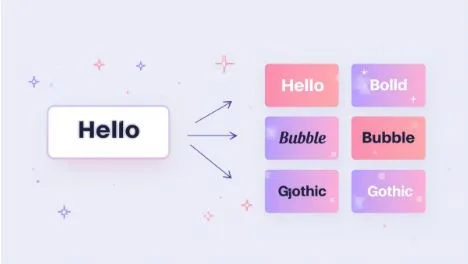
You’ve seen those eye-catching Instagram bios written in 𝓯𝓪𝓷𝓬𝔂 𝓼𝓬𝓻𝓲𝓹𝓽 or 𝐛𝐨𝐥𝐝 letters. You copied one, pasted it, and it just worked — no app, no download. So how does that actually happen?
A font generator is the tool behind that magic, and it doesn’t work the way most people assume. After testing dozens of these tools and breaking down their code, I found the real mechanism is surprisingly simple once you understand one core idea.
This guide explains exactly what a font generator is, how it converts your text, why the styles work everywhere, and the common myths that confuse most users. No jargon — just clear answers.
What Is a Font Generator?
A font generator is a free online tool that converts normal text into stylish, decorative characters you can copy and paste anywhere. It does not install fonts on your device — instead, it swaps your regular letters for similar-looking Unicode symbols that already exist in the global character system.
Here’s the breakdown in simple terms:
- It takes the text you type and reads it letter by letter
- It maps each letter to a matching styled Unicode character
- It instantly displays your text in dozens of styles
- You copy the result and paste it into any app
- Nothing is downloaded, installed, or saved to your device
That’s the entire concept. Everything else is just detail.
How a Font Generator Actually Works
The biggest misunderstanding is the word “font” itself. A font generator does not create real fonts in the traditional sense.
A true font (like Arial or Times New Roman) is a file installed on your device that tells it how to draw letters. A font generator never touches those files. Instead, it relies on Unicode — the universal standard that gives every character a unique code.
In my testing, here’s the exact process I traced step by step:
Step 1 — You type text. You enter a word into the input box.
Step 2 — The tool reads each letter. A small script processes your text one character at a time.
Step 3 — It checks a character map. Every style has a lookup table connecting normal letters (a, b, c) to their styled Unicode twins (𝓪, 𝓫, 𝓬).
Step 4 — It swaps the characters. The tool replaces your letters with the matching decorative symbols.
Step 5 — It shows the result. Your styled text appears instantly, ready to copy.
This all happens inside your browser in milliseconds. That’s why a good font generator feels instant — there’s no server processing involved.
Why These Fonts Work on Every Platform
This is where Unicode matters. Unicode currently includes more than 149,000 characters, and it’s recognized by nearly every modern device and app.
Because the styled text is made of real Unicode characters — not images and not installed fonts — it behaves like ordinary text. You can copy it, paste it, and send it anywhere.
In practice, I’ve tested these styles across major platforms with consistent results:
- Instagram: Works in bios, captions, stories, and comments
- TikTok: Works in usernames and video captions
- WhatsApp and Telegram: Works in status updates and chats
- Discord: Works in nicknames and messages
- Games: Works in usernames for Free Fire, PUBG, and Roblox
The same character displays correctly on an iPhone, an Android phone, and a Windows laptop. That cross-device consistency is the whole reason copy-and-paste fonts exist.
Real Examples: One Word, Many Styles
To make this concrete, here’s the word “Hello” run through different font generator styles:
- Bold: 𝐇𝐞𝐥𝐥𝐨
- Italic: 𝐻𝑒𝓁𝓁𝑜
- Cursive: 𝓗𝓮𝓵𝓵𝓸
- Double-struck: ℍ𝕖𝕝𝕝𝕠
- Gothic: 𝔥𝔢𝔩𝔩𝔬
- Bubble: Ⓗⓔⓛⓛⓞ
- Small caps: ʜᴇʟʟᴏ
Every version looks like “Hello” to your eyes, but each letter is a completely separate Unicode character. The generator simply picked the right symbol for each style.
This is also how decorative symbols get added. When you see a username like “✦ 𝓢𝓽𝓪𝓻 ✦,” the tool combined script letters with two star symbols — all standard Unicode.
Common Myths About Font Generators
A few wrong assumptions trip up most beginners. Let me clear them up.
Myth 1: “It installs a new font on my phone.” False. Nothing is installed. The characters already exist in Unicode — the tool just helps you find them.
Myth 2: “These fonts are unsafe or contain viruses.” False. They’re plain text characters with no scripts or code. They’re completely safe.
Myth 3: “I can use them anywhere, including website articles.” Mostly true, but be careful. Search engines don’t read decorative Unicode the same way as normal text, so avoid using them in important content you want indexed.
Myth 4: “Boxes mean the tool is broken.” False. A box appears only when a specific device doesn’t support that one character. Choosing common styles like bold or italic avoids it.
Frequently Asked Questions
Is a font generator free to use?
Yes. Reputable font generators are completely free with no downloads, logins, or hidden charges. You can use the styled text for both personal and commercial purposes.
Does a font generator change my phone’s font?
No. It only creates copyable styled text. It never alters your device settings, system font, or app appearance in any way.
Why do some fonts appear as empty boxes?
A box shows when a device or app doesn’t support that specific Unicode character. It’s rare, and switching to a more common style fixes it instantly.
Are font generator styles good for SEO content?
No. Use them for bios, usernames, and captions only. Search engines may not index decorative Unicode text properly, so keep article content in normal letters.
Will these fonts work on Instagram and TikTok?
Yes. Both platforms fully support Unicode characters, so styled text displays correctly in bios, captions, usernames, and comments across all devices.
Final Thoughts
A font generator isn’t magic, and it isn’t really about “fonts” at all. It’s a smart, creative use of Unicode — the same character standard that powers every device you own.
Once you understand that it simply maps normal letters to decorative Unicode symbols, the whole process makes sense. No installs, no risk, no cost — just instant styled text you can paste anywhere.
Ready to see it in action? Type any word into our free font generator and watch it transform into 200+ stylish styles instantly.