What Is an Infinite Canvas? The Future of Digital Workspaces
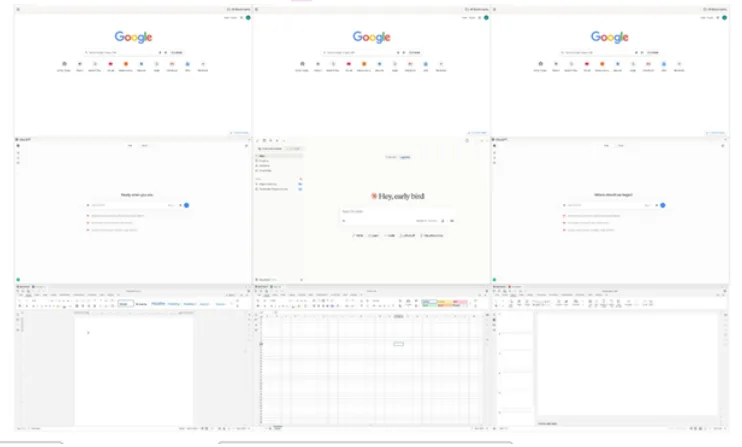
An infinite-canvas workspace can keep many live applications visible in one spatial layout instead of hiding them behind tabs.
For decades, the desktop computer has been organized around the same basic idea: open an application, place its window on a rectangular screen, and switch away when you need something else. That model works, but modern work routinely outgrows it. A research task may involve a browser, a spreadsheet, a chat thread, a PDF, an AI assistant, notes, and a presentation at the same time. The screen stays the same size while the number of things competing for attention keeps growing.
An infinite canvas takes a different approach. Instead of treating the edge of the monitor as the edge of the workspace, it gives you a large, zoomable surface that can hold far more than you can see at once. You pan to move across the workspace, zoom out to understand the big picture, and zoom in to work on a specific area. The concept is familiar to anyone who has used a design canvas or digital whiteboard, but its implications become much bigger when the objects on the canvas are not just shapes and sticky notes, but live applications and files.
How an infinite canvas works
At its simplest, an infinite canvas is a coordinate system with no meaningful edge. Objects live at positions on that surface, and the user controls the camera rather than constantly rearranging everything to fit inside one screen. A project can occupy one region, reference material another, and a set of tools a third. The layout itself becomes part of the information architecture.
That spatial model reduces one of the quiet costs of conventional computing: repeated context switching. On a normal desktop, the user remembers that a budget is in one window, an email is buried behind two others, and a research tab is somewhere in a browser group. On a canvas, the user can remember that the budget is to the left of the planning notes and the research sits above the presentation. Location becomes a memory cue.
Infinite canvas vs. digital whiteboard
The phrase “infinite canvas” is often associated with online whiteboards. Products such as Miro use a large zoomable board for diagrams, sticky notes, workshops, and visual planning. That is useful, but a whiteboard and an infinite-canvas operating environment are not quite the same thing.
A whiteboard usually contains representations of work: cards, screenshots, text boxes, diagrams, embedded links, and exports. An operating canvas can contain the work itself. A browser can remain a browser. A spreadsheet can stay editable. A document, chat app, terminal, file manager, or AI tool can remain live while occupying a place in the larger workspace. The distinction matters because the canvas stops being a planning layer that sits beside the computer and becomes the place where the computer is organized.
Why teams are interested in canvas-based work
The model becomes even more interesting when the canvas is shared. Traditional collaboration often means sharing a document, sending a link, or broadcasting a screen. Those methods give collaborators access to a particular artifact, but they do not necessarily preserve the surrounding context. A teammate may see the spreadsheet but not the research, notes, discussion, and source material that explain why the spreadsheet looks the way it does.
A shared canvas can preserve that context. Everyone can enter the same workspace, see the same arrangement, and understand how the pieces relate. For a product team, that might mean customer feedback beside a roadmap, mockups next to engineering tickets, and a live dashboard beside meeting notes. For a student, it might mean sources, class notes, drafts, and a presentation in one visual study area.
From documents to spatial computing
The deeper change is not simply “more room.” Infinite canvases encourage people to organize work spatially instead of hierarchically. Folders and tabs force information into lists and trees. A canvas can show relationships directly. Nearby items feel related; distant areas can represent different projects or phases; size and position can indicate importance without requiring another database field.
This is why the idea has moved beyond design software. Large monitors, ultrawide displays, interactive walls, remote work, and AI tools all increase the number of simultaneous contexts people want to manage. A workspace that can zoom from a portfolio view down to a single cell in a spreadsheet is a natural response to that pressure.
An infinite canvas for the whole computer
Novastart applies the infinite-canvas idea to the desktop itself. Its model places real application windows on a zoomable canvas, lets users create multiple saved canvases, and is designed so teams and AI agents can work in the same visual environment. Instead of asking users to rebuild their workflow inside a new whiteboard, the goal is to keep familiar apps and give them a much larger spatial home.
That approach is especially compelling for work that is naturally multi-source: research, deal analysis, operations, travel planning, creative direction, software development, and any project where the relationship between tools matters as much as the tools themselves.
What to look for in infinite-canvas software
Not every canvas product solves the same problem. Before choosing one, ask what actually lives on the canvas. Are the objects static notes, embedded previews, or fully interactive applications? Can you create separate canvases for different projects? Does the layout persist when you return? Can other people collaborate in real time? Can permissions hide sensitive areas? How smoothly does the software perform when dozens of objects are visible?
The best infinite-canvas experience should feel less like managing a giant board and more like having room to think. The interface should disappear when you focus on a task and reappear as a map when you zoom out. That balance—detail when you need it, context when you want it—is why the infinite canvas is becoming one of the most interesting alternatives to the traditional desktop.