When AI Image Editing Helps—and When Manual Control Still Matters
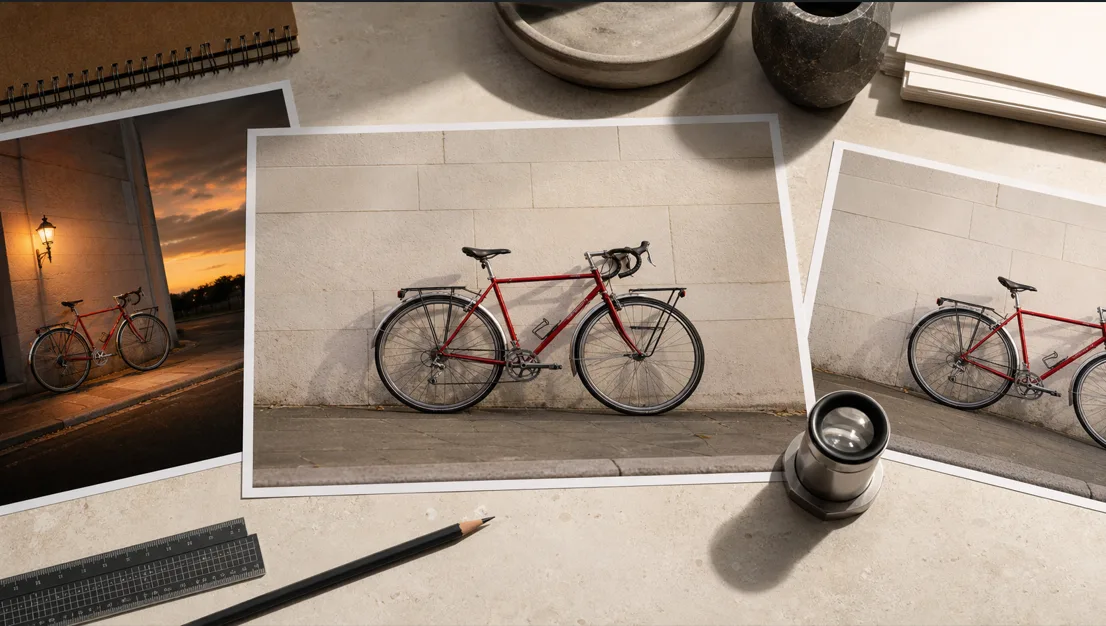
Image editing decisions used to begin with a fairly simple question: who has the time and skill to make the change? Generative tools have added another option, but they have not made every editing task interchangeable. A prompt may be excellent for exploring a new background and a poor choice for correcting a small logo. A traditional editor may offer precise control while adding unnecessary effort to a rough concept that has not been approved yet.
The useful question is not whether AI editing is better than manual editing. It is what kind of control the image needs at its current stage.
Consider a small travel company preparing a seasonal feature. It already has an approved photograph of a red touring bicycle against a pale stone wall. The team wants to test a warmer evening atmosphere, remove a distracting object, adapt the crop, and keep the bicycle recognizable. Those requests sound like one job, but they involve several different levels of creative freedom and precision. Choosing the right method for each level makes the work easier to direct and easier to review.
Start with the decision, not the software
Before opening any editor, describe the change in one sentence. If the sentence is about a direction—“make this feel like a quiet summer evening”—the team needs room to explore. If it names an exact correction—“keep every part of the bicycle unchanged and remove the bottle near the rear wheel”—the team needs control over a defined area.
It also helps to identify what a reviewer will judge. A concept-stage image may only need to communicate mood and composition. A final campaign image may need accurate product details, clean edges, a specific crop, and space for page copy. The closer an asset is to publication, the less useful uncontrolled variation becomes.
This distinction prevents a common source of wasted effort: using a precision workflow before the creative direction is settled, or using an exploratory workflow after exact details have already been approved.
Use AI when the brief describes a direction
AI-assisted editing is most useful when the requested change can be described clearly but does not have only one correct visual answer. Background changes, lighting ideas, color moods, scene restyling, and early campaign concepts all leave room for interpretation. Producing several plausible directions can help a team decide what it actually wants before anyone spends time refining small details.
For the bicycle photograph, the team might ask for softer evening light, a less cluttered wall, and a restrained travel-editorial mood. An AI image editor can use plain-language instructions to explore those broader changes while giving reviewers concrete results to discuss. The value is not that every result is ready to publish. It is that an abstract request becomes visible enough to compare.
A useful AI editing brief should still set boundaries. Name the subject that must remain recognizable, the element that may change, the intended placement, and the main reasons a result should be rejected. “Make it cinematic” leaves nearly every choice open. “Keep the red bicycle, camera angle, and stone wall; shift the light toward early evening; remove street clutter; preserve open space above the handlebars” gives the system and the reviewer a shared target.
Exploration should also stop once it has answered the creative question. Generating more directions after the team has selected one can reopen decisions that were already settled.
Use image-to-image when the source is worth preserving
Sometimes the source photograph is not merely inspiration. It contains the composition, identity, or visual evidence that makes the image useful. In that situation, starting again from a text description creates unnecessary distance from what the team has already approved.
An AI image-to-image workflow is a better fit when the existing image should guide the result while a prompt defines the allowed change. The bicycle’s frame, color, viewing angle, and relationship to the wall can remain the reference, while the team explores a different atmosphere or cleaner surroundings.
The prompt should describe both sides of the edit: what changes and what stays. This is more reliable than listing only desired additions. It also creates a practical review standard. A result can have attractive lighting and still fail if the bicycle geometry, wheel shape, or camera position drifts too far from the source.
Reference-guided editing is not a guarantee of perfect continuity. It is a way to make continuity part of the request rather than leaving the entire image open to reinterpretation.
Keep manual control for exactness
Manual editing remains the stronger choice when a change has one correct answer or when a small error could alter meaning. Exact typography, logos, packaging details, interface screenshots, technical diagrams, legal copy, and carefully defined brand colors all benefit from deterministic control.
The bicycle example has similar limits. A generated result might capture the right evening mood but produce an uneven spoke, change a reflector, soften a cable, or invent a small mechanical detail. Those may be minor visual defects, yet they become obvious in a high-resolution image or to someone familiar with the subject. A manual cleanup pass can correct the local issue without asking the entire scene to change again.
Cropping and export choices often belong here too. A designer can place the final image into its real article header, mobile card, or social frame and adjust it against the actual layout. That is more dependable than assuming a visually appealing master image will work in every destination.
Manual control is not a rejection of AI. It is the stage where selected ideas become exact deliverables.
Build a hybrid workflow around risk
A practical workflow can move from broad freedom to narrow control:
- Write the intended outcome and the publication placement.
- Mark the details that must remain unchanged.
- Use AI-assisted editing to explore changes that allow interpretation.
- Select one direction instead of combining every promising option.
- Compare the selected result with the original at full size.
- Repair exact details with conventional editing tools.
- Review the export inside the layout where it will appear.
The order matters. If the team manually perfects an image before the background and mood are approved, later exploration may discard that work. If it keeps regenerating after approval, each new version may introduce fresh details to inspect. Moving from flexible decisions to fixed decisions reduces both problems.
The amount of review should match the image’s role. A private mood board can tolerate imperfections that would be unacceptable in a product listing, news illustration, client presentation, or paid advertisement. Higher-stakes images need a clearer source trail, closer inspection, and an identifiable human approver.
Review the image as it will be published
AI-edited images should not be approved only at thumbnail size or inside the generation view. Export the candidate and inspect the subject edges, reflections, repeated patterns, shadows, perspective, and small functional details. Compare important regions directly with the source rather than relying on memory.
Then place the image into its destination. A crop can remove a critical part of the subject. A dark overlay can hide a defect on desktop but reveal it on mobile. Empty space intended for a headline may disappear at a narrower aspect ratio. An image is not finished simply because the central scene looks convincing.
The review should also consider context. Does the edit imply that a real place, event, or product looked different from how it actually appeared? Does the team have the right to use the source material? Would a reasonable audience need to know that the image was altered? These decisions depend on the publication and the purpose, so they should belong to the approval process rather than being left to the tool.
For the travel-company example, the final check is not “Does the evening version look better?” It is “Does this image preserve the approved bicycle, support the seasonal story, fit the intended layout, and avoid misleading the viewer?” That question is specific enough to guide a real decision.
The boundary can move during the job
The same image may need different methods at different moments. AI can help a team discover the atmosphere it wants. Reference-guided generation can carry the approved source into that direction. Manual editing can protect exact details and prepare the final export. None of those stages needs to claim the entire workflow.
The strongest editing process is therefore not the one that uses the newest tool at every step. It is the one that gives broad creative choices enough room early, then increases control as the image approaches publication. When teams choose the method according to the decision in front of them, they can explore without confusing exploration with finished work.