When Global News Needs a Short Video Draft, Start With the Reporting
A global news page can move from politics to markets, technology, weather, sport, entertainment, and public safety in the same hour. That range makes short video useful, but it also makes short video risky. A visual draft can help editors plan a story package. It should not become a shortcut around reporting, attribution, or verification.
News video has a different job from a social ad or a creator reel. It may need to explain what changed, where it happened, why readers should care, and which details remain uncertain. A polished-looking AI scene can be tempting, especially when the story is moving quickly. But polish is not evidence. In a newsroom or sponsored content desk, the safest role for a generated draft is previsualization: a way to test sequence, framing, pacing, and reader comprehension before final publication.
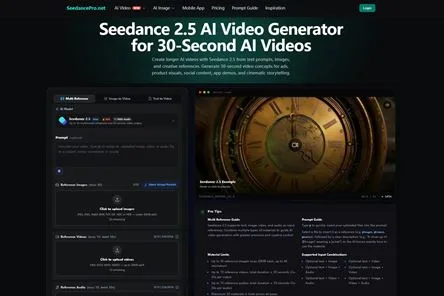
Used carefully, Seedance 2.5 can fit into that planning layer. The current Seedance 2.5 workflow describes browser-based generation with text, image, video, and audio references, up to 30-second clip settings, 480p and 720p output options, and reference limits such as up to 30 images, 10 videos, 10 audios, and 50 total materials across supported types. Editors should confirm live settings, costs, upload rules, and commercial-use terms inside the product before using a draft for a published article, branded post, or paid campaign.
Choose the Story Function First
A short video does not need to carry the whole article. In fact, it usually should not. The first decision is the editorial function of the clip.
For a technology story, the draft might show the order of a product update or policy change. For a business story, it might test how to move from a market headline to one simple explanatory chart. For a weather or public safety update, video may be the wrong format if the information is urgent, local, or changing minute by minute. For sports or entertainment, the draft might help plan a neutral recap graphic without pretending to show real match footage, backstage access, or a celebrity moment.
That decision should come before the prompt. If the goal is to explain context, the visual sequence should stay calm and simple. If the goal is to accompany a feature article, the draft can be more atmospheric. If the story depends on exact numbers, official statements, court filings, emergency instructions, or financial data, the final asset should keep those details editable outside the generated footage.
Label Sources Before Building the Brief
Newsrooms already understand that sources do not carry equal weight. The same discipline should apply before an AI video brief is written.
Official documents, verified screenshots, direct statements, court records, company filings, agency notices, and reporter-confirmed notes can support factual details. Social posts, demo clips, analyst commentary, rumors, and third-party summaries may provide context, but important claims should be checked before they enter captions or narration.
Dates matter too. A product page, market price, policy note, weather warning, API status, injury report, or event schedule can change after a story is drafted. If a video concept includes time-sensitive information, the final article team should recheck the fact immediately before publication and label the relevant date when needed.
Use References Without Importing Newsroom Risk
Reference materials can make a draft more specific, but they can also pull sensitive material into the wrong place. A newsroom may have access to field photos, internal notes, interview transcripts, police documents, medical details, unreleased product screenshots, agency briefings, or licensed images. Access inside an editorial system is not permission to upload those files to an external AI service.
The current Seedance 2.5 workflow states that real human faces cannot be used as image or video references. Editors should therefore avoid uploading photographs or footage showing identifiable people, even if the publication has permission to publish those materials elsewhere. Publication rights and platform eligibility are separate checks.
Safer planning references include original diagrams, abstract map shapes, publication-owned graphic templates, non-identifiable environments, simple charts prepared for the article, platform-supported synthetic or illustrated characters, and sanitized scene outlines containing no confidential or identifying information.
Do Not Present Synthetic Scenes as Reported Footage
A generated scene can look like a protest, factory floor, trading desk, hospital corridor, courtroom, stadium tunnel, storm-damaged street, or press conference. That does not make it documentation. If readers could mistake an illustrative scene for real footage, the caption or surrounding article should say clearly that it is illustrative.
This is especially important for disasters, public safety, health, conflict, crime, elections, finance, and legal stories. A synthetic image of a flooded road, a damaged building, a hospital ward, or a crowded checkpoint can create a false impression of what happened. For urgent or rapidly changing information, official sources and the live article should remain primary. A generated draft should not delay, replace, or visually reinterpret time-sensitive instructions.
Sports and entertainment coverage needs the same restraint. A draft should not invent game action, backstage scenes, celebrity reactions, award-show moments, or fan incidents. If real footage is needed, use licensed or verified material through the appropriate editorial process.
Keep Exact Words and Numbers Editable
Generated text inside video can be misspelled, distorted, or quietly wrong. That makes it a poor place for scores, casualty figures, stock prices, legal names, quotes, dates, statistics, URLs, medical terms, disclaimers, or public safety instructions.
The better workflow is simple: use the draft to reserve visual space for labels, lower thirds, headline cards, maps, and captions, then add the final wording during editing from verified source notes. If a chart is needed, build the chart from the article’s approved data rather than asking a video model to invent a graph.
For business and financial coverage, the distinction is not cosmetic. A generated market graphic can imply precision it does not have. Prices, forecasts, rankings, revenue figures, and investment claims should remain attributed unless independently verified. For health, legal, or safety-related stories, a qualified editor or subject-matter reviewer should check the final wording before publication.
Plan a Short Sequence Readers Can Actually Follow
A useful news video draft is not the one with the most motion. It is the one that helps a reader understand the article faster.
One structure is enough for many stories: open with the reader question, show one piece of context, introduce one verified visual aid, and close with space for an editor-added headline or source note. A technology update might use a simple before-and-after sequence. A business explainer might use a neutral timeline. A travel or culture story might use atmosphere and location context without pretending that the scene is live footage.
A practical Seedance 2.5 AI video workflow can help editors test that sequence before they commission final graphics, shoot footage, or hand the story to a social video team.
Review the Draft Like an Editor, Not a Viewer
A normal viewer may ask whether the clip looks smooth. An editor needs harder questions.
Could a reader mistake this scene for real footage? Are official details added from verified sources? Does the draft imply endorsement by a government agency, sports league, company, celebrity, university, hospital, or financial institution? Are logos, uniforms, badges, maps, and interface elements used only when rights and context allow it? Does the video leave enough room for accurate captions and source labels?
Editors should also check whether revisions changed nearby details. A small visual adjustment may affect motion, lighting, continuity, labels, or the way a scene is interpreted, so the whole draft should be reviewed again after each revision.
The Best Output May Be a Better Article Package
Sometimes the draft will show that the article needs a clearer lead, a simpler timeline, a better map, a static chart, or verified footage instead of generated video. That is not a failure. It is the point of testing early.
For a broad news site, the value of AI video planning is not that every story becomes a clip. The value is deciding which stories deserve motion, which details must stay in text, and which visuals need verification before readers see them.
Seedance 2.5 is most useful in this setting when it remains part of a larger editorial workflow. Reporting, source review, disclosure, rights checks, and human judgment still carry the story. The draft simply gives the team a visible way to shape the package before publication pressure makes every change harder.