Which AI Music Generator is Best? 2026’s Latest Features and Pricing Comparison Guide
In 2026, AI music generation technology has evolved from simple background music production tools into creative platforms capable of delivering professional-grade works. For music enthusiasts, short-video creators, content production teams, and novice users with limited budgets, choosing the right AI music tool is crucial.
This article provides a comparative review of three leading AI music generation tools on the market: MakeBestMusic, AIMusic.so, and iLoveSong.ai, to help you identify the solution best suited to your requirements.
| Dimensions | MakeBestMusic | AIMusic.so | iLoveSong.ai |
| Core Features | Text-to-Music, lyric generation, AI covers, voice cloning, MIDI, multi-track separation | Text-to-Music, AI Vocal Isolation, Sound Effect Generation, Single-Track Separation, Lyric Generation | AI Music Generation |
| Generation Efficiency and Quality | Finished in 1 minute, fast iteration with multiple versions, natural AI vocals, and precise MIDI adjustment supported. | Fast generation, but limited to single-track splitting, with average AI vocal and melody optimization. | Generated in two to three minutes, with single-track splitting limitations and average AI vocal and melody optimization. |
| Commercial Use & Pricing | All paid plans include commercial authorization. The annual plan is about 40% off, and the free version is available for trial. | Annual membership includes commercial use rights, while monthly/ free plans do not. | Intermediate and advanced plans include commercial use; terms for free/basic versions are ambiguous; free works will be removed after 30 days.
|
| Suitable for | Short-form video creators, independent musicians, brand teams, and complete beginners | Beginners, short-video creators, and users who need quick soundtracks or sound effects. | Musician, short-form video creator |
Evaluation Dimensions Explanation
Before diving into the detailed comparison, we first clarify the three core dimensions of this review, which are also critical in determining whether an AI music tool can truly improve creative efficiency:
- Functionality & Creative Freedom: Does the tool support text generation, lyric generation, and voice cloning? Can users fine-tune the music style, mood, and even specific instruments? Does it support AI vocals, or is it limited to instrumental music only?
- Generation Efficiency & Quality: How long does it take from inputting prompts to exporting the finished track? What is the audio quality? Are the emotion, breath control, and vocal transitions of the AI singing natural?
- Commercial Friendliness: Is the generated music royalty-free? Is there clear commercial licensing? Is the pricing structure friendly to users with limited budgets?
MakeBestMusic: The most comprehensive all-in-one AI music creation platform
Overall score:★★★★★(5/5)
If you’re looking for an all-in-one solution when searching for AI music generation tools, MakeBestMusic is currently one of the most comprehensive options available on the market.
From independent musicians and short-video creators to game developers and brand content teams, users of all kinds can fulfill their creative needs on a single platform. For musicians, it serves as an assistant that expands inspiration and boosts efficiency; for short-video creators, it acts as a scoring engine for high-frequency output; and for game and brand teams, it provides original music support with consistent styles and sustainable generation.
- Core Function Breakdown
MakeBestMusic’s text-to-music generation offers two creation modes catering to different user levels:
Simple Mode: Beginner-friendly, requiring only a textual description such as “Summer pop style featuring female vocals, with a light, upbeat rhythm and sunny feel”. The AI generates a complete song within seconds. Simple Mode also supports learning through reference music. You may preview sample compositions provided by MakeBestMusic, selecting preferred pieces as stylistic references to generate entirely original works with similar aesthetics. This proves exceptionally practical for short-form video creators lacking musical theory knowledge.
Custom Mode: Designed for creators with refined requirements, users may input complete lyric structures, precisely specify musical genres, emotional tones, and BPM rhythms, and even control parameters such as Weirdness and Style Influence via advanced options. Furthermore, Custom Mode incorporates an AI Lyrics feature specifically supporting creators lacking existing lyrics or whose inspiration remains unformed. Simply describe the desired lyrical feel in the input box, and the system will generate lyrics with a complete structure, natural and flowing phrasing, and content perfectly matched to the musical rhythm.
- Spilt Music
This is the most fundamental difference between MakeBestMusic and other tools. Many AI music tools only generate a single finished audio file. It may sound highly polished, but when you actually start creating content, you’ll find there is almost no room for further editing—the vocals are too prominent to lower, the drums lack punch but cannot be boosted individually, and you have no way to remove a certain melody.
With MakeBestMusic, however, you can directly use the Split Music feature to separate the generated mixed audio into independent tracks with one click, creating a complete multi-track project. Lead vocals, backing vocals, melodic instruments, drums, bass, atmospheric pads, and other elements are all separated, and each track can be downloaded and used individually.
Music is no longer an uneditable finished file, but a set of flexible audio materials that can be freely used. The same song can serve different purposes across various content scenarios: the full track helps build atmosphere for montages or emotional highlights; the instrumental-only version avoids vocal interference in narrative videos; and the isolated vocal track can be extracted for AI cover creations. One piece of work can naturally evolve into multiple versions, without repeated generation or extra material searching.
MakeBestMusic’s AI Voice Cover feature offers a diverse range of meticulously tuned preset voices, from sweet pop vocals and magnetic jazz tones to powerful rock vocals and rhythmically charged rap voices – catering to virtually any creative style. Operationally, MakeBestMusic’s AI Voice Cover follows an almost foolproof process: simply click to upload, or drag and drop the audio file requiring cover directly into the designated area; then select your desired vocal tone; finally, click the Cover button, and the system will automatically complete the voice replacement and generation. Without complex parameter settings or professional mixing expertise, you can achieve a high-quality cover piece, significantly lowering the creative threshold.
For creators looking to build their personal music brand, MakeBestMusic also offers a voice cloning feature. Simply upload 1–5 clips of your own voice (with a total duration of 40 seconds to 5 minutes), and the AI will analyze and learn your vocal characteristics to generate a highly similar voice. This means that even without professional recording equipment, independent musicians can use MakeBestMusic to feature their own voice in songs, achieving a personalized music production experience.
- MIDI Studio
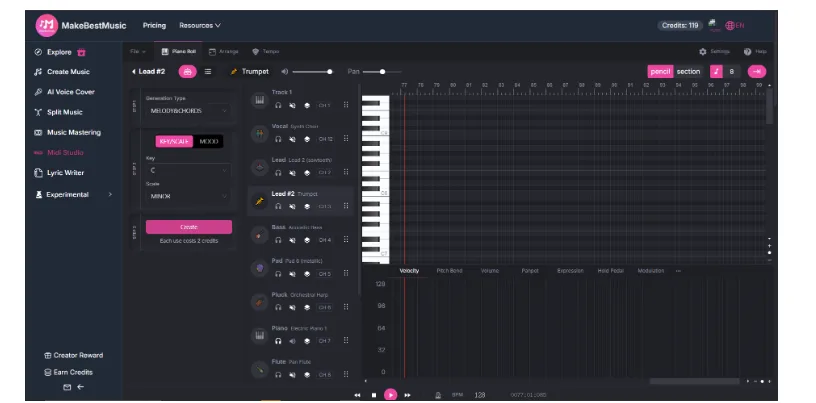
For more advanced users, MakeBestMusic also offers the MIDI Studio feature to meet sophisticated production needs. You can directly click the File button on the left side of the interface to upload existing MIDI files, then edit and rearrange them on the page, or create entirely new melodies or rhythm tracks from scratch. With its intuitive editing interface, you can freely adjust note timing, velocity, rhythm density, and pitch changes, allowing for finer control over the musical structure. Whether you’re fine-tuning melodic details or redesigning rhythmic progressions, MIDI Studio provides a flexible and free creative space for creators who want full control over their music.
- Price & Commercial Licensing
MakeBestMusic employs a tiered subscription model, offering particularly outstanding value for money:
| Proposal | Monthly Fee | Music Credits | Commercial Licence |
| Basic | $19.9/mon | 200/mon | ✅ |
| Standard | $39.9/mon | 600/mon | ✅ |
| Professional | $169.9/mon | Unlimited | ✅ |
The annual plan offers around a 40% discount, making it much more cost-effective than the monthly option. While the subscription fee may not seem low at first glance, MakeBestMusic integrates multiple powerful features—including AI music generation, voice cover, track separation, and lyric writing—essentially combining the capabilities of several tools into one, resulting in exceptional overall value.
The platform also provides a free version. Although the available credits are limited, all core functions can be tested directly, allowing users to fully evaluate the generation quality and workflow before subscribing, which greatly lowers the barrier for trial.
It is worth emphasising that all paid plans include full commercial licensing. Users retain complete copyright over generated music, enabling commercial monetisation across platforms such as YouTube, Spotify, and TikTok without copyright concerns.
- Target Audience
MakeBestMusic is highly suited to the following types of users:
- Short-video creators: Quickly generate custom BGM with vocals, standing out from repetitive free music libraries.
- Brand content teams: Produce batches of background music with consistent brand tone, reducing outsourcing costs.
- Professional musicians: Rapidly generate music in multiple styles with no copyright risks, and use voice cloning to cover any song with your own timbre.
- Novices with limited budgets: The free version is sufficient for initial exploration, with a clear and transparent upgrade path.
AIMusic.so: A beginner-friendly basic creation platform for fast music generation
Overall score:★★★★★(4/5)
AIMusic.so offers a suite of auxiliary tools centred around AI music generation, including text-to-song conversion, AI vocal separation, basic track splitting, AI lyric generation, and sound effect creation. These features are designed to assist creators in rapidly obtaining music and materials from text or lyrics. However, AIMusic.so’s functional depth and granular control remain relatively limited. Compared to more comprehensive platforms, it falls somewhat short in terms of high-degree creative freedom and professional music production workflows.
- Core Function Breakdown
AIMusic.so’s core functions are built around text-to-music, offering a variety of auxiliary tools to help creators quickly produce high-quality music works from text descriptions or lyrics.
- Music Generator
Users can input text prompts or custom lyrics, and the AI will convert them into complete songs or pure accompaniments while optimizing melodies and rhythms. This ensures the generated music is natural and coherent in both structure and emotional expression. This function can meet the demand for either vocal-included songs or pure background accompaniments.
- Vocal Remover
It provides fast vocal extraction or removal, allowing users to easily get pure accompaniment or independent vocal tracks. This is very practical for covers, mixing, secondary creation, and short video soundtracks, enabling flexible use in different scenarios.
- Stem Spiltter
It can split mixed audio into individual tracks, but only one track can be separated at a time, which is somewhat limited in operation. Even so, it still provides certain flexibility for post-editing and secondary creation.
- AI Lyrics Generator
It supports generating lyrics in two styles or versions, providing more inspirational options for songwriting and allowing creators to experiment with different emotions and expressions.
- Sound Effect Generator
Users can generate unique, royalty-free sound effects through a simple and intuitive interface, suitable for video editing, game development and podcast production, expanding possibilities for content creation beyond music composition.
- Price & Commercial Licensing
| Proposal | Monthly Fee | Annual Fee | Music Credits | Commercial Licence |
| Ultra | $39.99/mon | $23.99/mon | 10000/mon | Annual membership only |
| Pro | $9.99/mon | $7.99/mon
|
1500/mon | Annual membership only |
AIMusic.so’s pricing is moderately priced, though only annual subscription members receive explicit commercial usage rights, permitting lawful use of generated music in advertisements, short videos, or other commercial projects. Monthly or free plans do not include commercial licensing, requiring caution for formal business applications. While the cost may seem slightly high for users merely testing the service or occasional users, the annual plan offers better value for creators requiring sustained production and desiring commercial rights.
- Target Audience
AIMusic.so is best suited for the following types of users:
- Professional musicians: Can swiftly generate vocal tracks or instrumental accompaniments using text or complete lyrics.
- Short-form video creators and content producers: Require rapid access to background music, soundtracks, or audio effects for use in videos, games, podcasts, and similar scenarios.
- Beginners and non-professional musicians: Can generate complete songs or pure accompaniments without complex operations.
iLoveSong.ai: A clearly positioned AI music generation tool
Overall score:★★★(3/5)
iLoveSong.ai has a highly focused core function, mainly centered on AI music generation, aiming to provide users with a simple and direct entry point for music creation. Compared with platforms with a wide range of functions, its advantages lie in intuitive operation, fast generation, and a low barrier to entry. It is suitable for users who do not require high creation depth but want to get soundtracks quickly.
- Core Function Breakdown
iLoveSong.ai only has AI music generation as its core function, but it offers two modes to meet different creative needs. Custom Mode can generate a complete song with vocals based on the input full lyrics, music style, and song title, while Instrument Mode can generate pure instrumental music simply by entering a music description and title. The operation is intuitive, allowing fast output of finished works, making it suitable for creators who pursue efficiency or only need background music.
However, it also has obvious limitations: Custom Mode does not support one-sentence quick music generation and requires complete lyrics in advance. This is not user-friendly for those who have no lyrics or want to trigger inspiration with brief text. Compared with more full-featured platforms, iLoveSong.ai is slightly lacking in creative freedom and is more suitable for scenarios with clear existing lyrics or only single-track accompaniment needs.
- Price & Commercial Licensing
iLoveSong.ai also employs a tiered subscription model:
| Proposal | Monthly Fee | Quarterly Fee | Annual Fee | Song Generation Credits | Commercial Licence |
| Basic Plan | $14.8/mon | $11.6/mon | $7.3/mon | 200/mon | ✅ |
| Premium Plan | $44.8/mon | $35.8/mon
|
$22.4/mon | 800/mon | ✅ |
| Advanced Plan | $75/mon | $60/mon | $37.5/mon
|
1600/mon | ✅ |
iLoveSong.ai’s pricing is on the higher side, but it offers multiple payment options: Annual Payment provides a 50% discount, while Quarterly Payment offers a 20% discount, making long-term subscriptions more cost-effective. However, please note: if you do not upgrade to a paid plan, your generated musical works will be deleted after 30 days. Therefore, the free trial only allows you to test the features and does not permit long-term preservation of your creations.
Regarding commercial authorization, the mid-tier and premium paid plans explicitly include commercial usage rights, suitable for use in advertisements, short videos, or other formal commercial projects. However, the commercial terms for the free version and the monthly basic plan are relatively vague and not mentioned in the subscription details. You should carefully review the license agreement before official commercial use to avoid copyright risks. Overall, iLoveSong.ai is more suitable for creators with a budget or users who need to consistently generate commercially usable works.
- Target Audience
iLoveSong.ai is particularly suited to the following user types:
- Independent musicians with creative ideas: They can directly use Custom Mode to generate complete songs with vocals, without needing to prepare melodies or accompaniment separately.
- Short video and content creators: Requiring rapid generation of background music or pure accompaniment, the Instrument mode swiftly matches video rhythms, saving time spent searching for copyrighted music.
- Users who pursue simple operation and fast output: The platform features an intuitive interface and a quick generation process with no complex parameter settings, making it ideal for users who do not require advanced music production capabilities.
Comprehensive Comparison Summary
A comparison of three mainstream tools is as follows:
MakeBestMusic: The most comprehensive in features, supporting text-to-music generation, lyric writing, AI cover, voice cloning, MIDI editing, and multi-track separation. It provides a one-stop solution for creation, editing, and covering needs, with high efficiency and clear commercial licensing. Suitable for short-video creators, independent musicians, and brand teams.
AIMusic.so: Offers text-to-music generation, AI vocal separation, sound effect creation, and lyric composition. Ideal for rapid music or sound effect production. Features limited multi-track splitting and commercial licensing restrictions, with low entry barriers. Suitable for beginners, short-form video creators, and users requiring quick assets.
iLoveSong.ai: Core features focus on AI music generation, providing two modes: Custom (full lyrics) and Instrument (pure accompaniment). Simple operation and fast generation, but it does not support one-sentence generation, resulting in limited creative freedom. Mid-to-high tier paid plans include commercial licensing, while free/basic plans are restricted. Suitable for users who already have lyrics or only need background music.
Overall, MakeBestMusic has the richest features and the highest degree of freedom. AIMusic.so offers many functions but also more limitations with low freedom. iLoveSong.ai is suitable for quickly generating works based on existing lyrics.
Conclusion
Overall, by 2026, AI music generation tools have evolved from merely producing background music into comprehensive platforms capable of supporting the entire professional creative process. Among these, MakeBestMusic stands out as the most competitive. Offering a comprehensive suite of features, including text-to-music generation, AI vocal performance, lyric composition, vocal cloning, multi-track separation, and MIDI editing, it combines intuitive operation with exceptional creative efficiency. This makes it an indispensable all-rounder for short-form video creators, independent musicians, game developers, and brand teams. Whether rapidly producing high-quality accompaniments or undertaking deeply personalised music production, MakeBestMusic caters to diverse requirements.
In comparison, AIMusic.so has a low entry barrier, but commercial authorization is limited to annual plans, and its functional flexibility is inferior to MakeBestMusic. iLoveSong.ai offers fast generation and simple operation, yet it is limited in functionality and lacks advanced creative capabilities such as multi-track separation and voice cloning.
In short, if your goal is to achieve efficient, multi-scenario, professional-level music creation, MakeBestMusic is undoubtedly the most comprehensive and worthwhile AI music generation platform on the market today — one creation, multiple uses, making music a true core productivity tool for creation.