Why a Free Online PDF Editor Is Useful for Students and Professionals
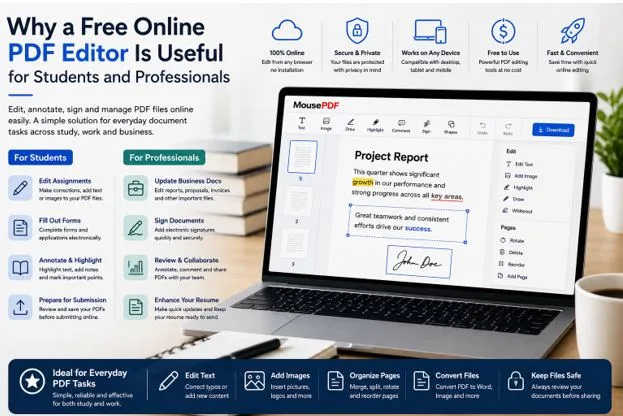
PDF documents have become a normal part of academic and professional life. Students use them for assignments, research papers, application forms, study materials, and project submissions, while professionals rely on PDFs for reports, proposals, resumes, contracts, invoices, presentations, and business correspondence. The challenge is that PDFs are primarily designed for consistent viewing and sharing, so making even small changes can sometimes require specialised software. A free online PDF editor provides a convenient alternative by allowing users to work with documents through a web browser rather than relying entirely on installed desktop applications. For people who only need to make occasional changes, browser based PDF editing can simplify everyday workflows while reducing the need for complicated software.
Why PDF Editing Matters in Everyday Work
The PDF format is popular because it helps preserve the appearance of a document when it is opened on different devices. Fonts, images, page layouts, and other elements are generally maintained in a consistent format, making PDFs convenient for sharing. However, that same consistency can make editing less straightforward than editing a word processing document.
Students and professionals regularly encounter situations where a PDF needs to be changed after it has already been created. A student may need to complete a form, add information to an assignment, or annotate reading material. An employee might receive a report that requires a correction before it is sent to a client. A freelancer may need to update a proposal or add a signature to an agreement. Instead of converting every document into another format, editing the PDF directly can make the process more efficient.
How Students Can Benefit From Online PDF Editing
Students often work with PDFs throughout their academic careers. Research papers, lecture notes, application forms, course materials, assignments, and project documents are frequently distributed or submitted in PDF format. While some documents only need to be read, others require students to add information or make changes.
For example, a student completing an application form may receive a PDF that needs personal information entered into specific sections. An online PDF editor can allow the student to add text without printing the document first. Similarly, when reviewing research material, annotation tools can be useful for highlighting important passages or adding notes for later reference.
Assignments are another practical example. Students may create their work in a word processor and then export it as a PDF before submission. If a small correction is discovered afterward, an online editing tool can potentially help with the change without requiring the entire assignment to be recreated. The final document can then be reviewed before being submitted.
Helping Students Manage Forms and Applications
Academic life involves more than assignments. Students often complete scholarship applications, internship forms, registration documents, consent forms, and other administrative paperwork. These documents may arrive as PDFs and can require information to be added before submission.
A browser based PDF editor can be particularly useful when a student is working from a shared computer, university workstation, or device where installing software is restricted. Instead of searching for an available application, the student can access an online editing environment through a compatible browser.
However, students should always check the requirements of the organisation receiving the document. Some institutions may specify a particular file format, signature method, or submission process. Editing a PDF successfully is only part of the task; the final file still needs to meet the submission requirements.
Benefits for Professionals
Professionals handle PDFs for many different reasons. Reports, proposals, resumes, contracts, invoices, business forms, presentations, and client documents may all need occasional editing. Even when a company has dedicated software, employees may not always have access to it on every device they use.
A free PDF editor can be useful for relatively straightforward tasks. An employee might need to correct a typo in a report, add a date to a form, insert a signature, highlight information for a colleague, or rearrange pages before sending a document. These tasks do not necessarily require the full capabilities of professional desktop software.
Freelancers can benefit in similar ways. A freelancer may receive a client brief as a PDF, update a proposal, sign an agreement, or prepare an invoice for delivery. When work takes place across different locations, having access to a browser based PDF editing tool can make document management more convenient.
Updating Resumes and Professional Documents
Resumes are another common document that may need regular changes. A professional may update their experience, add a certification, change contact information, or adjust a section before applying for a new opportunity. If the original editable document is unavailable, modifying the PDF can be an alternative to rebuilding the entire resume.
The same principle applies to professional reports and business documents. Small corrections can be made directly when appropriate, allowing users to prepare a final version without recreating the document from its original source.
However, users should be careful when making extensive layout changes to PDFs. If a document requires major restructuring, it may be better to return to the original editable file and make the changes there before generating a new PDF. Online editing tools are often most useful when the required modifications are limited and well defined.
Reviewing and Annotating Business Documents
PDF editing is not always about changing the original text. Professionals frequently need to review documents and communicate feedback. Annotation features can make this process easier by allowing users to highlight sections, add comments, draw shapes, or indicate areas that need attention.
Consider a manager reviewing a report prepared by an employee. Instead of sending a long email describing every correction, the manager can annotate the document and identify the relevant sections. Similarly, a freelancer can mark areas of a client brief that require clarification.
These PDF editing tools can support collaboration even when people are working remotely. The annotated file can be shared with another person, provided that the document is handled appropriately and contains no information that should not be distributed.
Working Across Different Devices
One of the strongest practical advantages of browser based PDF editing is accessibility across different devices. Modern professionals and students do not necessarily work from one computer. A person might use a laptop at home, a desktop computer in the office, and another device while travelling.
Desktop PDF applications may need to be installed and maintained separately on each compatible computer. Browser based tools can reduce this requirement by providing access through a web browser. This does not mean that every online editor works identically on every device, so users should still check compatibility and screen size before relying on a particular service.
For remote workers, this flexibility can be especially useful. Someone working temporarily from another location may need to make a quick document correction without changing the software setup on the computer they are using.
Privacy Should Always Be Considered
Convenience should not replace careful consideration of document security. PDFs can contain personal information, financial data, confidential business details, academic records, or legal documents. Before using any online service, users should understand how the platform handles uploaded or processed files.
Read the provider’s privacy information and determine whether files are stored remotely, processed locally, or retained for a specific period. For highly sensitive documents, users should follow their employer’s or institution’s security requirements rather than automatically choosing the most convenient option.
It is also important to use secure devices and updated browsers. Avoid editing confidential files on public computers unless absolutely necessary, and always verify the recipient before sharing a completed document.
When More Advanced PDF Software May Be Better
A free online PDF editor can be practical for routine tasks, but it is not necessarily suitable for every situation. Professionals who regularly work with complex PDFs may require advanced features such as extensive layout editing, batch processing, automation, specialised security controls, document comparison, or integration with other business systems.
Large organisations may also have specific compliance or data handling requirements that determine which software employees are permitted to use. In such environments, the organisation’s approved software should take priority over convenience.
The best approach is to match the tool to the task. If you need to make a small correction or sign a form, a browser based editor may be enough. If you are managing complex documents every day, dedicated professional software may provide a more appropriate workflow.
Choosing the Best Free PDF Editor
Choosing the best free PDF editor requires looking beyond the word “free.” Consider whether the tool supports your required tasks, how easy it is to use, whether it works on your devices, how it handles documents, and what privacy information the provider makes available.
It is also worth considering how frequently you edit PDFs. Occasional users may value convenience and simplicity more than advanced functionality. Professionals who edit documents every day may prioritise workflow efficiency and a larger set of editing capabilities.
A good PDF editing solution should fit naturally into the way you already work. The goal is not to collect as many features as possible but to find tools that solve your actual document problems efficiently.
Final Thoughts
PDF editing is no longer limited to people with specialised desktop software. Students can use browser based tools to manage assignments, forms, and study documents, while professionals can use them for reports, resumes, proposals, contracts, and routine business paperwork. Online PDF editing can be particularly convenient for people who work across multiple devices or only need to make occasional changes, although sensitive documents and advanced requirements still deserve additional consideration. For users exploring browser based mousepdf as part of their document workflow, the key is to evaluate its features, privacy approach, compatibility, and suitability for the specific PDF tasks they need to complete.