Why Businesses Are Moving From SMS Codes to Authenticator Apps
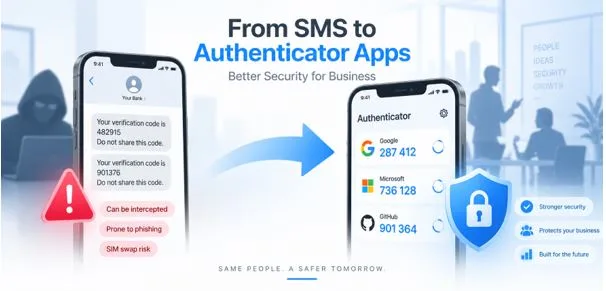
For years, receiving a six-digit code by text message was considered a convenient upgrade from password-only authentication.
It is still better than relying on a password alone. But for organizations protecting employee email, cloud storage, financial systems, customer information, SaaS platforms, and administrator accounts, SMS is increasingly becoming the weak link in the authentication process.
That is why more organizations are considering an authenticator app for business as the next step in their identity-security strategy.
The threat environment is changing quickly. Verizon’s 2026 Data Breach Investigations Report found that credential abuse still appeared at some point in 39% of analyzed breach paths, even though it fell to 13% as the first observed initial-access action. The report also found that mobile-focused social-engineering attacks such as fraudulent texts and calls produced click rates 40% higher than traditional email phishing.
Those findings matter because SMS authentication depends directly on the mobile communications ecosystem that attackers are increasingly targeting.
An authenticator app for business changes that model. Instead of waiting for a code to arrive through the telephone network, employees generate or approve authentication directly through an application registered to their account.
For many organizations, this makes app-based authentication a practical bridge between basic SMS verification and stronger phishing-resistant technologies such as passkeys and FIDO security keys.
1. Why SMS-Based Authentication Is Becoming a Business Liability
A password can be stolen through phishing, credential stuffing, malware, password reuse, or a data breach. Two-factor authentication is designed to make that stolen password insufficient on its own.
The problem is that not every second factor provides the same level of protection.
With SMS authentication, a website generates a one-time code and sends it to a registered telephone number. The user receives the message and enters the code into the login page.
The process is simple, familiar, and requires no dedicated application.
But simplicity comes with trade-offs.
Current NIST digital identity guidance treats authentication through the public switched telephone network, including SMS and voice delivery, as a “restricted” authenticator. NIST specifically advises verifiers to consider indicators such as SIM changes, device swaps and number porting before sending authentication secrets through the telephone network.
These SMS 2FA risks make the method less attractive for businesses whose employees routinely access valuable corporate resources.
CISA goes further in its mobile communications security guidance. It recommends migrating away from SMS-based MFA and notes that SMS messages are not encrypted and are not phishing-resistant.
For an organization evaluating an authenticator app for business, this is the fundamental issue: the company wants the second factor to depend less on a telephone number that can be redirected, intercepted, socially engineered, or abused as part of a phishing workflow.
2. The Security Problem With SMS Verification Codes
Consider what happens when a company’s finance employee receives a text message containing a six-digit login code.
The organization may assume possession of the phone number proves possession of the employee’s trusted device.
That assumption is not always reliable.
Phone numbers can be ported. SIM cards can be replaced. Attackers may manipulate carrier support processes. Text messages can also be socially engineered out of users through convincing phishing pages.
A fraudulent site can ask the victim for a username, password and then the SMS code that arrives seconds later.
Once the user enters that code, an attacker may relay it to the legitimate service while it is still valid.
This means MFA can be present without being phishing-resistant.
For businesses, the scale of credential attacks adds urgency. Verizon’s 2025 analysis of authentication logs found that credential-stuffing traffic accounted for a median 19% of daily authentication attempts in the organizations studied. Among enterprise-sized organizations, the median reached 25%, while even small companies experienced approximately 12%.
An authenticator app for business will not solve every identity attack, but it removes some dependencies associated with SMS and creates a stronger baseline for account security.
3. Authenticator App vs SMS: What Changes for Businesses?
The biggest difference is where the authentication credential comes from.
With SMS, the authentication service sends a secret through a telephone network.
With a typical TOTP authenticator app, a shared cryptographic secret is registered with the application during setup. The app then generates time-based one-time passwords locally.
No new text message has to travel through the carrier network every time the user signs in.
That makes an authenticator app for business particularly useful for employees who travel internationally, work in areas with weak cellular reception, or use company accounts from several locations.
CISA’s current guidance for businesses ranks MFA methods by security strength. Security keys are listed as the strongest option, followed by authenticator applications with number matching and authenticator applications that generate one-time codes. Text and email codes are placed at the bottom as the weakest option.
This distinction is important.
The debate about authenticator app vs SMS is not about whether SMS provides zero security. SMS MFA is usually better than using only a password.
The question is whether an organization should continue relying on the weakest commonly available MFA method when stronger alternatives are easy to deploy.
For many businesses, the answer is increasingly no.
4. How an Authenticator App Works
Most code-based authentication applications support TOTP, or Time-Based One-Time Passwords.
When an employee enrolls an account, the service typically displays a QR code containing an authentication secret. The employee scans it with the application.
From that point forward, the service and application can independently calculate matching one-time codes based on the shared secret and the current time.
Many implementations generate a new code approximately every 30 seconds.
Because the code is generated locally, the employee usually does not need cellular service to authenticate.
A company deploying an authenticator app for business can therefore reduce reliance on mobile carrier availability while maintaining a separate possession-based authentication factor.
Other applications support push authentication.
Instead of manually entering a code, an employee receives an approval request. More advanced implementations use number matching, requiring the employee to enter a number displayed on the login screen.
CISA recommends number matching over simple push approval because it helps reduce attacks based on repeated MFA prompts.
For organizations planning business 2FA, both TOTP and number-matching applications can be meaningful upgrades from SMS.
5. Why Businesses Are Adopting Authenticator Apps
Reduced dependence on telephone networks
An authenticator app for business does not need an SMS message every time an employee signs in.
That removes a dependency on the employee’s phone number and cellular connection.
For distributed teams, international workers and employees who frequently travel, this can improve both security and usability.
Better protection against SIM-related attacks
Because TOTP codes are generated from credentials stored inside the application rather than delivered to a telephone number, redirecting that telephone number does not automatically redirect future TOTP codes.
This is one of the strongest practical reasons for moving away from SMS.
Stronger corporate authentication policies
Organizations can make application-based MFA mandatory for employees accessing email, VPNs, finance platforms, customer databases, cloud dashboards and administration consoles.
Using a standardized authenticator app for business also makes it easier for IT teams to document security requirements instead of allowing employees to select weaker authentication methods independently.
Better access during travel
Employees may not always receive SMS messages while abroad.
A TOTP application can continue generating codes without roaming or active cellular coverage.
This is especially useful for remote-first companies and organizations with global teams.
Easier path toward stronger MFA
Deploying an authenticator app for business can also prepare employees for a broader move toward stronger authentication.
Microsoft has long reported that MFA dramatically reduces account-compromise risk. Microsoft states that more than 99.9% of compromised accounts observed in its environment lacked MFA, reinforcing the value of adding another authentication factor rather than relying on passwords alone.
An app-based deployment can therefore be a practical stage in a longer-term identity strategy.
6. Which Business Accounts Should Move Away From SMS First?
Organizations do not always need to migrate every account on the same day.
A risk-based rollout usually works better.
Begin an authenticator app for business deployment with accounts that can cause the greatest damage if compromised.
Administrator accounts should be near the top of the list. A compromised administrator may be able to create users, reset passwords, alter permissions or disable security controls.
Email accounts are another priority because email is frequently used to reset access to other services.
Next, protect:
- Cloud administration accounts
- Financial and payment systems
- Password managers
- VPN and remote-access services
- Customer relationship management platforms
- Source-code repositories
- Cloud-storage systems
- Human resources systems
- Social-media administrator accounts
- Domain and hosting accounts
CISA specifically advises businesses to require MFA for remote access and privileged or administrative access.
Once high-risk accounts have migrated, companies can expand the authenticator app for business policy across the broader workforce.
7. How to Roll Out an Authenticator App Across a Company
Moving hundreds of employees away from SMS requires more than sending an email telling everyone to install Authenticator App software.
A structured deployment reduces confusion and support tickets.
Step 1: Inventory applications
Identify every important service currently using passwords, SMS authentication or no MFA at all.
Document which MFA methods each platform supports.
Step 2: Select the authentication standard
Decide whether the organization will use TOTP, push authentication with number matching, FIDO/passkeys, security keys, or a combination.
For accounts where stronger phishing-resistant authentication is available, consider using it rather than stopping at TOTP.
Step 3: Choose an approved application
Before selecting an authenticator app for business, evaluate:
- Encryption and credential storage
- Backup capabilities
- Device migration
- Administrative controls
- Biometric or PIN locking
- Enterprise compatibility
- Export controls
- Recovery procedures
- Privacy practices
- Vendor support
Employees should not randomly download a 2FA authenticator app from an unknown developer simply because it appears first in an app-store search.
Step 4: Pilot the migration
Start with the IT or security team.
Then test with a small department.
Document every setup problem before expanding the migration.
Step 5: Enroll employees
Provide a simple enrollment guide showing employees where to enable MFA, how to scan the QR code and how to verify their first login.
The authenticator app for business rollout should also include instructions for backup codes and device replacement.
Step 6: Test authentication
Ask users to sign out and confirm that authentication works from a new session.
Do not disable the previous method until successful testing is complete.
Step 7: Remove SMS fallback where appropriate
One commonly overlooked issue is leaving SMS enabled after application-based MFA has been configured.
CISA specifically warns that enrolling an authenticator application does not necessarily disable SMS. Leaving SMS available can preserve a weaker fallback path for attackers.
If company policy permits it, remove SMS after the new authentication method is working reliably.
8. Employee Onboarding, Lost Phones, and Recovery
A strong MFA for business strategy must answer an uncomfortable question:
What happens when an employee loses the phone containing the authentication application?
Without a recovery policy, security controls can quickly become a productivity problem.
An authenticator app for business deployment should therefore include multiple recovery paths.
Companies may provide securely stored recovery codes, secondary registered authenticators, hardware security keys or IT-managed account recovery.
Privileged users should ideally have more than one secure authentication method.
The organization should also document a device-replacement process.
When an employee receives a new phone, authentication credentials should be migrated or re-enrolled before the old device is erased.
If a phone is lost, the old authenticator registration should be revoked promptly.
IT staff should never disable MFA simply because recovery is inconvenient.
Instead, establish a verified identity-recovery process with clear rules defining how the employee proves who they are.
An effective authenticator app for business is therefore not merely an app deployment. It is part of a complete identity lifecycle covering enrollment, daily use, recovery and offboarding.
9. Common Migration Mistakes
The first mistake is implementing authentication without employee education.
Users should understand why the company is changing the login process and what legitimate authentication prompts look like.
The second mistake is keeping SMS permanently enabled as the easiest fallback.
If attackers can simply choose “send a text instead,” much of the benefit of the migration disappears.
The third mistake is failing to secure recovery procedures.
Attackers frequently target help desks because bypassing MFA through social engineering can be easier than attacking the authentication technology itself.
A fourth mistake is allowing unmanaged backups of TOTP secrets.
The secret behind a TOTP account must be protected carefully. Anyone who obtains it may be able to generate valid codes.
Finally, businesses should not assume that deploying an authenticator app for business automatically solves phishing.
That leads to an important limitation.
10. Authenticator Apps Are Better Than SMS—but Not the Final Security Layer
An authentication application is an important security improvement, but businesses should understand the difference between stronger MFA and phishing-resistant MFA.
NIST’s current SP 800-63B guidance explicitly states that manually entered OTP authentication is not phishing-resistant. A fraudulent verifier can potentially capture a valid OTP and relay it to the real service before the code expires.
That means a TOTP authenticator app for business should not necessarily be the final destination for high-risk systems.
CISA recommends phishing-resistant FIDO authentication as the preferred long-term approach. Security keys and properly implemented passkeys can cryptographically bind authentication to the legitimate service, making traditional credential-relay phishing far harder.
NIST’s current guidance similarly requires service providers operating at Authentication Assurance Level 2 to offer at least one phishing-resistant authentication option, while AAL3 requires phishing-resistant cryptographic authentication.
A sensible security roadmap might therefore look like this:
Password only → SMS MFA → authenticator application → number matching → passkeys or FIDO security keys.
The exact progression depends on risk, systems and budget.
For many small and medium-sized organizations, however, an authenticator app for business provides an accessible improvement that can be implemented without buying dedicated hardware for every employee.
11. How to Measure Whether the Migration Is Working
Security teams should measure the rollout rather than simply marking MFA as “completed.”
Useful metrics include the percentage of employee accounts protected by MFA, percentage using SMS, percentage using application-based authentication and percentage using phishing-resistant methods.
Organizations should also monitor:
- Failed authentication attempts
- Suspicious login attempts
- MFA reset requests
- Lost-device incidents
- Help-desk recovery requests
- Number of accounts retaining SMS fallback
- Privileged accounts without strong MFA
- Authentication-related phishing incidents
A successful authenticator app for business project should steadily reduce the company’s dependence on SMS.
Businesses can also measure enrollment completion by department and identify teams where weaker authentication methods remain active.
This turns authentication from a one-time IT project into an ongoing account security program.
12. Frequently Asked Questions
Is an authenticator app safer than SMS for a business?
In general, app-based authentication avoids several weaknesses associated with codes delivered through the telephone network.
CISA ranks authenticator applications above SMS and email codes and describes text or email authentication as the weakest of its listed common MFA options.
For this reason, an authenticator app for business is often a better option than SMS when stronger phishing-resistant methods are not yet practical.
Can authenticator apps work without internet access?
TOTP applications usually can.
After enrollment, a TOTP application calculates authentication codes locally using a stored secret and the current time.
The employee generally does not need cellular reception to generate a code.
This makes an authenticator app for business useful for travelers and remote employees.
Does an authenticator app stop phishing?
Not completely.
A user can still enter a TOTP code into a convincing fake website, allowing an attacker to relay the code while it remains valid.
NIST therefore does not classify manually entered OTP authentication as phishing-resistant.
Businesses with high-risk accounts should consider passkeys, FIDO security keys or other phishing-resistant authentication.
Should a company disable SMS after enabling an authenticator app?
If the organization’s systems and recovery strategy allow it, removing SMS can prevent attackers from selecting it as a weaker fallback.
CISA specifically advises disabling SMS after stronger authentication has been enrolled where feasible.
Can small businesses use authenticator apps?
Yes.
An authenticator app for business is not limited to large enterprises.
Many cloud platforms already support application-based MFA without requiring businesses to build their own authentication infrastructure.
For small organizations, prioritizing administrators, email, accounting, cloud storage and other critical services can provide meaningful security improvements quickly.
What happens if an employee loses their phone?
The company should use its predefined recovery process rather than simply disabling MFA.
Possible recovery methods include backup codes, another registered authenticator, a security key or an administrator-assisted identity-verification procedure.
The lost device should then be removed from the employee’s account.
13. Final Thoughts
The case for replacing SMS authentication is becoming stronger.
Mobile devices are increasingly targeted by social engineering, credentials remain central to real-world breaches, and both NIST and CISA recognize important weaknesses in SMS-based authentication. Verizon’s 2026 DBIR also shows that credential abuse remains involved in 39% of breach progressions and that mobile social-engineering attacks are seeing substantially higher interaction rates than traditional email phishing.
For organizations that still rely heavily on text-message verification, an authenticator app for business offers a practical next step.
It reduces dependence on telephone numbers, improves authentication for international and remote employees, supports stronger corporate security policies and provides a foundation for moving toward phishing-resistant authentication.
Businesses should still recognize its limitations.
TOTP codes can be phished, backups need protection, lost-device recovery must be carefully designed and high-risk accounts may justify FIDO security keys or passkeys.
The goal is therefore not simply to replace one six-digit code with another.
A successful authenticator app for business strategy creates a stronger identity-security process around the entire employee lifecycle—from onboarding and daily authentication to recovery, device replacement and offboarding.
For companies currently relying on SMS, that migration can be one of the simplest meaningful improvements they make to their authentication security.
Sources
The security recommendations and statistics in this article were verified against the 2026 Verizon Data Breach Investigations Report, CISA multifactor authentication guidance, CISA Mobile Communications Best Practice Guidance, NIST SP 800-63B, and Microsoft Security research.