Why Invoice Automation Stalls at 70%, and What Closes the Gap
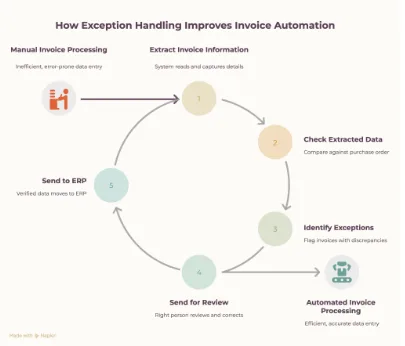
Invoice automation can handle a large part of the invoice process. But the invoices that don’t follow the expected format are often where teams still need to step in.
A supplier sends an invoice with a different layout. A price doesn’t match the purchase order. A quantity is missing. A scanned document is difficult to read. Someone then has to check the details, find the problem, and enter or correct the information in the ERP.
This is where invoice automation can stall.
The answer isn’t to automate everything and remove people from the process. It’s to make the automation handle the straightforward invoices and route the exceptions to the right person.
That’s what closes the gap between partial invoice automation and a process that can handle the day-to-day reality of supplier invoices.
Where Invoice Automation Starts to Break Down
Invoice automation works well when the information is clear and follows an expected structure. The problem starts when supplier invoices don’t.
A supplier may send a PDF in a different layout, a scanned invoice, or a document with information placed differently from what your system expects. The invoice can still be processed, but the data may need additional checks before it can safely move into the ERP.
Then there are invoices where the information itself doesn’t match.
- The invoice price is different from the purchase order.
- The quantity doesn’t match what was ordered or received.
- A product or supplier reference is missing.
- Tax or other charges are calculated differently.
- Some information is unclear or difficult to read.
These invoices can’t simply be processed and posted without checking. Someone from the finance or operations team has to compare the details, identify what is wrong, and decide what needs to be corrected.
This is where manual work starts coming back into the process.
Instead of processing the invoice from start to finish, the team has to open emails and documents, check the purchase order, compare the information with the ERP, and make the necessary corrections.
The challenge isn’t processing the straightforward invoices. It’s handling the exceptions without turning the whole process back into a manual one.
What Closes the Gap: Exception Handling
The next step in invoice automation isn’t trying to make every invoice follow the same path.
A better approach is to let automation handle the invoices that are clear and complete, while identifying the ones that need attention.
The process can work like this:
- Extract the invoice information
The system reads the invoice and captures details such as supplier, invoice number, products, quantities, prices, taxes, and totals. - Check the information
The extracted data is checked against the relevant purchase order, supplier information and existing ERP data. - Identify exceptions
If something doesn’t match, the invoice is flagged instead of being processed as if everything were correct. - Send the exception for review
The right person can review the issue, make a correction or confirm that the difference is valid. - Send the verified data to the ERP
Once the invoice is checked, the relevant information can move into the ERP without someone having to manually enter the entire invoice.
This changes the role of the team. Instead of checking every invoice from the beginning, they spend their time on the invoices that actually need a decision.
That’s what helps invoice automation move beyond the first 70% without trying to remove human review from the process.
What an Automated Invoice Workflow Looks Like
A practical invoice automation workflow doesn’t need to change how suppliers send their invoices. The process can start with the documents your team already receives.
For example, a supplier sends an invoice by email as a PDF, Excel file or scanned document.
The workflow can then:
Receive the invoice
The invoice is picked up from the relevant email inbox or source without someone having to download and process it manually.
Extract the invoice data
Key information such as supplier details, invoice number, products, quantities, prices, tax and totals is captured from the document.
Validate the details
The information is checked against purchase orders, supplier data and other relevant information in the ERP.
Flag anything that needs attention
If the price, quantity or another detail doesn’t match, the invoice is sent for review instead of being processed automatically.
Process the verified invoice
Once the information is confirmed, the relevant data is sent to the ERP for further processing.
The result is a workflow where straightforward invoices can move through with minimal manual input, while exceptions are brought to the team only when a decision is needed.
This is more practical than trying to automate every possible invoice scenario. The goal is to reduce the amount of manual work around invoice processing while keeping the checks that protect data accuracy.
What Better Invoice Automation Looks Like in Practice
Consider a business that receives invoices from multiple suppliers every day.
Some invoices can be processed without any issues. Others have different formats, missing information, price differences, or other details that need to be checked.
Instead of sending every invoice to a person for manual processing, the workflow can separate them.
Straightforward invoices can be processed automatically after the required checks.
Invoices with exceptions can be flagged with the specific issue that needs attention. A team member can review the invoice, make the necessary correction, or approve the difference.
Once the exception is resolved, the invoice can continue through the same process and reach the ERP.
This means the team doesn’t have to choose between two extremes: manually processing every invoice or trying to automate everything without review.
They can use automation for the part that is predictable and keep people involved where their judgement is actually needed.
For businesses processing a high volume of supplier invoices, this can make a significant difference to the amount of manual data entry and checking involved each day.
How Pool Chlor Reduced Manual Invoice Processing with Automation
Pool Chlor, a chemical distribution business in Germany, was managing a dropshipping workflow that involved order confirmations, invoices, and shipment information arriving through email.
The team had to manually process information from these emails and attachments and update the relevant data in PlentyMarkets. This meant spending significant time checking documents, entering information, and handling different file formats.
2Hats introduced an automation workflow that could:
- Classify incoming emails and identify the relevant documents.
- Extract information from PDF, CSV, and XLSX attachments.
- Validate the extracted data and identify errors.
- Send follow-up emails when additional information is needed.
- Update PlentyMarkets through its API.
The important part was that the workflow did not simply extract information and push it into the system. Validation and error handling were built into the process so that information requiring attention could be identified before the next step.
As a result, 90% of the order processing workflow is now automated, with processing reduced from hours to minutes and fewer errors during manual processing.
The case shows what happens when automation goes beyond basic data extraction. The real improvement comes from connecting document processing, validation, exception handling, and the existing business system into one workflow.
What to Look for in an Invoice Automation Solution
If your invoice automation still leaves your team handling a large number of invoices manually, the issue may not be the lack of automation. It may be how the process handles the invoices that don’t fit the expected pattern.
A practical solution should be able to:
- Process different invoice formats without requiring suppliers to change how they send documents.
- Extract the information you need from PDFs, scans, spreadsheets, and other common formats.
- Check invoice data against purchase orders, supplier information, and your existing systems.
- Identify exceptions instead of automatically processing information that may be incorrect.
- Bring the right issues to your team for review and approval.
- Work with your existing ERP instead of creating another system your team has to maintain.
The goal isn’t to automate every decision.
It’s to automate the parts that can be handled reliably and give your team a clear way to deal with the invoices that need their attention.
That’s where invoice automation becomes more useful in day-to-day operations, not just as a way to extract data, but as a process that can handle the variation found in real supplier invoices.
Close the Gap in Your Invoice Process
Invoice automation doesn’t have to mean choosing between manual processing and full automation.
A better approach is to automate the invoices that can be handled reliably, check the information before it reaches your ERP, and bring exceptions to your team when a decision is needed.
At 2Hats, we help businesses build different AI agent automation services like invoice automation workflows around their existing documents, processes, and ERP systems. From extracting invoice data to validating information and handling exceptions, the aim is to reduce manual work without losing the checks your team needs.
Want to see where invoice automation could reduce manual work in your process?
Book a conversation with our team.