Why Security Researchers and OSINT Professionals Are Switching to Advanced Session Managers for Chrome
OSINT research is often a race against information overload.
For security researchers, investigators, and intelligence analysts, the challenge is rarely finding information. The internet contains more data than ever before. The real challenge is maintaining control over that information preserving sources, tracking research paths, and keeping investigation context organized.
A single OSINT investigation can involve dozens or hundreds of browser tabs:
- News articles
- Social media profiles
- Government databases
- Technical documentation
- Threat intelligence reports
- Image references
- Archived pages
- Evidence sources
Over time, the browser becomes more than a browsing tool. It becomes a research workspace.
But traditional browser features are not designed for complex investigations. Bookmarks can save important links, but they cannot preserve an entire research environment. Open tabs can provide context, but they become fragile when browsers crash, devices restart, or sessions become too large to manage.
This is why security researchers and OSINT professionals are increasingly turning toward advanced session manager solutions for Chrome.
A modern session manager does more than save tabs. It helps researchers preserve complete browser workspaces, organize investigations, recover lost research, and manage large scale information workflows with greater privacy and control.
Why OSINT Researchers Need More Than a Bookmark Manager
A bookmark manager and a session manager solve two completely different problems.
A bookmark manager is designed for long term storage.
For example:
- Useful websites
- Reference articles
- Documentation pages
- Frequently used tools
Bookmarks answer the question:
“Where can I find this resource again?”
A session manager answers a different question:
“How can I preserve my entire investigation workspace?”
During an OSINT investigation, context matters.
A researcher may have a browser session containing:
- A timeline of news reports
- Multiple social media profiles
- Related company websites
- Technical analysis pages
- Government documents
- Archived references
Saving only individual URLs does not preserve the investigation flow.
A session manager allows researchers to save the complete working environment including open tabs, tab groups, and organization structure.
Instead of rebuilding an investigation from scratch, analysts can return to the exact workspace they created earlier.
For security teams, journalists, threat researchers, and investigators, this difference is critical.
How Super Session Manager Helps Researchers.
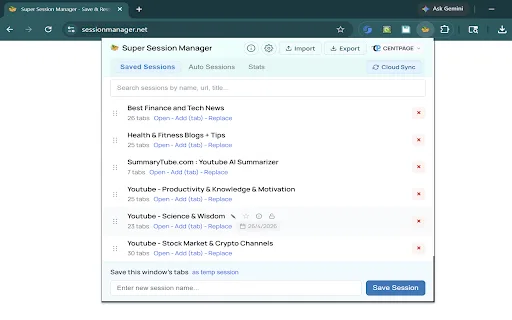
Super Session Manager is designed as a privacy focused browser workspace manager that combines session management, advanced tab management, and research organization features into one Chrome extension.
Rather than functioning as a simple tab saver, it provides tools designed for professionals who regularly handle large browser based workflows.
Save and Restore Research Sessions
One of the biggest challenges in OSINT work is preserving research continuity.
Investigations rarely happen in one sitting. Analysts may collect sources over several hours or return to a project days later.
A powerful session manager allows users to save an entire browser workspace and restore it whenever needed.
With Super Session Manager, researchers can:
- Save complete browser sessions
- Restore hundreds of tabs
- Preserve research workflows
- Recover previous investigation environments
The ability to restore tabs quickly can prevent hours of repeated searching.
Instead of manually reopening dozens of sources, researchers can bring back their complete workspace with a single action.
For example, an analyst investigating a cyber incident may save a session containing:
- Vendor reports
- Security advisories
- Malware analysis pages
- Threat actor profiles
- Related infrastructure research
Later, the entire investigation environment can be reopened instantly.
Auto Save Snapshots for Research Recovery.
OSINT workflows often involve long research sessions.
A browser crash, accidental closure, or system restart can interrupt hours of intelligence gathering.
Automatic session snapshots provide an additional layer of protection.
Super Session Manager helps researchers maintain recovery points by capturing browser states automatically.
Benefits include:
- Reduced risk of losing active research
- Faster recovery after browser failures
- Preservation of investigation progress
- Better workflow continuity
For investigators handling time sensitive intelligence, protecting research context is just as important as collecting information itself.
Advanced Tab Groups Organization.
Large investigations quickly become difficult to navigate when every source exists in one long browser window.
Chrome tab groups help organize research categories, but many users struggle to preserve those groups after closing their browser.
Super Session Manager extends tab organization by allowing researchers to save and restore structured workspaces.
Researchers can maintain groups such as:
Threat Intelligence Investigation
- Security reports
- IOC references
- Malware analysis
Corporate Research
- Company websites
- Employee profiles
- Financial records
News Monitoring
- Media coverage
- Press releases
- Historical articles
Tab groups maintain:
- Names
- Colors
- Ordering
- Workspace structure
This creates a cleaner research environment and reduces cognitive overload.
URL Cleaner for Research Privacy
OSINT researchers frequently collect and share URLs.
However, many links contain unnecessary tracking information:
- UTM parameters
- Referral codes
- Marketing identifiers
- Tracking tokens
These parameters can make research notes cluttered and may expose unnecessary metadata.
A built-in URL cleaner helps create cleaner research records.
Benefits include:
- Cleaner evidence documentation
- Easier URL sharing
- More organized investigation notes
- Reduced tracking information
For analysts preparing reports, removing unnecessary URL parameters creates more professional and reliable documentation.
Duplicate Tab Detection
During investigations, researchers often revisit the same sources multiple times.
This happens frequently when:
- Comparing reports
- Monitoring updates
- Collecting intelligence from multiple searches
Over time, duplicate tabs consume resources and make investigations harder to manage.
A duplicate tab detection feature helps identify repeated URLs and clean unnecessary duplicates.
This creates:
- Faster navigation
- Reduced browser memory usage
- More organized research sessions
For analysts working with hundreds of tabs, maintaining a clean workspace directly improves efficiency.
Session Statistics for Research Insights.
Understanding a research workspace can help improve investigation workflows.
Super Session Manager provides session statistics that allow researchers to analyze their browser environments.
Useful information includes:
- Total number of tabs
- Number of domains
- Session overview
- Workspace size
These insights help analysts understand how large investigations grow and identify opportunities for better organization.
A session is no longer just a collection of tabs it becomes a structured research asset.
Bulk URL Management for Large Investigations.
Professional researchers often need to manage large collections of URLs.
Manually copying individual links is inefficient when working with hundreds of sources.
Bulk URL management tools provide capabilities such as:
- Extracting URLs from sessions
- Copying multiple links
- Exporting research sources
- Opening multiple references together
This is especially useful when creating:
- Research reports
- Evidence collections
- Investigation backups
- Internal documentation
Instead of handling sources individually, researchers can manage entire collections efficiently.
Privacy Focused Architecture
Privacy is a critical requirement for security researchers and investigators.
Browser extensions that manage sensitive research data must minimize unnecessary exposure.
Super Session Manager focuses on privacy through:
- Local-first storage
- Minimal browser permissions
- No advertisements
- No unnecessary tracking
- Optional cloud synchronization
Researchers can maintain greater control over their browser workspace data.
For sensitive investigations, keeping research organization tools privacy focused is essential.
Practical Example: Managing an OSINT Investigation Session.
Consider a researcher investigating a cybersecurity incident.
Instead of keeping hundreds of random tabs open, the researcher creates a dedicated investigation workspace.
Create an Investigation Session
The researcher creates a session specifically for the case.
Example:
Operation: Data Breach Investigation
Collect Research Sources
The session includes:
- News articles
- Security reports
- Social media profiles
- Technical documentation
- Threat intelligence references
Organize and Clean URLs
Tracking parameters and unnecessary information are removed.
The research collection becomes cleaner and easier to analyze.
Export a Backup
The investigation session can be backed up for future reference.
Options such as JSON backup provide additional portability.
Restore Tabs When Needed
When continuing the investigation later, the researcher can restore tabs and return directly to the previous workspace.
No repeated searches.
No lost context.
No rebuilding from memory.
Why Advanced Session Management Matters for Modern OSINT.
The modern researcher’s problem is not access to information.
It is managing information at scale.
Traditional browser workflows were designed for everyday browsing, not complex intelligence operations.
Security researchers need tools that help them:
- Preserve investigation context
- Organize hundreds of sources
- Recover lost workflows
- Manage browser resources
- Maintain privacy
A powerful session manager transforms the browser from a collection of open tabs into a controlled research environment.
Final Thoughts.
OSINT professionals do not need more open tabs.
They need better controlled information environments.
A privacy focused browser workspace manager like Super Session Manager helps researchers preserve context, organize intelligence sources, and maintain efficient workflows across complex investigations.
From saving and restoring sessions to cleaning URLs, detecting duplicates, managing tab groups, and creating backups, advanced session management provides the structure required for modern research.
For analysts working in cybersecurity, investigations, and intelligence gathering, browser organization is no longer a convenience.
It is part of the research process.