
3DMakerPro Outlines a Practical Workflow for E-Commerce 3D Product Visualization
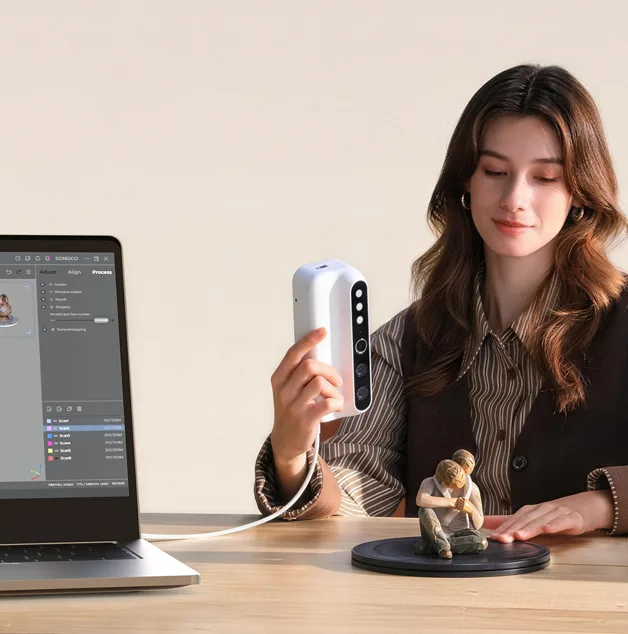
Online shoppers often want to understand a product before they buy it: its proportions, texture, shape, and the way its parts fit together. Standard product photography remains essential, but interactive 3D views can give shoppers a more complete sense of an item, especially when the product has sculpted surfaces, multiple angles, or details that are hard to communicate in a flat image.
The process starts with the physical product: capture its geometry, review the texture, clean the model, and prepare it for the web. The published version should load quickly and display well on common devices, alongside clear product photos and specifications.
Start With the Product and the Viewing Goal
Before choosing equipment, decide what the 3D asset needs to show. A small accessory may need close detail and accurate proportions. A larger product may be better represented through a sequence of views or a simplified model. If shoppers will rotate the object, plan for a complete capture; if the asset is intended mainly for product pages or previews, a lighter model may be sufficient.
Material is another important consideration. Matte surfaces are generally easier to capture than reflective, transparent, or very dark materials. Some surfaces may require careful lighting or a compatible preparation method, but product teams should follow material and safety guidance before applying anything to a retail item.
A Practical Product Capture Workflow
Reviewing capture quality, product accuracy, and web performance at separate stages makes problems easier to catch.
| Stage | Review point | Typical output |
| Plan | Object size, material, variant, viewer goal | Capture brief |
| Capture | Coverage, stability, lighting, detail | Raw scan data |
| Process | Alignment, cleanup, scale, texture | Reviewed model |
| Optimize | Polygon count, texture weight, mobile performance | Web-ready asset |
| Publish | Viewer controls, fallback image, product facts | Product-page experience |
A polished appearance alone does not make a model ready for an online catalog; it may still have missing geometry, incorrect scale, rough texture transitions, or files that load slowly. A model can look convincing at one angle and still contain missing geometry, incorrect scale, rough texture transitions, or slow-loading files.
Capture for Shape, Detail, and Color
For an accurate shape, the product should remain stationary while the scanner or turntable follows a planned path. Overlapping views help the software align captures into one model. Small features such as seams, buttons, ports, fasteners, and recessed areas deserve a final coverage check, because these details often distinguish one product version from another.
Color and texture may require a separate pass or a device with a suitable imaging system. Keep lighting consistent across views and avoid hard shadows that could be mistaken for surface details. If a brand uses multiple finishes, scan representative samples and verify that the digital appearance matches the physical product under the website’s display conditions.
Keep scale and variants under control
A scanned model should be measured against known dimensions before publishing. If the product line includes several sizes or colorways, label each source model clearly and avoid reusing one version as a stand-in for another. A small scale error can be noticeable when a shopper compares products side by side or views the model next to a familiar object.
Make the model usable on the web
High-resolution capture creates detailed data, but online delivery usually needs an optimized asset. Teams can reduce polygon counts, compress textures, remove hidden geometry, and prepare a lower-detail version for mobile viewing. Keep a high-quality source file separately so that future updates do not have to start from the beginning.
Choosing a Scanner for a Commerce Workflow
The best 3D scanner for product visualization depends on object size, required detail, surface type, color needs, and the team’s editing workflow. A small jewelry or collectible capture may prioritize fine detail, while a large home product may require more working range. The 3DMakerpro collection groups equipment across different object sizes and use cases, which can help a production team begin comparing options; a sample capture is still the best way to check whether a device suits a specific material.
Software compatibility also deserves attention. Confirm how the scanner exports geometry and texture data, whether the files can move into the team’s modeling tools, and whether the publishing platform accepts the final format. If a workflow requires repeated product updates, test the full path from capture to upload before scheduling a large catalog project.
Use Interactive Models to Support Clear Product Information
A 3D viewer should answer useful questions. It can let customers inspect the back of a product, understand the shape of an attachment, or see how a surface changes across the item. Pair the model with straightforward dimensions, materials, compatibility details, and high-quality photos. The interactive element should make the product easier to understand rather than forcing shoppers to search for basic facts.
Accessibility and performance matter as well. Provide a static alternative for users who cannot load interactive media, make controls easy to discover, and check the experience on mobile networks. A simple, responsive viewer can be more effective than a highly detailed asset that loads slowly or overwhelms a product page.
Accessibility, Rights, and Catalog Maintenance
An interactive asset should be accompanied by a static image, descriptive text, and basic product details so the page remains useful when the viewer is unavailable or unsuitable for a visitor’s device. Keyboard access, clear controls, and responsive behavior matter as much as visual polish. A digital model should complement the page’s product information, not become the only way to understand the item.
Confirm that the business has permission to use the product imagery and model, especially when a catalog includes licensed designs, third-party components, or user-submitted objects. Keep a record of source files and approvals so that assets can be updated or removed if the product changes.
Plan for catalog maintenance from the start. When packaging, accessories, dimensions, or finishes change, compare the live product against the stored scan before reusing the existing model. A controlled update process avoids publishing an attractive but inaccurate representation.
Conclusion
3D scanning can give e-commerce teams a reusable way to create product visualizations from physical items. The work involves more than capture: teams need to check geometry, color, scale, file size, platform compatibility, and the questions customers need answered.
When the asset is accurate and easy to use, it can complement photography and product specifications by adding another way to inspect an item. With accurate models, clear product information, and files sized for the web, 3D views can give shoppers another useful way to inspect an item.
Media info:
Company website: store.3dmakerpro.com
Company name: 3DMAKERPRO
Mail: [email protected]