How to Use AI for Landscape Design Without Losing Site Reality (AI Yard Design Studio)
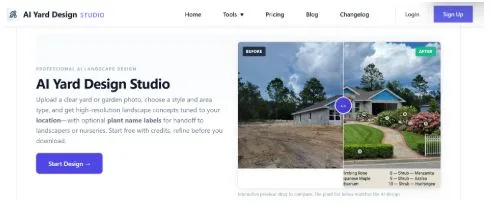
If you search for AI for landscape design today, you will find two kinds of promises. One is fantasy: perfect gardens that ignore your slope, your fence line, and your climate. The other is useful: faster iteration on your lot, so homeowners and small-project leaders can align before materials and labor lock decisions in. This article is about the second kind—and how AI Yard Design Studio is built to keep you anchored to site reality while still getting the speed benefits of generative tools.
The failure mode you are trying to avoid
Outdoor projects do not usually die because people lack taste. They die because people lack a shared picture of the same constraints. Couples argue in adjectives. Contractors ask questions that reveal missing priorities. Nurseries hear “lush” and “modern” without a plant list anyone can verify. The expensive part is late alignment. Once base prep, drainage logic, and hardscape commitments begin, changes stop being a conversation and start becoming a change order. So the right question is not whether AI can “design a yard.” The right question is whether it can help you use AI for landscape design in a way that respects the property: your edges, your trees, your paving, your circulation, and your regional plausibility.
Rule 1: Start from a truthful photograph (not a mood board)
AI Yard Design Studio begins with a simple premise: upload a real yard or garden photo (or start from a sample image if you are learning the interface first). That choice matters. A mood board can suggest style, but it cannot encode your non-negotiables: the mature oak you are keeping, the narrow side yard, the pool deck you cannot ignore, the driveway relationship that defines front-yard symmetry. If your baseline image hides constraints, the AI will happily invent a different property. If your baseline image includes context—house relationship, boundaries, key vertical elements, existing hardscape—you are far more likely to generate concepts you can critique as yours.
Rule 2: Plan by outdoor zone, not by “vibes”
Residential outdoor work is not one generic problem. AI Yard Design Studio organizes generation around home-scale zones—front yard, backyard, side yard, garden retreats, and pool surrounds—because each zone implies different priorities: arrival and curb appeal, private living, tight circulation, intimate planting rhythm, and water-adjacent safety and materials. Using AI for landscape design responsibly means matching the tool’s question to your actual job. If you treat a pool surround like a loose cottage garden brief, you will get beautiful nonsense. If you name the zone honestly, the outputs become easier to compare—and easier to defend in a meeting.
Rule 3: Put constraints in writing (site reality lives in the brief)
Style is not a substitute for requirements. AI Yard Design Studio lets you combine a required style direction with optional elements and plain-language requirements: screening needs, pet paths, low-maintenance priorities, features you refuse, and what must be preserved. This is where “site reality” often enters even without a survey: the homeowner’s lived knowledge—sun patterns observed over seasons, soggy corners, gate clearances, HOA sensitivities—belongs in the brief. Generative tools do not read your mind; they read what you encode.
Rule 4: Use location context as a realism lever (not a guarantee)
A common way AI for landscape design goes wrong is climate fantasy: the right look for the wrong region. AI Yard Design Studio includes optional location context to steer planting palettes and materials toward outcomes that feel more appropriate where you live. The honest framing matters: this is a bias toward plausibility, not a replacement for nursery inventory checks, invasive-plant diligence, or a local designer’s judgment. If you skip verification, you can still lose site reality—even if the render looks convincing.
Rule 5: Match output quality to your stage (draft exploration vs presentation detail)
AI Yard Design Studio separates exploration from presentation. A faster draft tier is built for layout exploration at lower cost—ideal when you are comparing compositions and circulation ideas. A higher-detail tier targets sharper output and may include on-image plant callouts when you need a more meeting-ready concept. Treat plant labels as reference prompts for conversation, not species certification. Mature size, winter hardiness, water needs, and availability still require human verification. The win is alignment speed, not botanical certainty.
Rule 6: Refine in layers (hardscape logic, then planting, then accents)
Outdoor design is iterative. AI Yard Design Studio supports fine-tuning so you can adjust pathway materials, planting emphasis, and common outdoor amenities without restarting from zero—plus custom instructions for the one change that must land without throwing away the whole direction. Layered refinement is also how you preserve site truth: if you change everything at once, you cannot tell what improved or what broke a constraint.
Rule 7: Pick the right scale: home lots vs large sites
AI for landscape design is not one universal problem. A backyard refresh is not a campus circulation study. AI Yard Design Studio keeps residential yard and garden work in its home-scale workflow, while large-scale landscape visualization belongs in a separate lane designed for parks, commercial grounds, streetscapes, and other expansive sites. If you use the wrong entry point, you get the wrong questions—and outputs that feel disconnected from the decision you are actually trying to make.
A simple workflow you can run this week
If you want AI for landscape design to stay grounded:
- Take a contextual photo of the outdoor space.
- In ai-yard-design.com , choose the correct zone, set a coherent style direction, and write constraints like a professional brief.
- Add location context if plant believability matters to you.
- Generate a draft pass to compare directions, then move to higher detail when you are ready to share.
- Fine-tune in layers, and verify planting and construction assumptions with local expertise.
Conclusion: AI should compress misalignment, not erase your lot
AI for landscape design becomes valuable when it helps people agree earlier—on your photo, your priorities, and your scale of project. It becomes harmful when it trains you to trust pixels more than drainage, codes, and ecology. AI Yard Design Studio is positioned for the first outcome: photo-grounded concepts, zone-aware direction, optional climate steering, tiered quality for staged decisions, and refinement that respects iteration. Site reality was never going to be optional. The opportunity is to stop paying for it twice—once in confusion, and again in rework