How Creative Businesses Organize Documents and Project Files Across Devices
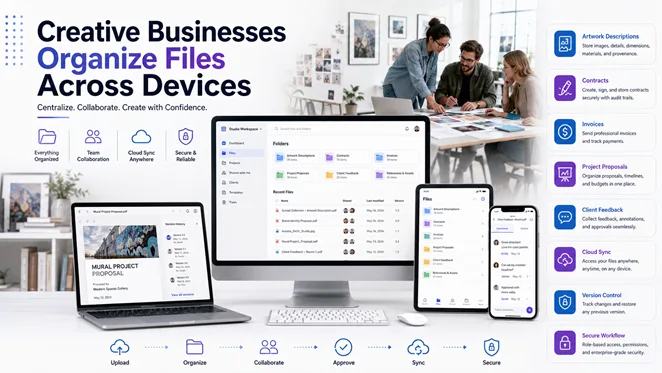
Creative businesses generate far more than visual content. A design agency, media team, photography studio, gallery, marketing department, or independent creator also manages contracts, invoices, project briefs, licensing records, content schedules, press materials, and client feedback.
These files often move between Windows computers, phones, tablets, email accounts, cloud folders, and collaboration platforms. Without a clear workflow, teams can lose track of approved versions, send outdated materials, overwrite client comments, or leave important records on a single employee’s device.
A structured document system does not reduce creative flexibility. It protects the commercial and operational work surrounding each project, helps distributed teams respond faster, and supports business continuity when devices, contractors, or project responsibilities change.
Why Creative Businesses Need Structured Document Workflows
Creative work is commonly organized around projects rather than fixed departments. A single campaign may involve designers, writers, photographers, video editors, account managers, legal reviewers, printers, and external partners. Each participant needs access to specific information, but not necessarily to every file.
When documents are managed informally, recurring problems appear:
- An outdated brief is used after the client has approved a revised direction
- A press kit contains an old biography, image credit, or product description
- A signed contract is mixed with editable drafts
- Different team members act on conflicting feedback
- Invoices, release forms, and licensing records are difficult to retrieve
- Final materials are stored only in chat threads or personal folders
A useful workflow should answer four questions immediately: where the current file is stored, who owns it, which version is approved, and how it can be recovered. Consistent answers reduce administrative work and allow creative staff to focus on production and client outcomes.
Managing Creative Assets, Project Briefs, and Media Materials
Creative businesses often reuse the same information across proposals, websites, press releases, social posts, catalogues, campaign decks, and client reports. A small error in a master description, credit line, release date, or usage term can therefore spread across multiple channels.
Teams should maintain approved source files for recurring information such as:
- Brand descriptions and company profiles
- Artist, executive, or contributor biographies
- Image credits, captions, and usage rights
- Project briefs and production schedules
- Press kits and media contact details
- Content calendars and publication plans
- Artwork, product, or campaign asset lists
Drafts should be stored separately from approved materials. For example, a folder may contain Working Drafts, Client Review, Approved, and Archive subfolders. This is more reliable than leaving several similarly named files in one location.
A clear file name such as Client_Campaign_PressKit_2026-07-11_v03_Approved.pdf tells the team what the file contains and whether it is ready to distribute. Names such as final-new or latest-copy do not provide the same control.
Organizing Contracts, Invoices, and Project Proposals
Contracts and Licensing Records
Creative projects may involve service agreements, licensing terms, image releases, commission contracts, freelancer agreements, exhibition loans, or usage permissions. Each contract should have an obvious status, such as Draft, Under Review, Signed, Expired, or Terminated.
Signed copies should be stored separately from editable drafts and protected from accidental modification. If a project includes licensed photographs, music, illustrations, or footage, the related permissions should remain connected to the asset record so future team members understand how the material may be used.
Invoices and Commercial Records
Invoices should follow a consistent numbering and storage system. The file should identify the client, project, issue date, due date, currency, and payment status. Keeping invoices only in email threads makes it harder to track overdue payments and prepare financial summaries.
Project Proposals
Proposals usually combine creative and commercial details: objectives, deliverables, timelines, revision limits, budget, licensing terms, and payment milestones. When a client approves a change, the team should create a new version rather than silently overwrite the earlier proposal. This preserves a record of what was reviewed and accepted.
Working Across Windows Computers and Mobile Devices
Creative teams move constantly between devices. A designer may prepare a proposal on a Windows workstation, a producer may review it on a tablet during a meeting, and an account manager may approve a correction from a phone while traveling. The workflow should preserve file access, formatting, and version clarity throughout these transitions.
When teams compare document tools or review information related to wps电脑版下载, the relevant business question is whether the software supports real Windows-based work: contract editing, invoice preparation, proposal formatting, comments, PDF export, and controlled access from approved mobile devices.
Before adopting a tool across the company, teams should test actual project files. Proposals with images, invoices with tables, contracts with comments, content calendars, press materials, and client feedback documents may display differently across operating systems or screen sizes.
Mobile access is useful for review, approval, and urgent corrections, but detailed layout work may still require a full desktop environment. A good policy defines which tasks may be completed on mobile and which require a Windows workstation.
Consolidating Client, Editorial, and Production Feedback
Feedback may arrive through email, chat, shared documents, PDF annotations, meetings, and project-management tools. If these comments are not consolidated, creative staff can receive contradictory instructions or revise the wrong file.
Each review round should identify:
- The reviewer and date
- The exact file version reviewed
- The requested change
- The team member responsible
- The approval or completion status
One project owner should resolve conflicting comments and confirm the final instruction set. This is particularly important for media and publishing work, where legal, editorial, client, and brand reviewers may all comment on the same material.
File Naming, Version Control, and Backup
A simple naming convention is one of the most effective controls available to a small creative business. A useful structure is Client_Project_Document_Date_Version_Status. The format should be applied to business documents as well as visual assets.
A new version should normally be created when the scope, price, legal terms, creative direction, or client feedback changes. Minor spelling corrections may not need a major revision, but substantive changes should remain traceable.
Critical documents should also have a secondary backup outside the primary working location. Backups should cover signed agreements, final invoices, approved proposals, licensing records, client approvals, project briefs, and archive materials. The team should test restoration periodically rather than assuming synchronized files can always be recovered.
Choosing Safe Sources for Productivity Software
Software security is part of protecting client and creative information. Unverified download pages may distribute modified installers, unwanted extensions, bundled programs, or tools that upload confidential files to unknown services.
Before installing office software, PDF utilities, converters, or collaboration tools, users should verify the publisher, domain, HTTPS connection, supported operating systems, update history, requested permissions, and any digital signature that is available.
Creative professionals researching wps下载 or other productivity software should confirm that the source is legitimate before installation, particularly when the device stores client files, contracts, unreleased campaigns, financial records, or licensed media.
A small business should maintain an approved software list and require review before employees or contractors install unfamiliar tools. Free converters and unofficial download portals deserve particular caution because the documents processed through them may contain commercially sensitive information.
Establishing Access and Ownership Rules
Not every participant needs access to every document. External photographers, freelance designers, clients, finance staff, and project managers should receive permissions that match their responsibilities.
Each important file category should have an owner responsible for maintaining the approved version, reviewing changes, removing obsolete copies, controlling access, confirming backup, and archiving completed work. Clear ownership prevents the common situation in which everyone assumes another person is maintaining the file.
A Practical Workflow for Creative Businesses
- Create standard project folders for administration, contracts, invoices, briefs, client feedback, working assets, approved materials, and archives.
- Use approved templates for proposals, invoices, release forms, press materials, and review records.
- Assign an owner and approval authority for every important document category.
- Use structured file names containing the project, date, version, and status.
- Consolidate client and editorial feedback into one approved source.
- Review important documents on both the Windows workstation and the mobile device used for approval.
- Move approved files into a clearly marked folder and export final records to PDF when appropriate.
- Maintain a secondary backup and confirm that files can be restored.
- Archive completed projects while preserving contracts, invoices, permissions, and approvals.
Final Document Checklist
- The correct client, project, contributor, or campaign is identified.
- The latest approved version is being used.
- Names, credits, dates, dimensions, prices, and usage rights are accurate.
- Client, legal, and editorial feedback has been incorporated.
- Images, tables, and layouts display correctly across required devices.
- Confidential information is shared only with authorized participants.
- The file name includes the correct version and approval status.
- The final copy is stored in the designated location and included in the backup process.
Final Thoughts
Creative businesses need flexibility in how ideas are developed, but they also need consistency in how project information is recorded. Structured workflows for briefs, contracts, invoices, media materials, client feedback, and licensing records reduce avoidable errors and protect commercial relationships.
A well-organized system connects Windows computers with mobile review, preserves version history, limits access appropriately, and keeps final documents recoverable after the project is complete. It does not restrict creativity; it removes administrative confusion so teams can focus on producing and delivering stronger work.