Image Upscaling in Creative Production: When Drafts Need to Become Campaign Assets
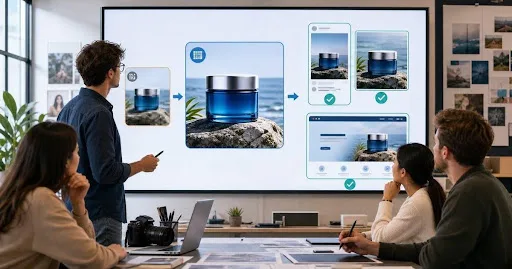
Image upscaling turns a small, rough or low-resolution visual into a larger file that can support real campaign use. For creative teams, that matters because many strong ideas begin as drafts: a product concept, a quick AI image, a cropped photo, a social preview or a layout pulled from an early presentation.
Those drafts can be useful for direction, but they often break down when the team needs to publish. A file that looks acceptable in a planning deck may look soft in a paid ad, compressed on a landing page or unprofessional in an ecommerce listing. Upscaling helps close the gap between idea and production asset when the visual direction is already right.
What image upscaling means
Image upscaling means increasing the size and usable resolution of an image while preserving or improving detail, edges and clarity. A practical image upscaler for campaign assets is useful when a team has a promising image but needs it to hold up across ads, product pages, landing pages, presentations or other high-visibility placements.
A traditional resize makes an image larger, but it does not always add usable detail. AI image upscaler workflows are designed to infer cleaner edges, reduce softness and improve the appearance of details that may have been lost through compression, cropping or low-resolution generation. The result still needs human review, but the file becomes more realistic for campaign production.
When teams need higher resolution
Teams usually need higher resolution when an image moves from internal review to public use. Early creative work often happens quickly, with small exports, compressed screenshots or drafts created for direction. Once the asset is approved, it may need to appear in multiple places where softness, pixelation or unclear edges become obvious.
This happens often in ecommerce and marketing. A product shot may need to move from a thumbnail to a landing-page hero. A social concept may become a display ad. A draft generated for a presentation may be reused in a sales page. In each case, the creative idea is already approved, but the file quality needs to catch up.
Higher resolution is also useful when a team has to create several crops from the same source. A wide landing-page visual may need a square paid-social version, a vertical story version and a tighter product-focused crop. If the starting file is too small, every crop loses detail. Upscaling gives the team more room to adapt the asset without making each version feel degraded.
Product, ad and landing page examples
For product teams, upscaling can help improve visuals that need sharper surfaces, cleaner edges and better detail around labels, packaging or materials. Ecommerce pages depend on trust, and soft product imagery can make even a strong offer feel less reliable. A clean high-resolution product asset gives the page a more finished appearance.
For ad teams, image quality affects performance indirectly. A visual does not need to be huge, but it does need to look crisp after cropping, compression and placement changes. Upscaling can help when a campaign has a strong concept but the original file is too small for paid channels or multiple aspect ratios.
For design teams, the value is often consistency. A campaign may include product images, AI-generated backgrounds, mockups, website visuals and presentation assets. If some images look sharp and others look soft, the full campaign can feel uneven. Upscaling helps teams bring approved visuals closer to the same quality standard before they are exported for final use.
Landing pages create another common use case. A hero image may be viewed on large desktop screens, high-density mobile displays and tablet layouts. If the image is not clean enough, the design can feel unfinished. Upscaling gives teams a way to preserve an approved visual direction while preparing the asset for larger and more demanding placements.
Upscaling vs editing
Upscaling and editing are related, but they solve different problems. Upscaling focuses on size, resolution and visible clarity. Editing focuses on changing the image itself: removing distractions, adjusting composition, replacing a background, correcting color or improving a product detail.
In a real workflow, teams often need both. They may use an AI image generator for creative teams to create the original concept, then improve or upscale the selected version before it becomes part of the campaign. Keter Labs fits this kind of workflow because teams can generate, edit and improve visuals as part of the same creative production process.
Quality checklist before publishing
Before using an upscaled image publicly, teams should review more than file dimensions. They should check whether important edges look natural, whether product details remain accurate, whether text or labels are still readable and whether the image holds up after crop and compression. If the asset is for ecommerce, the product should not be visually changed in a way that misrepresents what is being sold.
Teams should also compare the upscaled version with the original. The goal is improvement, not artificial sharpness. If skin, fabric, packaging, logos or small details look strange, the file needs another pass or manual review. A high-resolution campaign asset should look cleaner, not obviously processed.
It also helps to test the asset in context. Place the image inside the real ad layout, ecommerce module or landing page section before final approval. A file can look good by itself but still feel wrong once copy, buttons, background colors and responsive crops are added. Context review is what turns a cleaner file into a publish-ready creative asset.
FAQ
What does an image upscaler do?
An image upscaler increases the size and usable resolution of an image. AI upscaling can also help improve edges, detail and clarity when a draft needs to become a campaign-ready asset.
When should a team upscale an image?
A team should upscale an image when the visual direction is approved but the file is too small, soft or compressed for ads, ecommerce pages, landing pages or presentations.
Is image upscaling the same as image enhancement?
Not exactly. Upscaling focuses on increasing resolution and usable size, while image enhancement can include clarity, color, lighting, cleanup and other quality improvements.
Can upscaled images be used for ecommerce?
Yes, if the upscaled image remains accurate and does not misrepresent the product. Ecommerce teams should review labels, materials, shape and small details before publishing.
What should teams check after upscaling?
Teams should check detail, edges, crop behavior, compression, product accuracy, brand fit and whether the image still looks natural at the final placement size.
Conclusion
Image upscaling has become a practical step in creative production because campaigns move quickly from draft to public asset. When a visual idea is already strong, teams should not always need to start again simply because the file is too small. A thoughtful upscaling workflow can help turn approved drafts into sharper, cleaner and more useful campaign assets for ads, ecommerce, landing pages and presentations, while still keeping human review in control.