AI Virtual Staging: What to Check Before a Listing Photo Goes Live
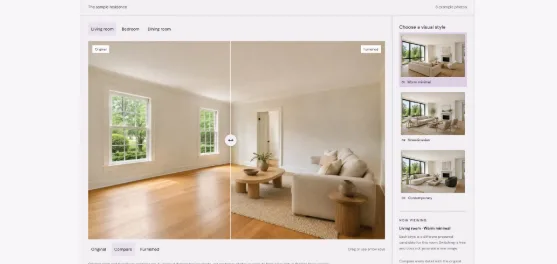
An attractive room is only the first test. Agents and photographers also need to check what changed, what buyers may infer, and what belongs in the final image set.
A sofa can make an empty living room easier to understand. It gives the eye a place to settle and suggests how the space might be used. But a convincing furniture arrangement is not enough to approve a listing photograph. Before publishing, someone still needs to ask: does this image show the same property?
AI virtual staging adds digital furnishings to a room image. For a real estate team, the useful outcome is a clearer illustration of the space. The review process should therefore look beyond the furniture and examine the room around it.
The following workflow is an editorial checklist for agents and property photographers. It is not a test of a particular tool, and the accompanying images are synthetic illustrations rather than photographs of a property for sale.
Start with the empty room
Keep the source image open beside the furnished version. Before judging the design, identify a few fixed reference points: window frames, the doorway, ceiling lines, wall corners and the direction of the floorboards.
In the empty-room illustration below, two windows sit along the left wall and an open doorway appears toward the back. Those features provide a useful inspection route. Start at one window, follow the wall to the second, then examine the doorway and the adjoining floor.
Empty-room illustration from the Virtual Staging Desk example library. Synthetic image; not a customer property photograph.
This approach gives the review a repeatable order. It is easier to spot an unexplained change when comparing specific features than when switching between images and asking whether they look roughly similar.
Separate furniture choices from changes to the property
A different sofa color is a design choice. A missing window or an altered doorway changes what the image says about the property. Treat those as different kinds of feedback.
The furnished illustration adds a sofa, an armchair, a rug and a coffee table. It offers a concrete way to discuss a seating arrangement. It does not establish the room’s dimensions, prove that particular furniture will fit, or demonstrate the performance of a live editing session.
Furnished concept from the same example library. Synthetic illustration, not a measured furniture plan or a verified product test.
For a real listing, compare the output with the actual source photograph. Check fixed finishes as well as geometry. A wall should not lose visible damage simply because furniture has been added, and the view through a window should not become a different landscape.
If a change cannot be checked because the new furniture covers it, return to the original. Do not treat the absence of a visible problem in the edited image as evidence that the problem has been resolved.
Review the layout from a person’s point of view
Next, follow the route a person would take through the room. Can they enter without meeting the back of a sofa? Does a chair appear to obstruct a door? Is a dining table placed where it would make circulation awkward?
These are visual screening questions, not measurements. A photograph alone cannot confirm clearance or furniture dimensions. Where fit matters, check the actual room and the proposed furniture measurements rather than relying on the image.
Then inspect contact points. Look at chair legs where they meet the floor, the edges of a rug, and the relationship between furniture and skirting boards. Also check mirrors and reflective surfaces: a reflection that does not match the furnished scene can make an otherwise plausible image confusing.
Use a short approval table
| Check | What to compare | What to do if it is unclear |
| Fixed features | Windows, doors, wall corners and ceiling lines | Reject unexplained changes and return to the source |
| Surfaces and condition | Flooring, finishes and visible defects | Check the original; do not approve concealed alterations |
| Furniture and movement | Apparent scale, entrances and walking routes | Simplify the layout; verify dimensions separately |
| Rendering details | Legs, edges, shadows and reflections | Request a specific correction or discard the version |
| Presentation | Image labels, captions and accompanying originals | Review the destination’s current requirements before uploading |
The table works best when one person owns the final decision. Other team members can flag issues, but a single reviewer should confirm which version is approved and which source photograph it belongs to.
Give corrections that an editor can act on
“Make it more realistic” leaves too much open to interpretation. A useful revision identifies the object, the problem and what should stay unchanged.
For example: “Remove the chair beside the rear doorway. Keep the windows, door frame, floor finish and remaining furniture unchanged.” This is an illustrative brief, not a guarantee that any particular tool will follow every constraint. The revised result still needs another comparison with the source.
When exploring tools such as Virtual Staging Desk, an AI-assisted photo editing tool for real estate listing workflows, bring that same brief to the evaluation. Judge whether the output is suitable for the photograph and the intended use, rather than choosing a version simply because it is the most decorative.
Prepare the images as a set
Save the original, the selected furnished version and the approval notes together. Clear filenames, such as living-room-original and living-room-virtually-staged, help prevent a draft from being mistaken for a finished image.
Make the nature of the illustration clear to viewers. Before uploading to a listing service, check its current rules for digitally altered images, including any labeling or original-image requirements. This checklist does not replace those destination-specific instructions.
Finally, view the selected image at the size buyers are likely to see, then inspect it at full resolution. The smaller view tests whether the room is understandable; the larger view helps reveal editing details that a thumbnail can hide.
A useful staged image gives buyers a furnishing idea while leaving the property itself recognizable. Approval should depend on both parts of that sentence.