Smart Locks for a Residential Building: What to Test With Residents Before You Order for Every Door
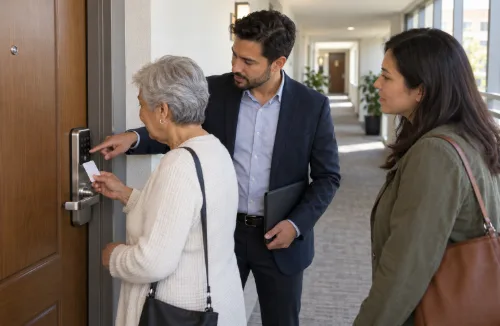
A pilot floor tells you whether a smart lock fits the doors and whether the software does what the supplier says.
It is also the best time to find out how residents manage the new lock before the whole building switches. That side of the pilot is easy to cut short, and problems that reach every door at once are harder to fix than problems on one floor.
For a building considering SivoLock smart locks, the pilot should test how residents enter, recover from a failed attempt and get help—not just whether the lock opens during a demonstration. Those everyday tasks give the trial a practical starting point.
Define What “Works for Residents” Means
ISO 9241-11, the international standard on usability, defines it as “the extent to which a system, product or service can be used by specified users to achieve specified goals with effectiveness, efficiency and satisfaction in a specified context of use.” The standard gives a framework rather than a procedure for testing locks with residents. One practical way to apply it to a pilot:
- Specified users: the people who actually live in the building, not the staff who chose the lock.
- Specified goals: the everyday tasks, such as getting into your own home, leaving and locking up, letting a visitor in, and getting in or out when something goes wrong.
- Effectiveness: was the task completed correctly? Record separately whether the resident needed help, and what kind.
- Efficiency: how long did it take, and how many attempts?
- Satisfaction: what do residents say about it after a few weeks of use?
- Context of use: at the real door, carrying shopping, at night, and in the weather if the door is outside.
When you record help, separate the support a resident normally relies on, such as a magnifier, a walking aid or a carer, from prompting by the person observing. A resident who opens the door in their usual way, with their usual help, has completed the task. A resident who needed the observer to explain the next step has found a problem with the lock or the instructions.
Choose Pilot Residents on Purpose
Volunteers for a pilot can easily be the residents most comfortable with technology. If they are the only ones who take part, the pilot is likely to look better than the rollout. Include, with their agreement:
- older residents;
- residents with limited vision, hearing or dexterity;
- residents who do not use a smartphone, or do not want an app;
- residents who read the building’s main language less well;
- households with carers, cleaners or regular visitors.
A resident association or house committee can help find people. Ask each participant which tasks matter most to them, and record how they normally use the door, including any aids or help they rely on.
Prepare Residents Before Installation Day
Tell pilot residents in writing what will change, when the installer will come, how long their door will be out of normal use, and who to call if something goes wrong that day. Check the notice your leases and local rules require before anyone enters a home to install. On installation day, have each resident try their own credential at their own door before the installer leaves, so a problem is found while help is still on site.
Test Everyday Use With Residents Who Have Different Needs
Ask residents with limited vision, hearing or dexterity to use the lock in front of you, the way they normally would. Can they find and press the keys, read any display in daylight and at night, hear or see the confirmation, and turn the handle with a bag in the other hand? Check leaving as well as arriving: watch each resident open the door from inside, as they would on the way out. Note anything that only works with help from the observer, and raise it with the supplier before the rollout, not after.
Treat the Non-App Route as a Full Route
Pew Research Center’s 2026 survey found that about nine in ten U.S. adults own a smartphone. That is a national figure, not a profile of your building, and some people who do own a phone will not want an app for their front door. Ask your own residents, and plan for those who will use another route. Depending on the model and the project, that may be a PIN, a card or fob, or a mechanical key.
Test that route from start to finish, the same way as the app: how a resident is enrolled, how a lost card is replaced, how a forgotten PIN is reset, and how the resident gets help. A route that exists on paper but needs a supplier visit every time is not a working option.
Local rules may also set requirements. New York City’s Tenant Data Privacy Law, for example, says owners of the buildings it covers may not “require use of a smart access system to gain entry to the tenant’s dwelling unit,” and it counts key fobs and other digital methods, not only apps, as smart access systems. Check the rules where your building is before deciding which credentials to offer.
Write the Instructions, Then Test Them on Someone New
Supplier manuals are often written for installers and administrators. Residents need a short guide: one page for the everyday tasks, in the languages your residents use, with a phone number or desk for help.
Test it on a resident who has not seen a demonstration. Hand over the guide and the credential, then watch without helping. Note where they hesitate, what they misread and where they give up. Revise the guide and test it again on someone else.
Test the Situations Residents Worry About
Exceptions are where residents need help, so plan each one as an exercise. Agree it with the participating resident in advance, use a test credential or a simulated fault where the system allows it, keep an immediate way back in, and never leave anyone without normal access to their home. Run at least one exercise outside office hours, with staff ready to step in, to see the support response a resident would really get.
- Locked out: a dead battery, a lost card or phone, a forgotten PIN. How does the resident get in, who do they contact, and how long does it take on a weekday evening or a weekend?
- Battery or network fault: can the resident still get in by the agreed route, and leave from inside as normal?
- Low battery: who notices the warning, the resident or the building staff, and who changes the batteries?
- Visitors and helpers: test the policy the building has chosen. If residents can give a carer, a cleaner or a family member temporary access, can they set it for a time and end it again? If management issues it, how does a resident ask, how long does approval take, and how is access withdrawn?
- Someone moves in or out of the household: can access be added or removed for one person without affecting the others?
Record each result the same way as the everyday tasks: completed or not, the help needed, the time taken, and what the resident had to do.
Tell Residents What the Lock Records
Depending on the system, logs may record credential use or unlocking events. A record of the door actually opening needs door-status detection, which not every lock has, so confirm what each event in your system represents. Residents will ask about it, and in some places the law sets the rules. Before the pilot, write down what the system records, who in the building and at the platform provider can see it, how long it is kept, how it is deleted and what it is used for. Check that this matches the platform’s actual settings, then give it to participants in plain language.
New York City’s Tenant Data Privacy Law shows the kind of conditions that can apply. For the buildings it covers, owners must provide a data retention and privacy policy and obtain express consent, in writing or through a mobile app, before collecting reference data. Collection is limited to the minimum needed from a listed set of data, and authentication data must be destroyed within 90 days unless it is anonymized. The data may not be sold, leased or disclosed except as the law allows, or used to harass or evict a tenant. Other cities and countries have their own rules, so check the ones that apply to your building and to the lock’s software platform.
Measure, Then Decide
Agree the acceptance criteria before the pilot starts: which tasks each group must complete, how much help is acceptable, and what support response counts as working. At the end, put the results for each task side by side:
| Measure | What to record |
|---|---|
| Completed correctly | For each task and each group of residents |
| Help needed | The resident’s normal aids or support, and any help from the observer or staff |
| Time and attempts | Typical and worst cases, not only the average |
| Support requests | Number and type, and how each was resolved |
| Resident feedback | Short survey answers and comments, for example: how easy is it to get in? Did you need help, and for what? What would you change? |
| Open issues | Each with an owner, a next step and a retest date |
A pilot on one floor cannot show that every resident in the building is ready. What it gives you is evidence for the rollout decision: whether each group completed the everyday tasks, whether the non-app route worked end to end, whether the lockout procedure worked out of hours, whether the revised instructions held up, and whether the privacy information matches the system. Correct significant problems and retest them before ordering for every door. Where a problem lies in the hardware, such as keys some residents cannot press or a display they cannot read, the answer may be a different model or installation, not new instructions. For residents who still have difficulty, plan suitable arrangements, such as a different credential or extra support, rather than expecting every household to adapt to one setup.
The resident side is one part of a pilot. For choosing the pilot doors, recording the configuration being tested and setting acceptance criteria for the hardware, see SivoLock’s guide to planning a smart lock pilot installation.
References
- International Organization for Standardization: ISO 9241-11:2018, Ergonomics of human-system interaction, Part 11: Usability: Definitions and concepts (BSI preview of BS EN ISO 9241-11:2018)
- Pew Research Center: Mobile Fact Sheet
- NYC Department of Housing Preservation and Development: Tenant Data Privacy Law
FAQS
Which residents should join a smart lock pilot?
Include older residents, people with limited vision, hearing or dexterity, people without smartphones, residents who read the main language less well, and households with carers.
Do residents need a smartphone app?
Plan a non-app route such as a PIN, card, fob or mechanical key, and test it fully from enrollment to replacement. Some local laws, such as NYC’s Tenant Data Privacy Law, limit requiring smart access.
Which problem situations should I test?
Lockouts, battery or network faults, low-battery warnings, visitor and carer access, and someone moving in or out of the household.
How do I measure pilot success?
Record task completion, help needed, time and attempts, support requests, resident feedback and open issues. Agree acceptance criteria before the pilot starts.