AI PPT Maker Gives Concert Planning a Clearer Shape
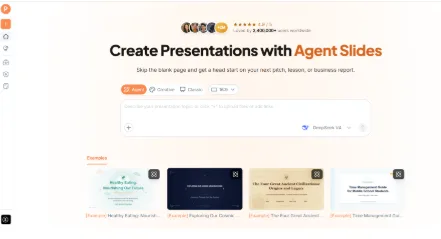
The proposed concert contains several strong pieces, but the program still needs a coherent shape. The conductor, performers, and organizing team may be thinking about different aspects of the same evening. AI PPT Maker can help turn program notes into a presentation draft for that planning conversation.
This is a useful test of the product’s organizing capabilities. A concert plan needs to explain the artistic idea while keeping practical questions visible.
The presentation should show how the proposed pieces relate, what remains provisional, and which decisions the team needs to make next.
(Create presentations with AI PPT Maker)
A Program Is More Than a List of Titles
A concert’s sequence affects how the audience experiences it.
The planning discussion may consider contrast, continuity, and the relationship between sections. Those ideas need explanation, especially when colleagues are unfamiliar with the proposed repertoire.
Write a short account of the program’s guiding idea before generating slides.
AI PPT Maker can use that account alongside the current proposal. The draft becomes more useful when it has a reason for the sequence rather than only a list to summarize.
Give Each Selection a Place in the Whole
Explain why a piece belongs in the program.
It may introduce the central theme, create a contrast, or connect with another selection. Use the reasoning actually recorded by the team.
Do not ask the presentation to manufacture historical or musical significance.
A concise deck should make the artistic thinking easier to follow without extending beyond the sources.
Mixed Input Suits a Program Built from Several Sources
AI PPT Maker supports mixed input across Agent, Creative, and Classic, including text, uploaded files, webpages, and video sources.
For concert planning, the written proposal might be supplemented with explanatory notes or relevant reference sources.
Clarify the role of each item. A reference performance can provide context, while the approved program notes govern what is being proposed.
The benefit is being able to bring the source material and the presentation instructions together without rewriting everything into one file.
Separate Confirmed Arrangements from Possibilities
A proposed guest performer is not a confirmed participant. A tentative sequence is not the final program.
Label those differences in the source notes.
A useful instruction would be:
Create an internal program-planning presentation. Explain the artistic idea, proposed sequence, confirmed arrangements, and open questions. Keep tentative selections and unconfirmed participants clearly labelled. Do not invent durations, availability, or historical facts.
That boundary makes the draft easier to review.
Agent Helps Explain the Artistic Reasoning
Agent mode in AI PPT Maker supports multi-round conversation.
If the draft lists pieces without showing their relationship, a follow-up can add direction:
Explain the contrast between these two proposed sections using the notes provided. Keep the explanation accessible to colleagues who are not performers.
Another could ask for a clearer account of why the opening selection supports the program’s idea.
This feature is useful because the brief can develop through specific additions.
Agent exports PPTX for continued editing in PowerPoint.
(AI PPT Maker Agent presentation preview)
Outline Review Reveals an Unbalanced Presentation
All three modes in AI PPT Maker allow outline review and adjustment before generating slides.
The outline is the right place to check whether the presentation gives the artistic concept enough space without neglecting practical decisions.
A deck that devotes most of its pages to background may leave little time to discuss the actual program.
Keep the Meeting’s Purpose Visible
The team may be reviewing the overall direction, comparing two sequences, or identifying preparation needs.
Choose one main purpose and organize around it.
For a sequence comparison, use the same questions for each option: what experience does it create, what changes, and what would need further work?
AI PPT Maker can organize the material into a draft that makes those differences easier to discuss.
Practical Details Need Their Own Treatment
A concert proposal may include preparation needs, participant arrangements, and scheduling considerations.
Use the information confirmed by the responsible people. Where a duration or requirement remains unknown, preserve that gap.
The presentation should not turn an estimate into a settled fact simply to complete a slide.
This is where AI PPT Maker’s usefulness depends on the quality of the brief and the care of the review.
Show What Needs to Happen Next
An open question should lead to a clear next action.
Someone may need to confirm a participant, review a sequence, or supply missing information. State that action without implying it has already happened.
The deck then supports coordination as well as artistic discussion.
It becomes a working presentation rather than a decorative description of an imagined evening.
The Three Modes Serve Different Needs
Creative in AI PPT Maker emphasizes visual expression and exports PNG images. It may suit concept pages where the visual atmosphere supports the idea.
Agent and Classic support PPTX downloads, useful for a planning deck likely to receive wording changes.
Classic offers a template-based workflow with more than 1,000 templates available. It also provides PDF, Keynote, and outline downloads in TXT or Markdown.
An outline download can help the team inspect the structure without focusing on the designed pages.
Visuals Should Support the Program
Agent includes AI image generation.
A conceptual illustration may be appropriate when clearly labelled, but it should not imply that it documents an actual performer, venue, or historical event.
Use approved material where the presentation describes real arrangements.
For an internal planning meeting, a simple, readable deck may work better than extensive imagery. The audience needs space to discuss the choices.
The Review Standard Is a Productive Conversation
Check titles, names, stated arrangements, and factual background against the current notes.
Agent also supports sharing a conversation link, which can help a colleague understand the presentation brief. That capability should not be confused with live co-editing.
Other options include PPT Maker and NoteGPT’s AI Slide Generator. AI PPT Maker is interesting here for the combination of mixed input, conversational development, and outline review.
Bring the Program into Focus
AI PPT Maker offers a practical way to organize concert-planning material into a presentation with a clear artistic idea and visible next steps. Start with the proposed sequence, explain the reasoning, and review the outline before generating slides. Try AI PPT Maker(https://aipptmaker.ai/) for your next program meeting, then verify the details with the organizing team. Keep PPT Maker(https://pptmaker.io/) in mind as another option as the program develops.