
Build a Digital Spokesperson With an AI Avatar Generator
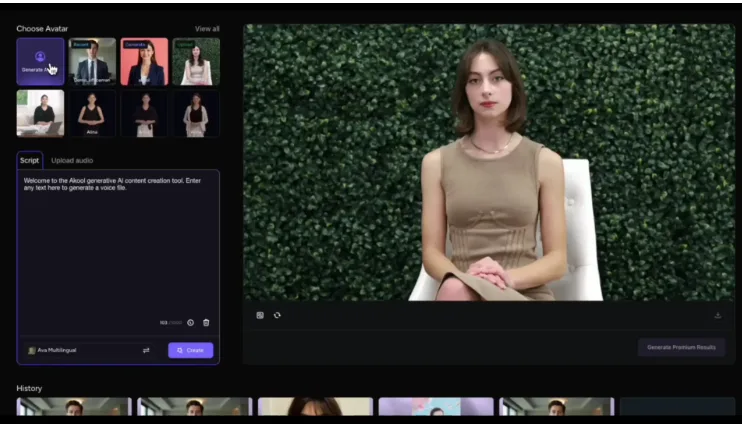
Brands that show up with a familiar face tend to be easier to remember. Large companies pay for ambassadors and studio crews to get that effect. Small businesses, course creators, and lean marketing teams usually cannot, which is why their video output often looks inconsistent or simply does not happen.
A digital spokesperson offers a middle path. Instead of a one-off clip, you create a recurring character who greets customers, explains features, and narrates lessons in the same voice and style every time. The value comes from design and consistency, not from the novelty of a synthetic face.
This guide treats the spokesperson as a brand asset you build in stages: defining the role, shaping the look and voice, writing for a series, reusing content across channels, and measuring what works. Follow the stages in order and you will have a repeatable system rather than a single experiment.
Define the Role Before You Pick a Face
A spokesperson is a job, not a picture. Before you open any tool, write down what this character will do: welcome new customers, walk through setup, introduce weekly lessons, or answer common support questions. The role shapes everything else, from script length to tone. A guide who helps with onboarding should sound patient and clear, while one who announces promotions can be brisk and upbeat.
Once the role is settled, an AI avatar generator becomes a production tool instead of a novelty. You are no longer asking what the software can do, but what your audience needs to see, and whether a presenter helps deliver it. Answer these questions on one page:
- Who watches, and what do they already know?
- What single action should they take after each video?
- How formal or friendly should the character sound?
- Which topics will the spokesperson never cover?
That last question is easy to skip and surprisingly useful. Clear limits keep the character credible and make review faster.
Design a Look and Voice That Fit Your Brand
Audiences form an impression of a presenter within seconds, so the visual and audio choices should support the role you defined rather than simply look pleasant.
Appearance, wardrobe, and setting
Choose a style that your customers would expect from your industry. A financial service benefits from a calm, tidy look, while a creative studio can afford more personality. Keep the wardrobe and background simple and consistent between videos, using brand colors in the setting instead of loud patterns that distract from the speaker. Consistency matters more than variety here, because recognition builds with repetition.
Voice, accent, and language
Match the voice to the audience. A clear, neutral accent suits international viewers, while a regional voice can feel more personal for local customers. Test a short passage with product names and numbers before committing, as mispronunciations break trust quickly. If you plan to serve several languages, pick a voice style that has equivalents in each, so the character feels like the same person everywhere.
Write Scripts for a Recurring Series
Series work differently from standalone videos. Viewers return when they know what to expect, so give each episode the same simple shape: a short greeting, one idea, one example, and one next step. Keeping the structure steady also makes scripts faster to write and easier to review.
Write for the ear. Use short sentences, direct address, and everyday words. Read each script aloud and cut anything you stumble over, because a synthetic voice will stumble in the same places. Aim for lengths that fit the channel: brief for social feeds, longer for help articles and lessons.
Plan a batch of episodes at once. A list of ten topics drawn from customer questions, sales calls, and support tickets gives you a content calendar and prevents the blank-page problem. Draft all scripts, review them together for tone, and generate in a batch so the character sounds the same from the first episode to the last.
Plan Reuse Across Channels
One recording session can feed many placements when you plan for it. A full-length lesson can be cut into short clips for social posts, a greeting version can sit on your homepage, and a single answer from a support video can be embedded in the matching help article.
Adapt the format, not the character. Vertical crops with large captions suit mobile feeds, while wider framing with room for slides works better for tutorials. Add captions everywhere, since many viewers watch with the sound off, and keep the presenter’s position in the frame consistent so cuts feel intentional.
Store your assets in an organized way. Keep scripts, final exports, and thumbnails together by episode, along with a note on which voice and look settings were used. When a product changes, you can update a single script, regenerate the affected clip, and replace it wherever it appears.
Measure What the Spokesperson Actually Does
A character is only worth maintaining if it helps. Choose a few measurements tied to the role you defined at the start. For onboarding, track completion of the setup steps. For lessons, watch how long students stay and where they drop off. For support, look at whether viewers still open tickets on the same topic after watching.
Review results every few weeks and adjust. If viewers leave early, shorten the opening. If a certain topic performs well, build more episodes around it. Tools such as AKOOL make regenerating a revised script simple, which keeps this test-and-improve cycle realistic for a small team.
Gather qualitative feedback as well. A short question under the video asking whether it answered the viewer’s question will tell you more than a dashboard. Be open about the use of a digital presenter, and refresh the character’s look only occasionally, since stability is part of what makes it feel like yours.
A Spokesperson Is a System, Not a Single Clip
The strongest digital spokespeople are not the most realistic ones. They are the ones with a clear job, a consistent look and voice, and scripts written for a series that audiences want to follow. Technology makes the production possible, but planning makes it effective.
To begin, write the role on one page, choose a simple appearance and voice, and draft a batch of short scripts from real customer questions. Generate one episode, review it with a colleague, and publish it in a single channel. Then watch the numbers that matter for the role and refine. Within a few cycles you will have a repeatable process, and a face your audience begins to recognize.