Calilio Review 2026: Pricing, Features, Pros & Cons
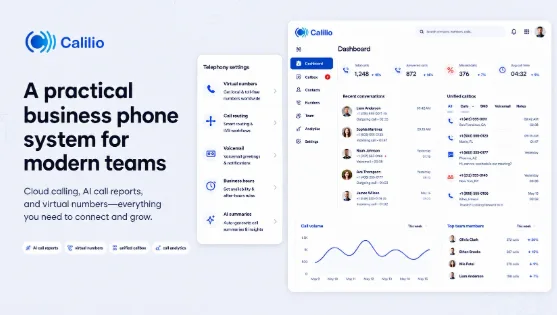
Choosing a business phone system is difficult when every provider promises easier calling, better service, and lower costs. The wrong choice can leave teams dealing with missed calls, scattered messages, and tools that fail to support daily communication. To see how Calilio performs beyond those claims, we reviewed its current product documentation, pricing, feature information, and verified user feedback from independent software review platforms.
Calilio combines business calling, SMS, virtual phone numbers, call management, and AI-powered call analysis in one cloud-based platform.
However, teams that rely heavily on built-in video conferencing or many integrations may need to use additional tools alongside it. This Calilio review looks at its key features, benefits, usability, and overall value to help you decide whether it fits your business communication needs.
Why Traditional Business Phone Systems Feel Limiting for Modern Teams?
Traditional business phone systems can create several challenges for modern teams:
- Limited mobility: Employees often need to depend on desk phones, making remote and hybrid work less convenient.
- Difficult to scale: Adding new users, phone lines, or office locations requires additional hardware and setup.
- Higher maintenance costs: Older systems need regular maintenance, upgrades, and technical support.
- Limited integrations: Traditional systems may not connect easily with CRM software, messaging tools, or other business applications.
- Fewer call insights: Many older systems offer limited analytics, reporting, and call management features.
As teams become more distributed and businesses grow faster, they need phone systems that are flexible, scalable, and easier to manage.
How We Reviewed Calilio?
This review is based on Calilio’s current product documentation, pricing information, feature details, and verified feedback from users on platforms such as G2 and Capterra. We evaluated its capabilities, pricing, usability, and limitations based on these sources rather than conducting a controlled long-term hands-on test.
Why Is Calilio a Practical Business Phone System for Modern Teams?
What stood out to me while reviewing Calilio is how much of the everyday business calling process it brings into one place. Your teams can make and receive calls from their computer, mobile device, or browser instead of being tied to an office desk phone. Features like IVR, call forwarding, business hours, and voicemail also make incoming calls easier to manage.
For managers, call recording, live monitoring, and AI-generated call reports provide a clearer picture of customer conversations and team performance. Calilio also offers virtual numbers from 100+ countries, which makes it a practical option for businesses managing local or international communication.
How Easy Is Calilio to Set Up and Use?
Calilio is relatively straightforward to set up, especially for teams moving away from traditional phone systems. Since it is cloud-based business phone system, there is no need to install PBX hardware or complex phone equipment. Businesses can create an account, add team members, choose or port business numbers, and configure call settings such as IVR, business hours, voicemail, and call forwarding from the dashboard.
The interface keeps calling, messaging, contacts, and call records in one place, which makes everyday use easier for both agents and managers. Overall, the setup process feels practical for businesses that want to get started without dealing with complicated infrastructure.
The Calilio Features That Matter Most for Business Telephony
Calilio’s most useful features for business telephony include AI call reports, unified callbox, virtual phone numbers, inbound call management, power dialer, live call monitoring, and call analytics.
- AI Call Reports: After each call, Calilio creates a transcript, summary, call reason, conclusion, and sentiment analysis. This makes it easier to review conversations without listening to the entire recording.
- Unified Callbox: Instead of keeping calls, messages, voicemail, recordings, notes, and AI reports in separate places, Calilio brings them together in one communication history. This gives team members a clearer view of previous customer interactions without requiring them to manage separate communication histories.
- Virtual Phone Numbers: Calilio offers local, mobile, and toll-free numbers from more than 100 countries, which makes it easier to build a local presence in different markets.
- Inbound Call Management: Features like IVR, business hours, call forwarding, transfers, and voicemail make incoming calls easier to organize. IVR can route callers to the appropriate team or destination according to their keypad selection. Some advanced routing features, however, are limited to higher plans.
- Power Dialer: For outbound calling, Calilio’s power dialer automatically moves through a contact list one number at a time. Preview periods give agents time to review contact information before a call, while post-call periods allow them to add notes and dispositions afterward. The feature reduces repetitive manual dialing for sales and outbound teams, although it is not included in the entry-level plan.
- Live Call Monitoring: Calilio gives supervisors three ways to support agents during live calls: listening, whispering, and barging. These capabilities are particularly useful for agent training, quality assurance, and handling difficult customer interactions. These tools are available on the premium plan.
- Call Analytics: The analytics dashboard gives a simple view of call volume, missed calls, answered calls, busy hours, and agent activity. When combined with AI reports, the data becomes more useful because teams can see both what happened and why the customer called.
- AI Receptionist: Calilio’s AI Receptionist uses an AI voice agent to answer incoming calls and communicate with customers based on the predefined knowledge provided by the business. This helps you handle routine caller questions and reduces the need for team members to attend every incoming call manually.
- Bulk SMS: With bulk SMS feature, Calilio lets businesses send text messages to multiple customers at once and create, schedule, and monitor SMS campaigns. This is useful for sending promotions, appointment reminders, alerts, and updates without contacting customers individually.
- Call Flip: Call Flip lets users move an active call from one device to another without disconnecting the caller. This makes it easier for employees to continue important business conversations when switching between a desktop, browser, or mobile device.
Calilio Pricing
Calilio offers three pricing plans. Standard covers basic business calling, while Premium includes most of the AI, sales, and call center tools that make the platform stand out.
| Plan | Price | Key Features | Best Suited For |
| Standard | $15/user/month or $12/user/month, when paid annually | Unified callbox, global virtual numbers, web and mobile calling, voicemail, call forwarding, number sharing, notes and tags, basic analytics, and one local US or Canada number per user. | Solopreneurs, startups, and teams of up to 10 users that mainly need calls, SMS, and basic call management. |
| Premium | $35/user/month or $28/user/month when paid annually | Everything in Standard, plus call summaries, sentiment analysis, IVR, business hours, call transfer, live listening, whispering, and power dialer. | Growing sales teams, support departments, franchises, and call centers that need automation, monitoring, and call insights. |
| Enterprise | Custom pricing | Everything in Premium, plus advanced call strategies, developer support, a dedicated account manager, and phone and WhatsApp support. | Larger organizations with complex call flows, higher usage, custom integration needs, or dedicated support requirements. |
The Standard plan is affordable, but it leaves out several of Calilio’s strongest features. Teams that need AI call reports, IVR, live agent coaching, or the power dialer will need the Premium plan.
Calilio Strengths and Limitations
Calilio combines a simple interface with practical calling, messaging, monitoring, and AI-powered features. Customer feedback is generally positive, with Calilio rated 4.7/5 on G2 and 4.3/5 on Capterra. Its main strengths are ease of use, virtual number availability, and call management, while its main limitations are a smaller integration ecosystem and the lack of built-in collaboration tools such as video conferencing.
| Strengths | Limitations |
| Easy-to-navigate interface | Smaller native integration ecosystem than some established UCaaS providers |
| Virtual phone numbers available in 100+ countries | No built-in video conferencing |
| AI call reports for transcripts, summaries, sentiment, and call insights | Limited broader workplace collaboration features |
| Unified callbox keeps calls, messages, voicemail, notes, and reports together | Some advanced features are available only on higher-tier plans |
| Live call monitoring with listening, whispering, and barging | |
| Useful inbound and outbound call management tools |
These considerations do not remove the platform’s value, but they are important when deciding whether its communication model matches a company’s actual requirements.
Who Should Use Calilio?
Calilio is a practical option for businesses that want to manage calls, messages, and customer conversations from one cloud-based platform.
It is especially useful for:
- Small businesses who want to replace traditional office phones
- Sales teams handling regular outbound calls
- Support teams managing customer enquiries
- Remote and hybrid teams working across locations
- Call centers that need monitoring and reporting tools
- Businesses using virtual numbers in different countries
Calilio is best suited to teams that rely mainly on calls and SMS and want useful call insights without investing in a large enterprise communication system.
Conclusion
Calilio is a practical cloud phone system for businesses that want calling, SMS, virtual numbers, and AI call insights in one place. During our review, its simple interface, unified callbox, international numbers, power dialer, call monitoring, and AI reports made it useful for sales, support, remote, and call center teams.
The Standard plan works for basic business telephony, but most of Calilio’s stronger tools require the Premium plan. Its limited integrations and lack of built-in video conferencing also make it less suitable for businesses looking for a complete unified communications suite.
Overall, Calilio is worth considering if your team mainly relies on calls and messaging and wants useful automation without the cost or complexity of a larger enterprise phone system.