
EHOMEWEI M2 Air: The First Portable Monitor with Touch Support for an Extended iPad Display—More Than Just a Second Screen
Company Overview
While most portable monitors stick with some variation of a plastic shell and a hinged stand, the EHOMEWEI M2 Air takes a different approach. Its 16-inch Mini LED display and all-aluminum stand are two separate pieces, with precision CNC machining that gives the hardware a MacBook-like finish. The stand folds neatly into place for storage and offers stepless angle adjustment and 360-degree rotation when in use, making it easy to switch between landscape and portrait.
What really sets it apart from a typical second screen, though, is that it is the world’s first portable monitor with touch support for an extended iPad display. Connect it with a single USB-C cable, and you can tap, swipe, and drag directly on the external screen with your fingers or a stylus, much as you would on a second iPad. Add a pen with 4,096 levels of pressure sensitivity, and the experience becomes considerably more useful for designers, note-takers, and video editors than a display-only setup.
The display specifications are equally impressive: a 16-inch Mini LED panel, 1,024 local dimming zones, 2.5K resolution, a 240Hz refresh rate, 1,000 nits of peak brightness, and 100% DCI-P3 coverage. Even alongside a professional desktop monitor, its HDR dynamic range and black levels stand out.
Premium materials and distinctive features come at a premium price. If you want a tool that fits into your workflow and makes it easier to work, the M2 Air deserves a closer look. It is especially well suited to heavy iPad users, creative professionals, and people who want a desktop-like experience in a portable setup.
Design and Build Quality
Portable monitors tend to fall into two camps: plastic models with a basic stand, or metal slabs with a hinged kickstand that offers only limited ergonomic adjustment. The M2 Air takes a different approach. The 16-inch display and aluminum stand are separate pieces, both made from anodized aluminum with precision CNC machining. The finish feels right at home next to a MacBook. It feels solid in the hand, and the screen itself looks like an oversized tablet.
Portable Design and Adjustable Stand
The way it packs away is clever. Detach the stand from the back of the display, fold it down, and it fits snugly into the base area, with no protruding parts to catch on your backpack’s lining. At about 7mm thick, with the display weighing 1,150g and the stand another 592g, the setup is easy enough to slip into a bag.
To set it up again, clip the stand onto the back of the display and reconnect it at the mounting point. From there, you can adjust it to suit your workspace. The stand offers stepless angle adjustment and 360-degree rotation for landscape or portrait use, while nonslip pads keep it stable on the desk.
Touch Support for Extended iPad Displays
The biggest change in this generation goes beyond the hardware design. The M2 Air is the world’s first portable monitor to support touch input on an extended iPad display. Connect it to an iPad with a full-featured USB-C cable, download the EHOMEWEI app from the App Store, and you can use your fingers or a stylus directly on the external screen.
Drag files, tap apps, or swipe through web pages, just as you would on a second iPad. For design work, note-taking, and video editing, that makes for a very different experience from using a conventional portable monitor. The screen supports 10-point multitouch and gestures, and the Microsoft MPP-certified pen offers 4,096 levels of pressure sensitivity, very low latency, and a writing feel that comes close to paper.
Connectivity and Compatibility
Connectivity includes USB-C and HDMI. A single-cable connection to a laptop, phone, or game console can carry both video and power, without a separate power supply.
Flexible Viewing and Workspace Setup
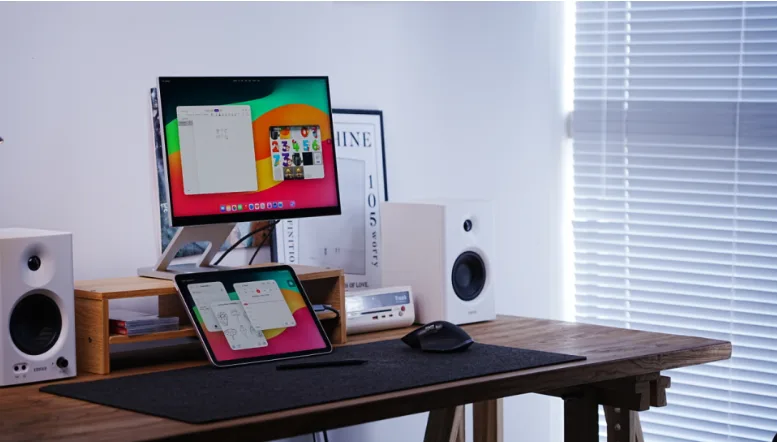
Set it beside a MacBook in landscape, turn it vertically for a sidebar of apps, or raise it above an iPad Pro for a more comfortable viewing height. That flexibility gives the setup the feel of a full-size desktop monitor.
Display Quality and Specifications
The display does not cut corners, either. You get a 16-inch Mini LED panel with 1,024 local dimming zones, 2.5K resolution (2560 × 1600), a 240Hz refresh rate, 1,000 nits of peak brightness, and 100% DCI-P3 coverage. Whether I’m editing video, browsing the web, or gaming, the image looks sharp and motion feels smooth. I put it beside my 5K BenQ monitor, which is rated at 400 nits, and HDR content showed a clear improvement in dynamic range and detail. The deeper blacks made possible by local dimming were especially noticeable. Colors look vivid without feeling oversaturated, and viewing angles are comfortably wide. It also supports both 16:10 and 16:9 aspect ratios, so switching between different types of content is straightforward.
Real-World Usage and iPad Experience
I mainly use it in two ways. The first is with my iPad. The windowed multitasking introduced in iPadOS 26 has made the iPad a much more capable work device. I edit videos in LumaFusion on the iPad’s own screen, while ChatGPT, Twitter, and other productivity apps sit on the M2 Air. Because the extended display supports touch, I can use my fingers or the pen directly on that screen instead of constantly reaching back to the iPad. When I’m done, the whole setup packs down neatly and fits comfortably in a 16-inch laptop sleeve.
Mac mini Setup and Long-Term Durability
The second is as a portrait-oriented secondary display for my M4 Mac mini in my home office. In portrait mode, its height lines up nicely with my 5K BenQ. The 240Hz refresh rate makes scrolling and switching between windows feel exceptionally smooth, and the 1,000-nit Mini LED display stays easy to read in a bright room. Having another screen for extra app windows makes a real difference. After a year of use, including trips that have left a few scuffs and scratches, it still feels sturdy and the screen looks as clear as ever. It is not a device I have to baby.
Price and Overall Value
All that design work and those materials come at a cost. The M2 Air is a premium product, and it is priced accordingly. Still, its unique support for touch on an extended iPad display, 240Hz Mini LED panel with 1,024 local dimming zones, 100% DCI-P3 coverage, 4,096-level pressure-sensitive pen, and solid construction make it difficult to find a directly comparable alternative.
It is currently available through EHOMEWEI official sales channels. If you are looking for a portable monitor that makes your day-to-day workflow more comfortable, the M2 Air is worth a look. EHOMEWEI also offers less expensive models that deliver good value, but this series sits in a different class.
Questions and Answers
Q1: What makes the M2 Air’s design different?
A: It pairs an aluminum display body with a separate stand, using CNC machining and an anodized finish. The stand offers stepless angle adjustment and 360-degree rotation, and the unit is 7mm thick. Its key distinction is being the world’s first portable monitor with touch support for an extended iPad display: the EHOMEWEI app enables finger and stylus input directly on the external screen. It also supports 10-point multitouch and a Microsoft MPP-certified pen with 4,096 levels of pressure sensitivity. Connectivity includes USB-C and HDMI, with single-cable power delivery.
Q2: What are the display specifications?
A: A 16-inch Mini LED panel with 1,024 local dimming zones, 2.5K resolution (2560 × 1600), a 240Hz refresh rate, 1,000 nits of peak brightness, and 100% DCI-P3 coverage. It supports both 16:10 and 16:9 aspect ratios.
Q3: Can I use it with an iPad or Mac?
A: Yes. It connects with a full-featured USB-C cable without a separate power supply. It supports iPads, Macs, Windows computers, phones, and game consoles. With the EHOMEWEI app, iPad users can use touch input directly on the extended display. The stand supports landscape, portrait, and raised positions, and the monitor works particularly well as a portrait secondary display for a Mac mini.
Q4: Does the EHOMEWEI M2 Air support stylus input?
A: Yes. It supports a Microsoft MPP-certified pen with 4,096 levels of pressure sensitivity, very low latency, and 10-point multitouch. This makes it useful for drawing, note-taking, design work, and other creative tasks.
Q5: Is the EHOMEWEI M2 Air suitable for travel and everyday use?
A: Yes. Its slim 7mm display, detachable aluminum stand, and compact folding design make it convenient to carry in a laptop bag. Despite its portable construction, it offers a sturdy build, flexible viewing angles, and a high-quality Mini LED display for everyday productivity and creative workflows.