How Email Validation Protects Your Deliverability and Sender Reputation
Every email you send is judged twice. First by the person who receives it, and long before that, by the mailbox provider deciding whether the message deserves a place in the inbox. Gmail, Outlook, Yahoo, and other providers watch how senders behave, and they use that behavior to build a reputation for your domain and your sending IP address. Once that reputation slips, even your best-written campaign can end up in spam or never arrive at all.
One of the most common causes of a damaged reputation is also one of the easiest to prevent: sending to addresses that should never have been on your list. This is where email validation comes in. This article explains how deliverability and sender reputation work, how bad addresses undermine both, and how a consistent validation routine keeps your campaigns on track.
Understanding Deliverability and Sender Reputation
Deliverability is your ability to get an email into the recipient’s inbox, not just to the recipient’s server. An email can be “delivered” in the technical sense, meaning the server accepted it, and still land in the spam folder where nobody sees it. Inbox placement is the number that matters.
Sender reputation is the score, formal or informal, that mailbox providers assign to you. It is shaped by several signals:
- Bounce rate: how many of your messages are rejected because the address does not exist or cannot receive mail.
- Spam complaints: how often recipients mark your message as junk.
- Engagement: whether people open, click, reply, or ignore and delete your emails.
- Spam trap hits: whether you send to addresses that exist only to catch careless senders.
- Authentication: whether your domain is properly configured with SPF, DKIM, and DMARC.
- Sending consistency: whether your volume and patterns look steady or suspicious.
Most of these signals come down to one question: does this sender know who they are mailing? A sender with a clean, engaged, verified list looks trustworthy. A sender who blasts messages to outdated or mistyped addresses looks careless or, worse, abusive.
How Bad Email Addresses Hurt Your Reputation
Invalid addresses do not sit quietly on your list. Each one creates a specific kind of damage.
Hard bounces
When you send to an address that does not exist, the receiving server rejects the message with a permanent error. A few hard bounces are normal, but a high rate tells providers that you collect or maintain your list poorly. Many email service providers will warn you, throttle your sending, or suspend your account if bounce rates climb past their thresholds.
Spam traps
Spam traps are addresses that do not belong to real, active users. Some are old addresses that were abandoned and later repurposed to identify senders with poor list hygiene. Others are created specifically to catch senders who scrape or buy lists. Hitting a trap can lead to blocklisting, and recovering from a blocklist takes time and effort that most teams would rather spend elsewhere.
Typos and fake signups
People mistype their addresses all the time, writing “gmial.com” instead of “gmail.com,” for example. Others enter fake addresses on purpose to get a download without joining your list. If those addresses are accepted into your system, you will send to them again and again, and the bounces will accumulate.
Disposable and risky addresses
Temporary inbox services let people sign up and discard the address within minutes. These addresses may work today and bounce tomorrow. Role-based addresses such as info@ or support@ often reach multiple people, which tends to raise complaint rates and lower engagement.
Dead weight that drags engagement down
Even valid addresses can become useless over time. People change jobs, abandon old inboxes, and stop reading. Because engagement is a signal providers watch closely, a large inactive segment can pull down your overall performance and make healthy subscribers look less engaged than they are.
What Email Validation Actually Does
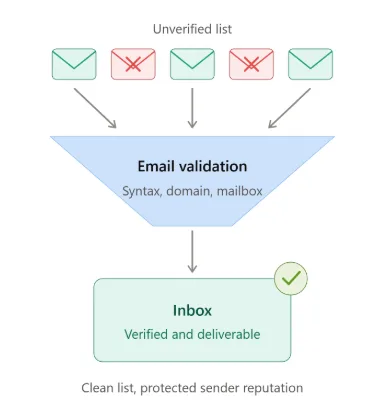
Email validation is the process of checking whether an address is real, reachable, and safe to send to before you send. A thorough check usually works through several layers:
- Syntax check: confirms the address is formatted correctly, with an @ symbol, a valid domain, and no illegal characters.
- Domain and DNS check: confirms the domain exists and is configured to receive email through valid MX records.
- Mailbox check: communicates with the receiving mail server to determine whether the specific mailbox exists, without sending a message.
- Risk detection: flags disposable domains, role-based addresses, known spam traps, and catch-all domains where it is hard to confirm whether a mailbox is real.
- Typo detection: catches common domain misspellings so they can be corrected rather than lost.
The result is a verdict for each address, typically along the lines of deliverable, undeliverable, risky, or unknown. With those verdicts, you can decide what to keep, what to fix, and what to remove.
Why Regular List Cleaning Matters
Email lists decay. Even a list built entirely from willing subscribers loses accuracy over time as people change employers, switch providers, or abandon accounts. A list that was clean a year ago may now contain a meaningful share of addresses that no longer work.
This is why list cleaning belongs in your routine rather than being a one-time fix. Running your list through a verification service such as email validation before major campaigns helps you remove invalid, risky, and undeliverable addresses before they generate bounces or reach a spam trap. The effect on deliverability is direct: fewer bounces, fewer wasted sends, and a cleaner signal to the mailbox providers who decide where your messages land. Over time, that consistency helps your sender reputation recover and then stay strong.
Cleaning pays off most when it happens at specific moments:
- Before a large send: especially after a long gap since your last campaign.
- After importing a list: from events, partners, or a CRM migration.
- On a recurring schedule: quarterly for active lists, more often for high-volume senders.
- Before re-engaging inactive subscribers: to avoid hitting abandoned addresses and traps.
Validating at the Point of Entry
Cleaning an existing list fixes yesterday’s problems. Preventing new ones is just as valuable. Real-time validation checks an address the moment someone types it into a signup form, checkout page, or lead capture form.
When the check runs instantly, you can respond right away. If the address has an obvious typo, you can prompt the visitor to correct it. If it belongs to a disposable service, you can ask for a permanent address. If the mailbox does not exist, you can stop the bad data before it enters your system.
This approach has a few lasting benefits:
- Your list starts clean and stays cleaner.
- Real subscribers who made a typo are not lost.
- Fake and throwaway signups are filtered out early.
- Your sales and marketing teams work with more accurate contact data.
Pairing point-of-entry validation with periodic bulk cleaning gives you protection on both ends: new addresses are checked as they arrive, and older addresses are rechecked as they age.
Building a Practical Validation Routine
You do not need a complicated process. A simple, repeatable routine works well:
Step 1: Audit your current list. Check your recent bounce rate, complaint rate, and engagement. If bounces are creeping up or open rates are sliding, your list likely needs attention.
Step 2: Run a bulk validation. Upload your list to a validation service and review the results. Remove undeliverable addresses immediately. Decide how to handle risky or unknown ones based on your tolerance for risk and your sending volume.
Step 3: Segment by result. Keep verified addresses in your main sending pool. Move risky addresses into a separate segment and send to them cautiously, or leave them out of your most important campaigns.
Step 4: Add real-time validation to your forms. Stop new bad addresses at the door.
Step 5: Monitor and repeat. Track bounce rates and engagement after each send. Schedule your next cleaning rather than waiting for problems to appear.
Validation Is Part of a Bigger Picture
Email validation is powerful, but it works best alongside other good practices. Authenticate your domain with SPF, DKIM, and DMARC so providers can confirm your messages are legitimate. Use a clear opt-in process so subscribers actually want to hear from you. Make unsubscribing easy, since an unsubscribe is far better for your reputation than a spam complaint. Write relevant content and send at a frequency your audience expects.
None of these steps replaces the others. Validation keeps your list accurate, authentication proves your identity, and good content keeps people engaged. Together they create the conditions in which mailbox providers trust you.
The Business Case
It is tempting to treat list hygiene as a technical chore, but the business impact is real. Every email sent to an invalid address is wasted effort, and in most pricing models it is wasted money. Every bounce or trap hit chips away at a reputation that took months to build. And every message that lands in spam instead of the inbox is a lost chance to reach a customer.
Teams that validate consistently tend to see the benefits show up in practical ways: steadier inbox placement, more reliable campaign metrics, and fewer surprises when a send goes out. Reporting becomes more trustworthy too, because open and click rates are calculated against a list of real, reachable people instead of one padded with dead addresses.
Conclusion
Your sender reputation is one of your most valuable marketing assets, and it is built or lost one send at a time. Invalid addresses, spam traps, and stale contacts quietly erode it, while consistent email validation protects it by making sure your messages go only to addresses that can actually receive them.
Clean your list before big campaigns, validate new signups in real time, and repeat the process on a schedule. Combined with proper authentication and engaging content, these habits give your emails the best chance of doing what they were written to do: reach the inbox and get read.