Streamline Payroll with a Mobile Time Clock App Featuring GPS
Every pay period, HR teams across industries face the same frustrating cycle: chasing down missing timesheets, correcting punch errors, and resolving disputes over hours worked. Manual time tracking doesn’t just waste administrative hours—it bleeds money through overpayments, compliance risks, and payroll inaccuracies that compound over time. For organizations managing field workers, remote teams, or multi-site operations, the problem intensifies. How do you verify that employees are actually where they claim to be when they clock in?
A mobile time clock app with GPS capability answers this challenge head-on. By combining smartphone accessibility with location verification technology, these tools give HR professionals something they’ve long needed: trustworthy attendance data that flows directly into payroll without manual intervention. The result is fewer errors, faster processing, and complete visibility into workforce activity in real time. This article breaks down how GPS-enabled mobile time tracking works, why it transforms attendance management, how it integrates with your existing payroll systems, and exactly how to implement it successfully within your organization.
What is a Mobile Time Clock App with GPS? Core Features Explained
A mobile time clock app with GPS is a workforce management tool that turns employees’ smartphones into verified punch clocks. When a worker clocks in or out, the app captures their precise geographic coordinates alongside the timestamp, creating an attendance record that proves both when and where the action occurred. This dual verification fundamentally eliminates time theft—the costly practice where employees log hours they haven’t actually worked or clock in from unauthorized locations.
The technology relies on several interconnected features working together. Geofencing allows administrators to draw virtual boundaries around approved work sites; if an employee attempts to clock in from outside that perimeter, the system either blocks the punch or flags it for review. Secure clock-in mechanisms often include photo capture at the moment of punching, adding facial verification to the location data. Some systems incorporate biometric checks or require PIN codes to prevent one worker from clocking in on another’s device. All of this data feeds into a cloud-based platform, meaning records aren’t stored on a single device or locked in an on-premise server. Instead, every punch, every GPS coordinate, and every photo is instantly accessible from anywhere with an internet connection—giving HR teams and managers a centralized, tamper-proof attendance system that requires zero physical infrastructure at job sites.
Beyond Location: Ensuring Accurate Attendance Records
GPS data transforms a simple timestamp into a verified attendance event. Traditional punch cards only confirm that someone pressed a button at a certain time—they say nothing about where that person actually was. Basic mobile apps without location tracking offer marginal improvement, still relying on trust alone. GPS-enabled time clocks layer objective geographic proof onto every record, creating documentation that holds up during disputes, audits, or compliance reviews. This verification is particularly critical for field service teams, construction crews, healthcare workers visiting patient homes, and any workforce operating beyond a single supervised location.
The Power of the Cloud: Real-Time Data Access for Managers
A cloud time clock gives managers immediate visibility without waiting for end-of-week timesheet submissions. The moment an employee clocks in, their status updates on the management dashboard—showing their location, arrival time, and whether they’re early, on time, or late. Supervisors managing multiple sites can monitor attendance across all locations simultaneously from a laptop or their own mobile device. This real-time access means scheduling gaps get spotted instantly, overtime trends become visible as they develop rather than after payroll runs, and location history provides a complete audit trail without anyone manually compiling reports.
Transforming Attendance Management for HR Teams
For HR managers, attendance data isn’t just about knowing who showed up—it’s the foundation for accurate compensation, labor law compliance, and workforce planning decisions. Yet traditional attendance management forces HR teams into a reactive posture: manually reviewing timesheets, following up on discrepancies, and spending hours each pay period reconciling records before payroll can run. A GPS-enabled mobile time clock app shifts this dynamic entirely by automating the capture, verification, and organization of attendance data without requiring HR intervention at the point of collection.
The automation begins the moment an employee taps their screen. Every clock-in and clock-out generates a verified record that populates the central dashboard automatically—no paper forms to collect, no spreadsheets to update, no supervisor signatures to chase. HR teams gain access to audit-ready records organized by employee, department, project, or location, all maintained in real time. When questions arise about hours worked, the GPS-stamped data provides objective evidence that resolves issues in seconds rather than days of back-and-forth communication. This reliability transforms HR’s role from data entry and error correction into strategic workforce management. With trustworthy attendance data flowing continuously, HR professionals can focus on identifying patterns—chronic absenteeism, understaffed shifts, overtime concentration—and address them proactively rather than discovering problems buried in end-of-month reports.
Solving “Buddy Punching” and Eliminating Disputes
Buddy punching—where one employee clocks in on behalf of an absent coworker—costs organizations thousands annually in fraudulent wages. GPS verification makes this practice nearly impossible because the system ties each punch to a specific device location and, in many configurations, a photo or biometric confirmation. An employee can’t clock in a colleague from across town when the system requires presence within a geofenced work site. Beyond preventing fraud, this verification eliminates the payroll disputes that drain HR resources. When an employee challenges their recorded hours, the GPS data and timestamps provide indisputable documentation, resolving conflicts immediately without subjective interpretation.
Generating Reports and Ensuring Compliance
Labor law compliance demands meticulous record-keeping—tracking overtime thresholds, break periods, and maximum weekly hours across every employee. A GPS-enabled time clock app generates these reports automatically, pulling verified data into formatted summaries that satisfy regulatory requirements without manual compilation. HR teams can produce overtime reports, attendance summaries, and location-based work logs with a few clicks, ready for internal review or external audit. The location verification component adds an extra compliance layer for industries where proof of on-site presence is legally required, such as healthcare home visits or government contract work, ensuring documentation standards are met continuously rather than reconstructed after the fact.
Seamless Integration: Connecting Time Data Directly to Payroll
The gap between time tracking and payroll processing is where most errors originate. Every manual step—transcribing hours from timesheets, keying data into payroll software, cross-referencing approved overtime—introduces opportunities for mistakes that cost real money. A GPS-enabled mobile time clock app bridges this gap by creating a direct data pipeline between verified attendance records and your payroll system. When hours are captured, verified by GPS, and approved by managers within the same platform, that approved data can flow directly into payroll processing without anyone retyping a single number.
This integration eliminates the reconciliation nightmare that plagues HR teams every pay period. Instead of exporting CSV files, reformatting columns, and importing data into separate software, the time clock platform communicates directly with popular payroll systems through built-in integrations or API connections. Hours worked, overtime calculations, break deductions, and location-based pay differentials all transfer automatically based on rules you configure once. The practical impact is substantial: payroll processing that previously consumed days shrinks to hours, error rates drop dramatically because human data entry is removed from the equation, and employees receive accurate paychecks consistently. For HR professionals managing complex pay structures—shift differentials, project-based billing, multi-state tax requirements—this automated flow ensures the right data reaches the right fields every time, reducing costly corrections and reprocessing after payroll has already run.
Automating the Payroll Workflow
The automated workflow follows a clear sequence. An employee clocks in via the mobile app, and GPS verifies their location while the cloud platform records the timestamp. Throughout the shift, the system tracks hours and flags any anomalies like missed punches or geofence violations. At period’s end, managers review and approve timesheets on the dashboard—addressing exceptions rather than verifying every entry. Once approved, the finalized hours push automatically into the connected payroll system, pre-calculated with overtime, deductions, and applicable rules applied. This end-to-end automation means payroll staff receive clean, verified data ready for processing rather than raw information requiring interpretation.
Choosing Compatible Hardware: The Role of Dedicated Time Clock Devices
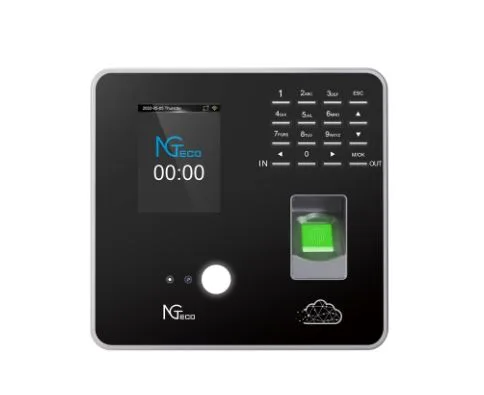
While mobile apps serve field workers and remote employees effectively, fixed-location teams still benefit from dedicated hardware at entry points. NGteco time clock devices offer physical punch stations for warehouses, offices, or job sites where a mounted terminal makes sense. The critical advantage is unified data—punches from NGteco hardware and the mobile app feed into the same cloud platform, creating a single source of truth regardless of how employees clock in. This hybrid approach gives organizations flexibility to match the right tool to each work scenario without fragmenting their attendance data across disconnected systems.
Your Step-by-Step Guide to Implementation and Success
Knowing that a GPS-enabled mobile time clock app can transform your payroll process is one thing—actually deploying it across your organization requires deliberate planning. The difference between a smooth rollout and a frustrating one comes down to preparation: selecting the right tool for your specific workforce structure, establishing clear policies before launch day, and supporting your team through the transition. HR professionals who approach implementation strategically see faster adoption rates, fewer support requests, and quicker returns on their investment.
The implementation process works best when treated as a phased project rather than an overnight switch. Rushing deployment without proper groundwork leads to employee resistance, inconsistent usage, and data gaps that undermine the very accuracy you’re trying to achieve. Instead, successful organizations dedicate time to evaluating their needs, configuring the system to match their existing workflows, communicating transparently with staff about what’s changing and why, and building in a monitoring period where adjustments happen based on real feedback. The following steps provide a concrete framework that HR managers can adapt to their organizational size, industry requirements, and workforce distribution—whether you’re managing fifty employees at three locations or five hundred across multiple states.
Step 1: Selecting the Right App and Setting Up Policies
Evaluate potential solutions against three non-negotiable criteria: GPS accuracy and reliability across your geographic operating areas, cloud accessibility that works on both iOS and Android devices your employees already carry, and native integrations with your current payroll software. Once you’ve selected a platform, draft clear policies covering when GPS tracking activates, how location data is stored and accessed, acceptable clock-in windows, and consequences for policy violations. Distribute these policies before the app goes live so employees understand expectations upfront.
Step 2: Rolling Out to Your Team and Training
Start with a pilot group—ideally one department or location—before expanding company-wide. Provide hands-on training sessions that walk employees through downloading the app, enabling location permissions, and completing their first clock-in. Simultaneously train managers on the dashboard: reviewing timesheets, handling flagged exceptions, and approving hours. Address privacy concerns directly during training by explaining exactly what data is collected and when tracking stops. A phased approach surfaces issues early while they’re still manageable.
Step 3: Monitoring, Optimizing, and Leveraging Data
During the first two pay periods after launch, actively monitor adoption metrics—missed punches, geofence violations, and employees who haven’t activated the app. Assign a point person to handle questions and troubleshoot device-specific issues quickly. Once the system stabilizes, shift focus to leveraging the data: use attendance patterns to optimize shift scheduling, identify locations with chronic tardiness for operational review, and refine geofence boundaries based on real-world GPS accuracy at each site.
Building a Future-Ready Workforce with GPS-Verified Time Tracking
The shift from manual time tracking to a GPS-enabled mobile time clock app represents more than a technology upgrade—it’s a fundamental improvement in how organizations manage their most significant expense: labor costs. By capturing verified attendance data at the source, these tools eliminate the errors, fraud, and administrative overhead that have plagued payroll processing for decades. HR teams gain accurate, audit-ready records without chasing timesheets. Managers get real-time visibility into workforce activity across every location. Payroll runs faster with fewer corrections because verified hours flow directly into processing systems without manual intervention.
The core challenges this solves—buddy punching, timesheet disputes, compliance documentation, and payroll integration gaps—aren’t minor inconveniences. They’re systemic problems that drain resources every single pay period. GPS verification paired with cloud accessibility and automated payroll connections addresses each one simultaneously. Organizations that embrace these tools position themselves not just for immediate efficiency gains, but for smarter workforce decisions driven by reliable data. As work becomes increasingly distributed across locations and schedules, the ability to track, verify, and process attendance accurately from anywhere isn’t a luxury—it’s the operational standard that separates well-run organizations from those still buried in spreadsheets and corrections.