What Is an AI Router? One API, Every Model, Zero Lock-In
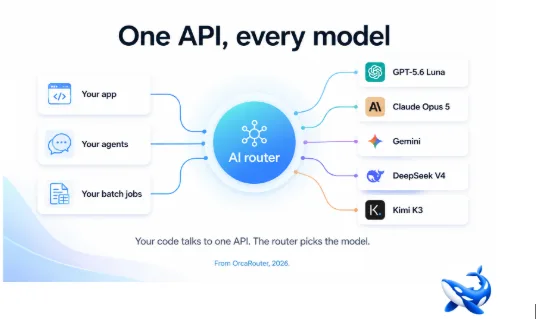
An AI router is a single API in front of every large language model. Your code sends one request to one endpoint; the router decides which model actually answers — based on the task, the cost, the latency, and the current health of each provider. OrcaRouter is the platform that does this, but the concept matters more than any one vendor: an AI router is how production systems stop being married to a single model.
The problem an AI router solves
For the first few years of the LLM era, integrating a model meant committing to it. You adopted one vendor’s API, built your prompts around its quirks, and the cost of switching — re-implementing the client, re-tuning the prompts, re-validating the outputs — made change rare. Every model release was a decision: do we migrate, and is it worth the project?
An AI router dissolves that decision. The router exposes an OpenAI-compatible endpoint, so your existing code works unchanged. You configure which models are available and the rules for choosing between them — cheapest first, fastest first, a specific model for a specific task, a fallback if one provider is down. When a new model ships, you add it to the pool rather than rewrite the integration. When one model’s price rises, you shift traffic without a deploy.
How the routing decision actually works
The router’s job is to pick, per request, the model that best fits the request’s needs under your constraints. The common dimensions:
- Cost. For work where quality differences don’t matter much — extraction, classification, summarising supplied text — the router can prefer the cheapest model and only escalate when a cheaper one fails or when the task needs more.
- Latency. For user-facing work, the router can route to the model with the best time-to-first-token for the current load.
- Capability. For hard reasoning, code generation or complex agent steps, the router can send the request to the strongest model in the pool.
- Availability. If the primary provider is down or rate-limiting, the router fails over to a healthy alternative automatically — no error surfaces to your users.
The result is not “one model to rule them all” but “the right model for each request, chosen automatically.” That is the actual value: you stop optimising for a single best model and start optimising for a pool of good ones.
What using a router feels like
From the developer’s side, it is deliberately boring. One base URL, one API key, one model string. Your prompts, your streaming, your existing OpenAI-compatible client all work against the router’s endpoint. The intelligence is in the configuration: which models are in the pool, what each is for, and what the fallback order is.
From the operations side, it changes the economics. A single key for 200-plus models means the team that used to manage five vendor accounts and five sets of rate limits manages one. List prices pass through with no markup, so routing a request to a cheap model saves what a cheap model costs, not what a middleman adds. And because nothing is held in a black box — logs of every call, tokens used, cost incurred — you can see what each model actually costs you.
The three reasons teams adopt one
Escape from lock-in. The strongest argument. Your code talks to the router, not to a vendor. When a vendor’s prices rise or a better model ships, the change is configuration, not migration.
Cost control. A pool with a “cheapest first” rule on tolerant workloads produces real savings, and per-team budgets keep spend accountable.
Reliability. Failover between providers means a single vendor’s outage stops being your outage.
None of that requires believing any specific model is best. That is the point: an AI router is the infrastructure that lets the model landscape keep changing without changing your architecture.
Common questions
Do I keep my existing OpenAI SDK? Yes — the router exposes an OpenAI-compatible endpoint, so the client you use today works against it with a base-URL change. Do I need a separate key per vendor? No — one key covers the whole pool. Is there a markup? No — vendor list prices pass through with zero markup. What about a single point of failure? A router is the opposite: it routes around a vendor outage rather than being taken down by one. And do I have to decide which model is best before I start? No — that is the router’s job, per request.
The mental model
Think of an AI router the way you think of a database connection pool or a load balancer: infrastructure that exists to absorb change and failure. A load balancer does not make any single server better; it makes the fleet usable. A router does not make any single model better; it makes the model pool usable. Once you hold that model, most of the decisions fall into place — which models to add, which rules to set, when to fail over. The router is the layer that lets the models be interchangeable, and that interchangeability is what protects you from the single biggest risk in production LLM work: betting the product on one model that may be different tomorrow.
The takeaway
An AI router is one API in front of every model: your code talks to a single endpoint, and the router picks the right model per request by cost, latency, capability and availability. It dissolves vendor lock-in, makes cost control a configuration rule rather than a project, and turns a provider outage into an automatic failover. For teams building on LLMs, it is the difference between being married to today’s best model and being ready for tomorrow’s. OrcaRouter is one implementation of exactly this — but the pattern is the thing worth adopting, whatever you choose to run it with.
Sourcing note: this article describes the AI-router product category and OrcaRouter’s implementation. All product claims — OpenAI-compatible endpoint, 200-plus models on one key, list-price pass-through with no markup, automatic failover — are OrcaRouter’s own published descriptions, checked August 2026.