The Best 10.1‑Inch Digital Picture Frames We Tested in 2026
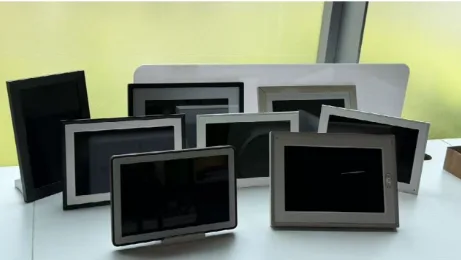
Digital picture frames are one of the easiest ways to keep family photos out of phone albums and in the rooms where people actually live. We focused on 10.1‑inch frames because this size is the most practical for most homes: big enough for photos to look clear on a counter, desk, shelf, or nightstand, but not so large that it feels like a smart display or small TV.
We tested eight popular 10.1‑inch digital picture frames with the same mix of vertical phone photos, landscape travel shots, family portraits, and short videos. We looked at setup, screen quality, touchscreen controls, remote sharing, portrait and landscape support, wall‑mounting, subscription limits, and how well each frame works as a gift for parents or grandparents. Our top pick is AmivoFrame Smart Digital Photo Frame.
Our Top Picks
- Best Overall: AmivoFrame Smart Digital Photo Frame
- Best For: Parents, grandparents, family connection
- Price: $199
- Best App Experience: Aura Carver 10.1″
- Best For: Simple cloud photo sharing
- Price: $179
- Best Easy Gift: Skylight Frame 10″
- Best For: Non-technical users
- Price: $159
- Best Established Brand: Nixplay 10.1″ Smart Frame
- Best For: App playlists and remote management
- Price: $199.99
- Best Budget Touchscreen: Aeezo Portrait 01
- Best For: Affordable touchscreen sharing
- Price: $119.99
- Best Offline Option: PhotoSpring 10
- Best For: USB/SD and local storage
- Price: $129.90
- Best Feature Set: Pix-Star 10″ Wi-Fi Frame
- Best For: Email uploads and extra tools
- Price: $159.99
- Best Basic App Frame: Frameo 10.1″ Digital Frame
- Best For: Budget app sharing
- Price: $70
Compare Specs
- AmivoFrame
- Screen: 10.1″ In-cell HD
- Touch: Yes
- Orientation: Yes
- Wall: Yes
- Cloud / Local Storage: Unlimited cloud / 16GB local
- Audio: Yes
- Subscription: AI voice chat requires premium
- Aura Carver
- Screen: 10.1″, 1280 × 800
- Touch: No
- Orientation: Landscape only
- Wall: No
- Cloud / Local Storage: Unlimited Aura cloud / no user-expandable local storage
- Audio: Video sound
- Subscription: No subscription
- Skylight Frame
- Screen: 10″ class
- Touch: Yes
- Orientation: Yes on newer models
- Wall: Varies
- Cloud / Local Storage: Skylight cloud via Plus / 8GB local
- Audio: Video sound
- Subscription: Videos, settings, and other features require Premium
- Nixplay 10.1″
- Screen: 10.1″ class
- Touch: Varies
- Orientation: Varies
- Wall: Often yes
- Cloud / Local Storage: 500MB free cloud; 100GB or unlimited paid / local storage varies
- Audio: Video sound
- Subscription: Storage/plan limits vary
- Aeezo Portrait 01
- Screen: 10.1″, often 1280 × 800
- Touch: Yes
- Orientation: Yes
- Wall: Varies
- Cloud / Local Storage: No native cloud / 16GB–32GB local by model
- Audio: Basic audio
- Subscription: Usually no required plan
- PhotoSpring 10
- Screen: 10″, 1280 × 800
- Touch: Yes
- Orientation: Yes
- Wall: Limited
- Cloud / Local Storage: Cloud integrations / 16GB local
- Audio: Video sound
- Subscription: No required plan
- Pix-Star 10″
- Screen: 10″ class
- Touch: Often no
- Orientation: Landscape focus
- Wall: Some models
- Cloud / Local Storage: Pix-Star cloud / commonly 8GB local
- Audio: Basic audio
- Subscription: No required plan
- Frameo 10.1″
- Screen: 10.1″ class
- Touch: Yes
- Orientation: Yes
- Wall: Depends on brand
- Cloud / Local Storage: Frameo app transfer, no universal cloud / 16GB–32GB typical
- Audio: Basic audio
- Subscription: Usually no required plan
Best Overall: AmivoFrame Smart Digital Photo Frame
Score: 4.5 / 5 Excellent
Best for: Adult children buying for parents or grandparents, especially recipients who are not comfortable using apps or smart devices
Not for: Shoppers who only want the cheapest basic slideshow screen
AmivoFrame is our top pick because it gets the physical details right and adds useful family features that most digital frames do not have. The 10.1‑inch In‑cell HD screen is a practical size for a shelf, counter, bedside table, or wall, and the paper‑like matte finish makes photos look less like they are being displayed on a tablet.
The touchscreen is easier to use than hidden touch bars, especially for older users. It also supports both portrait and landscape display, which matters because so many family photos are vertical phone shots. The ability to use it on a tabletop or mount it on a wall gives it more placement flexibility than frames that are stand‑only or landscape‑only.
Another major advantage is AmivoFrame’s internet‑based remote pairing. Aura relies on Bluetooth pairing and requires a phone or tablet running the Aura app to be physically near the frame during setup. This can create problems when the frame is shipped directly to a parent or grandparent who is not comfortable downloading apps, enabling Bluetooth permissions, or troubleshooting connection issues.
AmivoFrame is designed differently. Once the frame is connected to Wi‑Fi, an adult child can pair with and manage it remotely over the internet, even from another city or state. The person giving the gift does not need to be physically present beside the frame with the app open.
The standout feature is Daily Family Letters. Instead of only sending photos, families can get gentle updates that make it easier to understand what a parent or grandparent has been talking about or remembering. That makes the next phone call feel more natural. You are not starting from zero. The main caveat is that some advanced AI features may require membership, and AmivoFrame is a newer brand than Aura, Skylight, or Nixplay. But if the goal is a digital picture frame for family connection, not just passive slideshows, it is the most complete frame we tested.
Pros: Touchscreen, portrait and landscape support, wall mounting, matte display, built‑in speaker, internet‑based remote pairing, no app required for the recipient, remote setup and management, voice features, Daily Family Letters, and unlimited cloud storage
Cons: Some optional AI features may require a membership; newer brand
Best App Experience: Aura Carver 10.1″
Best for: people who want a polished app and simple remote photo sharing
Not for: users who want touchscreen control, portrait placement, or wall mounting
Aura Carver is still one of the safest digital picture frame recommendations. The app is excellent, setup is easy, and family members can add photos remotely without much instruction. It also has unlimited cloud storage and a clean design that looks more like home decor than a cheap screen.
The tradeoff is control and placement. The Carver does not have a touchscreen, so you use the top touch bar or the app. It is also landscape‑only. Aura’s software can pair vertical photos side by side, but that is not the same as rotating the frame into portrait mode. Reviewers consistently praise the Carver’s design and app while noting the landscape limitation.
Pros: excellent app, attractive design, easy sharing, no subscription
Cons: no touchscreen, landscape‑only, no true wall‑mount flexibility
Best Easy Gift: Skylight Frame 10″
Best for: non‑technical users who need a very simple touchscreen frame
Not for: buyers who dislike subscription‑limited features
Skylight is popular because it is easy to understand. The touchscreen makes browsing photos natural, and remote photo sharing is simple enough for less technical family members. As a gift, it has one of the shortest learning curves.
The issue is feature access. Depending on the model and plan, features like video, captions, cloud backup, albums, or expanded management tools may require Skylight Plus. That does not make it a bad frame, but it means buyers should check what is included before purchase.
Pros: touchscreen, simple setup, gift‑friendly, easy for older users
Cons: some useful features require subscription; less flexible than smarter frames
Best Established Brand: Nixplay 10.1″
Best for: families who want app playlists and remote management
Not for: buyers who want simple storage rules
Nixplay is a capable choice if you want playlist management, remote uploads, and a brand with a long history in digital frames. It works well when one family member manages photo updates for someone else.
The downside is long‑term storage confidence. Nixplay reduced free cloud storage and moved some previously free features behind paid plans, which triggered public user frustration. If you choose Nixplay, check current storage limits and plan rules before buying, especially if you plan to upload years of family photos.
Pros: established brand, remote uploads, playlist control, good for managing photos remotely
Cons: storage rules can be confusing; free cloud limits have changed
Best Budget Touchscreen: Aeezo Portrait 01
Best for: budget buyers who still want touchscreen controls
Not for: people who want premium materials or a polished app
Aeezo offers a lot for the price: a 10.1‑inch screen, touchscreen controls, local storage, portrait and landscape support, and app sharing. It is one of the better value picks if the goal is basic photo sharing without paying for a premium brand.
The weaker points are build and polish. Public reviews commonly describe budget frames in this class as useful but plasticky, with less refined stands, apps, and screen finishes than premium models. Aeezo is practical, but it does not feel as gift‑ready as Aura, Skylight, or AmivoFrame.
Pros: affordable, touchscreen, portrait and landscape, generous features for price
Cons: budget build, less polished app, weaker gift feel
Best Offline Option: PhotoSpring 10
Best for: users who want USB/SD options and local storage
Not for: buyers who care most about design and wall placement
PhotoSpring 10 is useful because it does not force everything through an app or cloud account. It supports local storage and traditional USB/SD transfer, which is helpful for users who want more control or have unreliable Wi‑Fi.
It also has a touchscreen and a 10‑inch 1280 x 800 screen, making it more convenient than older offline frames. The drawback is presentation. It looks and feels more functional than elegant, and wall mounting may require extra planning or accessories.
Pros: touchscreen, local storage, USB/SD support, good offline flexibility
Cons: less stylish, less polished app, wall mounting is not as clean
Best Feature Set: Pix‑Star 10″
Best for: technical users who want many upload methods
Not for: people who want a modern, simple interface
Pix‑Star is one of the more feature‑heavy frames. Email uploads, web albums, remote management, calendar tools, and extra functions make it useful for technical family members managing a frame from afar.
But the interface feels dated compared with newer app‑first frames. It is powerful, but not elegant. If you are buying for someone who gets frustrated by menus, Pix‑Star may feel like too much frame.
Pros: many upload methods, email sharing, remote management, extra tools
Cons: dated interface, less attractive design, not as intuitive
Best Basic App Frame: Frameo 10.1″
Best for: budget buyers who want simple app sharing
Not for: people who want consistent hardware quality
Frameo‑based frames are everywhere, and the appeal is obvious. The app is simple, setup is usually easy, and many 10.1‑inch models include touchscreens and local storage at low prices.
For basic sharing, Frameo frames are fine. Family members can connect through the app and send photos without much training.
The problem is consistency. Frameo is an app ecosystem used by many hardware brands, so screen quality, build quality, speakers, stands, storage, and wall‑mount options vary widely. Buy the exact model, not just the Frameo name.
Pros: simple app, affordable, easy to find
Cons: hardware quality varies; not a premium gift experience
How We Tested
We used the same photo and video library on each frame, including vertical phone photos, horizontal travel shots, close‑up family portraits, and short videos. We tested setup, app sharing, on‑frame controls, screen visibility in daylight, portrait handling, tabletop stability, and wall placement.
We gave extra weight to features that matter for parents and grandparents: easy controls, remote updates, readable photos, fewer subscription surprises, and whether family members would keep using the frame after the first week.
What to Look For in a 10.1‑Inch Digital Picture Frame
Touchscreen: Helpful for older users and easier than hidden bars or app‑only controls.
Portrait and landscape support: Most phone photos are vertical, so rotation matters.
Wall mounting: A frame should work where the recipient wants it, not only where the stand allows.
Cloud and subscription rules: Check whether video, backup, captions, storage, or AI features require payment.
Family features: Remote sharing is now basic. Voice messages, reminders, and family update features make a frame more useful over time.
FAQ
Is 10.1 inches a good size for a digital picture frame?
Yes. It is large enough for family photos to look clear, but compact enough for desks, counters, shelves, nightstands, and walls.
Do digital picture frames need Wi‑Fi?
Most smart frames need Wi‑Fi for remote sharing. Some also support USB, SD cards, or local storage for offline use.
How much storage do I need?
8GB is fine for casual photo use. 16GB to 32GB is better if you upload lots of photos or videos.
Is touchscreen worth it?
Usually yes, especially for parents or grandparents. It is easier than using an app, remote, or hidden touch bar.
Do digital picture frames require a subscription?
Not always. Some subscriptions unlock video, cloud backup, captions, larger storage, albums, or AI features.
Which digital picture frame is best for grandparents?
Choose one with easy remote sharing, touchscreen controls, clear photos, simple setup, and minimal subscription friction.
Can digital picture frames be wall‑mounted?
Some can. Check for built‑in mounting support, cable placement, and whether extra accessories are required.