How to Use Video Sunglasses for Effective Hands-Free Monitoring
Imagine you’re a security professional tasked with documenting suspicious activity in a crowded public space. Using a handheld camera or phone would immediately draw attention, compromising your cover and potentially putting you at risk. This is precisely where having the right tool makes all the difference.
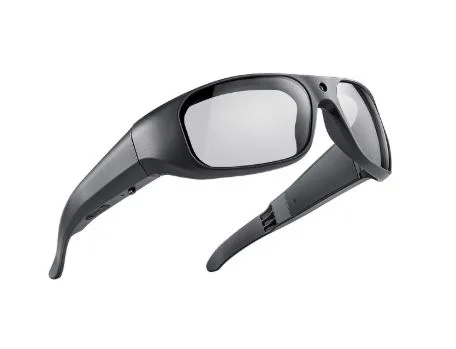
Video sunglasses have emerged as a game-changing solution for covert surveillance and evidence collection. Designed to look like ordinary eyewear, these devices embed recording technology directly into a wearable frame, allowing security professionals to capture footage without raising suspicion or sacrificing mobility.
This article serves as a practical guide for security professionals looking to maximize the effectiveness of video sunglasses in the field. Whether you’re conducting undercover operations, monitoring public areas, or collecting admissible evidence, understanding how to properly use this technology is essential.
The advantages are compelling: the discreet design eliminates the tell-tale signs of traditional recording equipment, while modern models offer high-quality recording capabilities up to 4K resolution for crystal-clear footage. Add seamless Bluetooth connectivity for integration with smartphones and other devices, and you have a powerful, hands-free monitoring tool built for demanding real-world scenarios.
Understanding Video Sunglasses Technology and Key Features
Video sunglasses are wearable recording devices engineered to look indistinguishable from everyday eyewear. Unlike standard action cameras or body-worn devices that require visible mounting hardware, video sunglasses embed the entire recording system—lens, processor, and storage—within a conventional frame. This integration eliminates the physical bulk and conspicuous appearance that would otherwise compromise covert operations.
At the core of these devices are several critical components working in unison. A miniaturized wide-angle camera sits within the frame’s bridge or lens housing, capturing footage from the wearer’s natural line of sight. Dual microphones handle audio capture, filtering ambient noise to isolate relevant conversations or sounds. Battery capacity varies by model but typically supports 60 to 90 minutes of continuous recording, while onboard storage accommodates either built-in memory or expandable microSD cards for extended field use.
Recording at 4K resolution is particularly significant for security work. Higher resolution footage preserves fine details—facial features, license plates, identifying marks—that lower-resolution video would render unusable in court or during post-incident analysis. When evidence quality directly impacts case outcomes, this capability becomes non-negotiable.
Bluetooth connectivity transforms these glasses from a standalone recorder into a networked surveillance tool. Through paired smartphone apps, operators can remotely trigger recordings, adjust settings, and monitor status indicators without touching the device. This hands-free control is essential when drawing attention to the glasses—even briefly—could expose an operation. For security professionals, this combination of invisibility and remote operability defines the core value proposition of video sunglasses over conventional recording equipment.
Setting Up Your Video Sunglasses for Optimal Performance
Getting your video sunglasses field-ready requires methodical preparation before any deployment. Start by fully charging the device—most models reach full capacity within 90 minutes via USB-C. While charging, download the manufacturer’s companion app on your smartphone, as this will serve as your primary control interface. Once charged, activate Bluetooth on both devices and follow the app’s pairing sequence, which typically involves holding the glasses’ power button for three seconds until the indicator light pulses. Complete the pairing before you need the device in the field, not during an operation.
With the connection established, configure your recording settings to match the operational environment. For evidence collection requiring court-admissible footage, set resolution to 1080p or 4K at 30fps—this balances detail with manageable file sizes. In low-light conditions, drop to 1080p at 60fps to improve motion clarity. High frame rates reduce blur during fast movement, which matters significantly when subjects are mobile. Access these settings through the companion app’s recording menu rather than cycling through on-device controls, which are less precise.
Storage management directly affects operational continuity. Use a Class 10 or UHS-I microSD card with at least 64GB capacity to accommodate extended recording sessions. Format the card through the app before each deployment to prevent file corruption. For high-stakes operations, enable automatic cloud backup through the app’s sync settings so footage uploads immediately when the device connects to a trusted Wi-Fi network.
Common field issues include failed Bluetooth reconnection and unexpected shutdowns. Resolve reconnection failures by toggling the glasses off and on, then re-initiating pairing from the app. Unexpected shutdowns usually indicate low battery—monitor the indicator light, which typically shifts from green to red below 20% charge.
Configuring Recording Modes for Various Situations
Video sunglasses offer three primary recording modes, each suited to distinct surveillance scenarios. Continuous recording captures everything from activation to manual stop—ideal for scheduled operations with defined timeframes. Motion-activated recording conserves battery and storage by triggering only when the sensor detects movement within the frame, making it effective for stationary monitoring posts. Voice command activation, available on Bluetooth-enabled models through the companion app, lets you start and stop recording with a preset phrase, keeping your hands completely free and your actions invisible to bystanders. Brands like ohosunshine have refined this mode selection process, making it accessible directly through intuitive app interfaces so operators can switch configurations without fumbling with on-device controls mid-operation.
Hands-Free Monitoring Techniques for Security Professionals
Effective hands-free monitoring begins with how you wear and position the glasses. Adjust the frame so the camera sits level with your natural line of sight—tilting the nose bridge too high or low shifts the recording angle and may cut off critical subjects. Before deployment, verify the framing by recording a short test clip and reviewing it through the companion app. Wear the glasses naturally; forced or unnatural positioning signals discomfort to trained observers and undermines your cover.
Integrating video sunglasses with your existing security gear amplifies their effectiveness. Pair them with a covert earpiece connected to your smartphone so you receive audio alerts from the companion app without visibly checking your phone. If your operation involves a team, designate one member to monitor the live feed remotely via Bluetooth streaming while you maintain physical presence in the target area. This division of roles keeps the wearer focused on situational awareness rather than footage management.
Maintaining situational awareness while recording requires deliberate practice. Train yourself to scan environments naturally—slow, steady head movements produce smoother footage and appear less conspicuous than rapid turns. Avoid fixating on subjects directly; peripheral positioning captures relevant activity while reducing the chance of eye contact that could trigger suspicion.
For fully hands-free control, configure voice command activation through the app before deployment. Set a phrase that blends naturally into conversation, such as a short cough sequence or a neutral word unlikely to trigger accidentally. Gesture commands, available on select models, offer an alternative—a subtle tap on the frame activates recording without any vocalization, keeping your actions completely undetectable in sensitive environments.
Best Practices for Evidence Collection Using Video Sunglasses
Before deploying video sunglasses for evidence collection, verify that your operation complies with applicable privacy and surveillance laws. Regulations vary significantly by jurisdiction—some require one-party consent for audio recording, while others mandate all-party consent. In public spaces, recording is generally permissible, but private settings carry stricter requirements. When in doubt, consult your organization’s legal counsel before the operation, not after footage has been captured. Inadmissible evidence can collapse a case regardless of its quality.
Capturing reliable evidence demands attention to three elements: visual clarity, audio quality, and accurate timestamping. Position yourself within 15 to 20 feet of the subject to ensure facial features and identifying details remain sharp in the footage. Keep your head movements slow and deliberate—erratic motion introduces blur that degrades evidentiary value. For audio, minimize background interference by positioning yourself away from high-traffic noise sources when possible. Enable automatic timestamping through the companion app before recording begins; this embeds date and time data directly into the file metadata, establishing a verifiable chain of custody from the moment of capture.
Securing footage immediately after collection prevents tampering and data loss. Transfer recordings to an encrypted storage device as soon as you leave the field, and rename files using a standardized format that includes date, location, and operation code. Enable the app’s cloud backup feature to create a redundant copy on a secured server. Compared to fixed security camera glasses mounted in static positions, video sunglasses follow the subject’s movement, capturing continuous, perspective-accurate footage that holds stronger evidentiary weight in legal proceedings.
Advanced Features and Integration for Enhanced Surveillance
Beyond basic recording, modern video sunglasses offer advanced capabilities that substantially extend their operational value. Live streaming via Bluetooth pushes real-time footage directly to a paired smartphone or tablet, enabling remote command personnel to monitor situations as they unfold without being physically present. This creates a genuine force-multiplier effect—your team sees exactly what you see, allowing them to direct your positioning or call for backup based on live intelligence rather than delayed reports. Select models also incorporate GPS tagging, embedding precise location coordinates into each recorded file. This metadata proves invaluable when documenting incidents across large areas or when footage must be correlated with physical evidence at specific sites. Night vision capability, achieved through infrared sensors in higher-end models, extends operational hours into low-light environments where standard lenses would produce unusable footage.
Integrating video sunglasses with broader security infrastructure amplifies their effectiveness considerably. Connect them to your organization’s video management system through the companion app’s export protocols, allowing footage to feed directly into centralized monitoring dashboards alongside fixed camera networks. This unified view eliminates blind spots that stationary systems inherently create.
Extending operational endurance requires two practical measures. Carry a slim USB-C power bank that connects during low-activity periods to restore charge without removing the glasses. For storage, use dual microSD cards and swap them at designated intervals rather than relying solely on cloud sync. Looking ahead, emerging developments in AI-assisted facial recognition integration and edge-processing chips embedded within frames—an area that eyewear specialists like ohosunshine are actively tracking—will push real-time subject identification directly onto the device, eliminating the need for post-processing and dramatically accelerating field decision-making for security professionals.
Integrating Video Sunglasses Into Modern Security Practice
Video sunglasses represent a genuine advancement in how security professionals approach covert surveillance and evidence collection. Throughout this guide, we’ve covered the core technology that makes these devices effective, the setup process that ensures field reliability, hands-free monitoring techniques that preserve operational cover, and best practices that keep collected evidence legally sound and court-admissible.
The case for adopting this technology rests on three pillars: discreet operation that eliminates the visibility problems of traditional recording equipment, high-quality 4K recording that preserves the fine details investigations depend on, and seamless integration with smartphones and security infrastructure that transforms a wearable device into a networked surveillance asset. These aren’t incremental improvements—they fundamentally change what a single operator can accomplish in the field.
For security professionals ready to get started, the practical path forward is straightforward. Select a model that supports Bluetooth connectivity and your required resolution, invest in a high-capacity Class 10 microSD card, and spend time practicing natural movement and voice command activation before your first deployment. Familiarity with the device before an operation eliminates hesitation when it matters most.
Technology continues reshaping modern security practice, and video sunglasses sit at the center of that shift. Professionals who integrate these tools effectively gain a measurable operational advantage—one that conventional equipment simply cannot replicate.